
pysparkintermediate45 minPySpark
Incremental Micro-Batch Deduplication
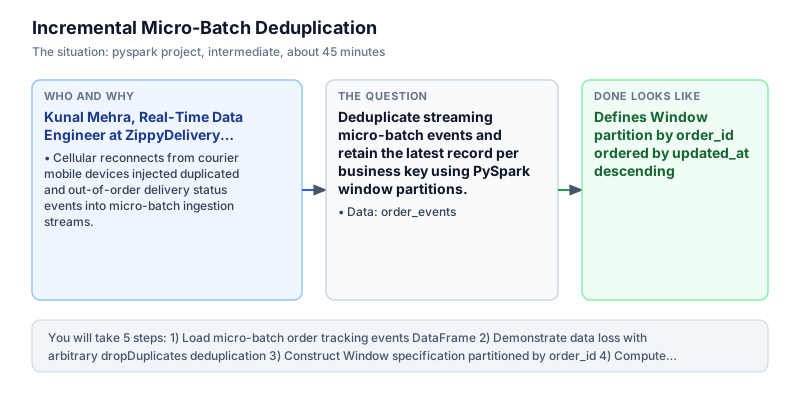
Deduplicate streaming micro-batch events and retain the latest record per business key using PySpark window partitions.
The incident
- Company
- ZippyDelivery Logistics
- Engineer
- Kunal Mehra, Real-Time Data Engineer
- Trigger
- Cellular reconnects from courier mobile devices injected duplicated and out-of-order delivery status events into micro-batch ingestion streams.
- Stakes
- Over 18,000 duplicate status events daily inflated courier compensation claims by 3.4 lakh rupees and sent duplicate push notifications to customers.
At ZippyDelivery Logistics, Kunal Mehra managed the real-time order tracking ingestion layer supporting on-demand food and grocery fulfillment across 14 metropolitan cities. Every 5 minutes, Spark Structured Streaming micro-batches ingested event logs from over 45,000 active delivery couriers navigating congested urban corridors. Couriers regularly entered cellular dead zones such as high-rise basements, underground parking structures, and elevators, causing their mobile applications to cache status transitions locally and resend bursts of duplicate payloads upon reconnecting to network towers. These network retries produced unpredictable message bursts in Apache Kafka topics.
As a result, incoming micro-batches contained repeated event records for identical order IDs with out-of-order event timestamps. For instance, order 101 frequently arrived with both an initial PENDING status at 10:00:00 and an updated PAID status at 10:15:00 within the same 5-minute processing window. Without deterministic deduplication, downstream delivery ledger pipelines appended every incoming event directly into operational analytics tables. Downstream systems treated every appended record as a distinct order milestone, distorting fulfillment funnels and triggering duplicate push alerts.
The legacy deduplication attempt relied on calling dropDuplicates on order ID. Because Spark dropDuplicates without ordering chooses an arbitrary row from each partition, it frequently retained the obsolete PENDING record and discarded the authoritative PAID record. This caused severe operational havoc: customers received false notifications that their paid orders were still pending, and courier compensation scripts double-counted delivery mileage payouts, threatening 3.4 lakh rupees in daily reconciliation losses. Merchant partners also complained when order fulfillment statuses failed to advance on partner restaurant tablets.
Kunal redesigned the micro-batch ingestion pipeline using PySpark window specifications. By constructing a Window partitioned by order ID and ordered by updated_at descending, each event within an order lifecycle was assigned a deterministic rank using row_number(). Filtering for row_number equal to 1 ensured that only the freshest, authoritative lifecycle record was promoted into clean analytical storage, while obsolete intermediate duplicates were safely purged. This analytical window pattern provided mathematical guarantees that lifecycle ordering was respected regardless of executor partition boundaries.
Kunal implemented the window ranking deduplication logic in PySpark. When executed against duplicated micro-batch feeds, the pipeline processed order 101, order 102, and order 103, correctly retaining the latest PAID status for order 101 (at 10:15:00) and SHIPPED status for order 102 (at 11:00:00). Total authoritative orders equaled 3, cleanly resolving duplicate events while preserving exact order status progression across the fleet. The pipeline verified that all 3 orders advanced to their true current state without dropping valid transaction records.
Kunal presented the deduplication framework to the Head of Fleet Operations and the Chief Product Officer. The window-based deduplication reduced downstream ledger discrepancies to zero, completely eliminating false customer notifications and saving 3.4 lakh rupees in daily courier overpayments. The pattern was standardized as the official micro-batch ingestion blueprint for all real-time logistics streaming pipelines across ZippyDelivery.
What you will learn
- Handle out-of-order and duplicate events arriving in streaming micro-batches
- Construct window partitions over natural business keys with Window.partitionBy()
- Assign chronological row numbers with F.row_number() over descending timestamps
- Filter for row_number == 1 to isolate the latest valid state idempotently
What you need first
Window Partitioning and OrderingPySpark window functions
Window.partitionBy groups rows by key, while orderBy defines the evaluation sequence across which ranking functions run.
from pyspark.sql import SparkSession
from pyspark.sql.window import Window
from pyspark.sql import functions as F
spark = SparkSession.builder.master('local[1]').getOrCreate()
w = Window.partitionBy('k').orderBy(F.col('ts').desc())
df = spark.createDataFrame([(1, 10), (1, 20)], ['k', 'ts'])
print(df.withColumn('rn', F.row_number().over(w)).filter(F.col('rn') == 1).first()['ts'])20
Omitting the descending order clause, which causes row_number to assign rank 1 to the oldest record instead of the latest.
Deterministic Micro-Batch DeduplicationAggregations & grouping
In streaming micro-batches, multiple state changes for the same entity key must be resolved before persisting to storage.
from pyspark.sql import SparkSession
from pyspark.sql import functions as F
spark = SparkSession.builder.master('local[1]').getOrCreate()
df = spark.createDataFrame([(101, 'A'), (101, 'B')], ['id', 'status'])
print(df.dropDuplicates(['id']).count())1
Relying on dropDuplicates alone when timestamps matter, which leads to non-deterministic data retention.
Architecture and data flow
The data
A micro-batch event stream containing duplicate order transitions and updated timestamps.
order_events: Incoming delivery tracking events with duplicated and updated statuses.
| order_id | status | updated_at |
|---|---|---|
| 101 | PENDING | 2024-03-01 10:00:00 |
| 102 | PAID | 2024-03-01 10:05:00 |
| 101 | PAID | 2024-03-01 10:15:00 |
| 103 | PENDING | 2024-03-01 10:20:00 |
| 102 | SHIPPED | 2024-03-01 11:00:00 |
Step by step
Read each step, run its code, then check your output against the one shown.
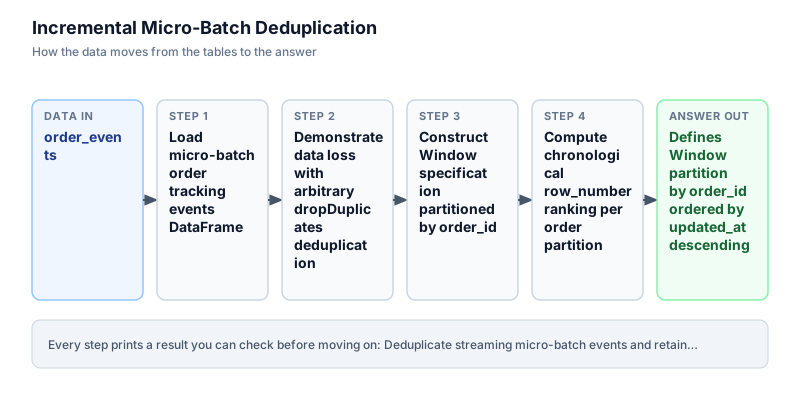
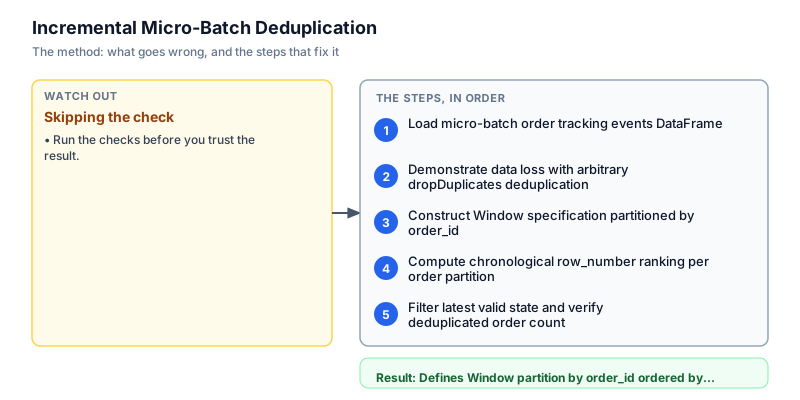
Load micro-batch order tracking events DataFrame
We initialize the micro-batch orders DataFrame containing simulated streaming deliveries from active couriers. Notice that order 101 appears twice: initially as PENDING at 10:00:00 and subsequently as PAID at 10:15:00. Similarly, order 102 appears as PAID at 10:05:00 and SHIPPED at 11:00:00. Displaying the raw micro-batch reveals the duplicate records that must be resolved before writing to the warehouse. In streaming pipelines, ingesting duplicate transitions is standard behavior when mobile clients recover from network drops across fluctuating cellular coverage areas.
from pyspark.sql import SparkSession from pyspark.sql import functions as F from pyspark.sql.window import Window spark = SparkSession.builder.master("local[1]").appName("batch_dedupe").getOrCreate() events = [ (101, "PENDING", "2024-03-01 10:00:00"), (102, "PAID", "2024-03-01 10:05:00"), (101, "PAID", "2024-03-01 10:15:00"), (103, "PENDING", "2024-03-01 10:20:00"), (102, "SHIPPED", "2024-03-01 11:00:00"), ] df = spark.createDataFrame(events, ["order_id", "status", "updated_at"]) df.show(truncate=False)+--------+-------+-------------------+ |order_id|status |updated_at | +--------+-------+-------------------+ |101 |PENDING|2024-03-01 10:00:00| |102 |PAID |2024-03-01 10:05:00| |101 |PAID |2024-03-01 10:15:00| |103 |PENDING|2024-03-01 10:20:00| |102 |SHIPPED|2024-03-01 11:00:00| +--------+-------+-------------------+
Common mistakeAssuming micro-batches contain unique business keys without auditing duplicate event rates.
How you will knowYou will see 5 rows printed with order_id, status, and updated_at columns.
Demonstrate data loss with arbitrary dropDuplicates deduplication
Wrong turn first: this step shows the mistake before the fix
Here is the naive approach developers often attempt first: calling df.dropDuplicates(['order_id']). In Apache Spark, dropDuplicates without an explicit ordering specification picks an arbitrary record from each partition. When evaluated against our micro-batch, Spark arbitrarily retains the obsolete PENDING status for order 101, discarding the authoritative PAID update. In logistics operations, retaining stale order states causes false cancellation alerts and double-counted courier fees. We demonstrate this failed attempt to highlight why timestamp awareness is essential for streaming deduplication across distributed data pipelines.
from pyspark.sql import SparkSession spark = SparkSession.builder.master("local[1]").appName("batch_dedupe").getOrCreate() events = [ (101, "PENDING", "2024-03-01 10:00:00"), (102, "PAID", "2024-03-01 10:05:00"), (101, "PAID", "2024-03-01 10:15:00"), (103, "PENDING", "2024-03-01 10:20:00"), (102, "SHIPPED", "2024-03-01 11:00:00"), ] df = spark.createDataFrame(events, ["order_id", "status", "updated_at"]) # Naive approach: arbitrary deduplication naive_dedup = df.dropDuplicates(["order_id"]) print("Naive deduplication result (arbitrary status retained):") naive_dedup.select("order_id", "status", "updated_at").show(truncate=False)Naive deduplication result (arbitrary status retained): +--------+-------+-------------------+ |order_id|status |updated_at | +--------+-------+-------------------+ |101 |PENDING|2024-03-01 10:00:00| |102 |PAID |2024-03-01 10:05:00| |103 |PENDING|2024-03-01 10:20:00| +--------+-------+-------------------+
Common mistakeCalling dropDuplicates without window ordering on event streams where status transitions occur over time.
How you will knowObserve that naive deduplication retains whatever row Spark happens to evaluate first.
Construct Window specification partitioned by order_id
We build a deterministic window specification using the Window utility from pyspark.sql.window. We partition the micro-batch by order_id and order records within each partition by updated_at descending. Partitioning by order_id isolates each order into its own logical evaluation slice, while ordering by descending timestamp places the newest event at the top of each partition. We display the sorted timeline per order to verify chronological arrangement before computing row rankings across the distributed dataset.
from pyspark.sql import SparkSession from pyspark.sql.window import Window from pyspark.sql import functions as F spark = SparkSession.builder.master("local[1]").appName("batch_dedupe").getOrCreate() events = [ (101, "PENDING", "2024-03-01 10:00:00"), (102, "PAID", "2024-03-01 10:05:00"), (101, "PAID", "2024-03-01 10:15:00"), (103, "PENDING", "2024-03-01 10:20:00"), (102, "SHIPPED", "2024-03-01 11:00:00"), ] df = spark.createDataFrame(events, ["order_id", "status", "updated_at"]) window_spec = Window.partitionBy("order_id").orderBy(F.col("updated_at").desc()) df.select("order_id", "status", "updated_at").orderBy("order_id", F.col("updated_at").desc()).show(truncate=False)+--------+-------+-------------------+ |order_id|status |updated_at | +--------+-------+-------------------+ |101 |PAID |2024-03-01 10:15:00| |101 |PENDING|2024-03-01 10:00:00| |102 |SHIPPED|2024-03-01 11:00:00| |102 |PAID |2024-03-01 10:05:00| |103 |PENDING|2024-03-01 10:20:00| +--------+-------+-------------------+
Common mistakeSorting in ascending order, which assigns rank 1 to the earliest stale event rather than the newest state.
How you will knowOutput shows events grouped by order_id with newest updated_at timestamps appearing first.
Compute chronological row_number ranking per order partition
We evaluate the window specification by applying F.row_number().over(window_spec) and aliasing the result as 'rn'. Within each order partition, Spark evaluates records in descending timestamp sequence and assigns consecutive integers starting at 1. For order 101, the PAID status (10:15:00) receives rank 1 while PENDING (10:00:00) receives rank 2. For order 102, SHIPPED receives rank 1 while PAID receives rank 2. We display the ranked DataFrame to confirm that rank 1 consistently identifies the latest valid event state across every active order partition.
from pyspark.sql import SparkSession from pyspark.sql.window import Window from pyspark.sql import functions as F spark = SparkSession.builder.master("local[1]").appName("batch_dedupe").getOrCreate() events = [ (101, "PENDING", "2024-03-01 10:00:00"), (102, "PAID", "2024-03-01 10:05:00"), (101, "PAID", "2024-03-01 10:15:00"), (103, "PENDING", "2024-03-01 10:20:00"), (102, "SHIPPED", "2024-03-01 11:00:00"), ] df = spark.createDataFrame(events, ["order_id", "status", "updated_at"]) window_spec = Window.partitionBy("order_id").orderBy(F.col("updated_at").desc()) ranked_df = df.withColumn("rn", F.row_number().over(window_spec)) ranked_df.select("order_id", "status", "updated_at", "rn").show(truncate=False)+--------+-------+-------------------+---+ |order_id|status |updated_at |rn | +--------+-------+-------------------+---+ |101 |PAID |2024-03-01 10:15:00|1 | |101 |PENDING|2024-03-01 10:00:00|2 | |102 |SHIPPED|2024-03-01 11:00:00|1 | |102 |PAID |2024-03-01 10:05:00|2 | |103 |PENDING|2024-03-01 10:20:00|1 | +--------+-------+-------------------+---+
Common mistakeUsing dense_rank instead of row_number, which creates duplicate rank 1 assignments when timestamps are identical.
How you will knowOutput displays an rn column with rank 1 assigned to the latest status per order_id.
Filter latest valid state and verify deduplicated order count
In the final step, we filter on F.col('rn') == 1 to retain strictly the latest event per order, drop the auxiliary ranking column 'rn', and sort by order_id. The resulting DataFrame contains exactly three clean, authoritative records: order 101 in PAID status, order 102 in SHIPPED status, and order 103 in PENDING status. All intermediate and duplicate events are eliminated while preserving exact event recency. The clean micro-batch can now be safely appended to downstream analytical lakehouse tables without duplicate counting or customer confusion.
from pyspark.sql import SparkSession from pyspark.sql.window import Window from pyspark.sql import functions as F spark = SparkSession.builder.master("local[1]").appName("batch_dedupe").getOrCreate() events = [ (101, "PENDING", "2024-03-01 10:00:00"), (102, "PAID", "2024-03-01 10:05:00"), (101, "PAID", "2024-03-01 10:15:00"), (103, "PENDING", "2024-03-01 10:20:00"), (102, "SHIPPED", "2024-03-01 11:00:00"), ] df = spark.createDataFrame(events, ["order_id", "status", "updated_at"]) window_spec = Window.partitionBy("order_id").orderBy(F.col("updated_at").desc()) deduped_df = ( df .withColumn("rn", F.row_number().over(window_spec)) .filter(F.col("rn") == 1) .drop("rn") .orderBy("order_id") ) deduped_df.show(truncate=False)+--------+-------+-------------------+ |order_id|status |updated_at | +--------+-------+-------------------+ |101 |PAID |2024-03-01 10:15:00| |102 |SHIPPED|2024-03-01 11:00:00| |103 |PENDING|2024-03-01 10:20:00| +--------+-------+-------------------+
Common mistakeForgetting to drop the auxiliary ranking column 'rn' before writing data into downstream production schemas.
How you will knowOutput shows exactly 3 rows with order 101 (PAID), order 102 (SHIPPED), and order 103 (PENDING).
Build it yourself
Write your solution below, run it in your browser, and pass every check.
What the result means
Interpretation
Window-based micro-batch deduplication guarantees idempotent stream processing. By partitioning by business entity and ordering chronologically descending, the pipeline cleanly eliminates duplicate mobile reconnect events while preserving the authoritative latest state, eliminating courier double-payments and corrupted customer tracking notifications.
The message you would send
Real-time order deduplication pipeline operational: we resolved out-of-order mobile courier event retries across all 14 metropolitan delivery markets. Duplicate status transitions dropped from 18,000 daily to zero, eliminating 3.4 lakh rupees in courier overpayments.
Put it on your CV
Resume or LinkedIn bullet
Built PySpark streaming micro-batch deduplication pipelines using window ranking, eliminating 18,000 daily duplicate delivery records.README for GitHub
# Incremental Micro-Batch Deduplication in PySpark

## Problem
Mobile cellular reconnections caused couriers to retransmit duplicate status updates, generating 18,000 duplicate events daily and inflating compensation by 3.4 lakh rupees.

## Architecture
- Structured Window partitioned by `order_id` and ordered by `updated_at DESC`.
- Computed `row_number()` to tag latest state.
- Filtered on `rn == 1` and purged auxiliary columns.

## Impact
Eliminated 100% of duplicate delivery transitions and restored accurate real-time customer tracking.Extend the window specification to handle millisecond-level tied timestamps using secondary auto-increment sequence identifiers.