DevOps and quality
Linux, Bash & Shell Wrangling for Data Engineers
The shell commands, pipes and scripts that save hours when you wrangle data on a server.
- Handwritten-style
- Diagrams and tables
- Worked examples
Who this notebook is for
Data engineers who log into servers and need to inspect, clean and move data quickly without opening a notebook or an IDE.
What you will be able to do
- Look inside very large files without loading them into memory
- Filter and reshape text streams with grep, sed and awk
- Query JSON and CSV from the command line with jq and DuckDB
- Write a safe Bash script and schedule it with cron or systemd
What's inside
Pick a chapter and the notebook opens right there.
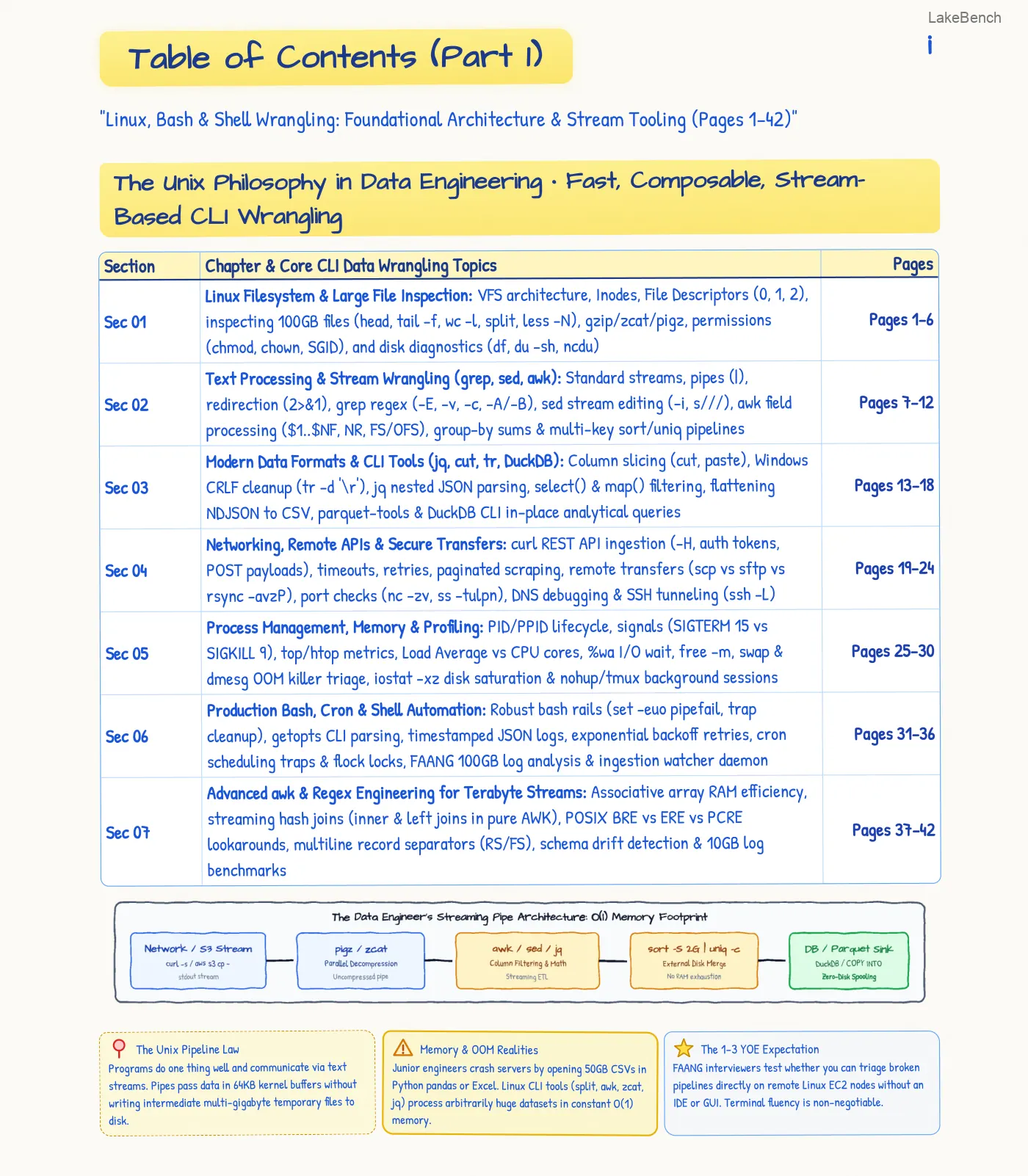
- Linux Filesystem & Large File InspectionVFS architecture, Inodes, File Descriptors (0, 1, 2), inspecting 100GB files (head, tail -f, wc -l, split, less -N), gzip/zcat/pigz, permissions (chmod, chown, SGID), and disk diagnostics (df, du -sh, ncdu)Start here
- Text Processing & Stream Wrangling (grep, sed, awk)Standard streams, pipes (|), redirection (2>&1), grep regex (-E, -v, -c, -A/-B), sed stream editing (-i, s///), awk field processing ($1..$NF, NR, FS/OFS), group-by sums & multi-key sort/uniq pipelinesStart here
- Modern Data Formats & CLI Tools (jq, cut, tr, DuckDB)Column slicing (cut, paste), Windows CRLF cleanup (tr -d '\r'), jq nested JSON parsing, select() & map() filtering, flattening NDJSON to CSV, parquet-tools & DuckDB CLI in-place analytical queriesStart here
- Networking, Remote APIs & Secure Transferscurl REST API ingestion (-H, auth tokens, POST payloads), timeouts, retries, paginated scraping, remote transfers (scp vs sftp vs rsync -avzP), port checks (nc -zv, ss -tulpn), DNS debugging & SSH tunneling (ssh -L)Start here
- Process Management, Memory & ProfilingPID/PPID lifecycle, signals (SIGTERM 15 vs SIGKILL 9), top/htop metrics, Load Average vs CPU cores, %wa I/O wait, free -m, swap & dmesg OOM killer triage, iostat -xz disk saturation & nohup/tmux background sessionsStart here
- Production Bash, Cron & Shell AutomationRobust bash rails (set -euo pipefail, trap cleanup), getopts CLI parsing, timestamped JSON logs, exponential backoff retries, cron scheduling traps & flock locks, FAANG 100GB log analysis & ingestion watcher daemonStart here
- Advanced awk & Regex Engineering for Terabyte StreamsAssociative array RAM efficiency, streaming hash joins (inner & left joins in pure AWK), POSIX BRE vs ERE vs PCRE lookarounds, multiline record separators (RS/FS), schema drift detection & 10GB log benchmarksStart here
- Linux Kernel I/O & High-Throughput StoragePage cache, dirty ratios, O_DIRECT vs buffered I/O, NVMe queues, ext4 vs XFS mount tuning (noatime), fio IOPS benchmarks, RAID 0/1/5/10 & NFS/FUSE cloud mount gotchasStart here
- Systemd Services, Daemons & Log ManagementUnit files, cgroups, production Python/PySpark daemons, systemd timers vs cron, journalctl log filtering, logrotate retention & crash-loop triageStart here
- Environment Variables, Shell Lifecycle & Secret SecurityInteractive vs non-interactive shells, export scopes, clean envs (env -i), masking ps aux credentials,.env hierarchies & HashiCorp Vault / Cloud Secret Manager integrationStart here
- Modern Command-Line Power Tools for Data Engineersripgrep (rg) parallel searching, fd fast traversal, bat & eza syntax-highlighted visual audits, hyperfine statistical benchmarks, fzf interactive fuzzy stream filteringStart here
- Distributed Parallelism & GNU Parallel WorkflowsSubshell job control (&, wait), GNU Parallel core sharding, multi-node SSH cluster dispatch, pure bash worker semaphores, fault- tolerant job resumes (--joblog)Start here
- Cloud CLI Automation (AWS, GCP & Azure Shell Wrangling)aws-cli JMESPath (--query), gcloud format filtering & service account impersonation, az-cli blob sync & SAS rotation, universal cross-cloud sync & metadata IAM token retrievalStart here
- Network Sockets, Named Pipes (FIFOs) & Zero-Copy IPCUnix domain sockets vs TCP, named pipes (mkfifo) streaming without disk storage, netcat (nc) high-speed data piping, socat SSL proxies, process substitution <() diffsStart here
- Senior DE War-Room Drills & Systems TriageUnlinked open file descriptor leaks (lsof +L1), connection refused network triage, OOM cascade mitigation, self-healing Slack watchdog daemons & 10 Linux CommandmentsStart here
- Modern Staff Systems & Kernel TuningLinux kernel page cache dirty ratio tuning, Zero- Copy sendfile/splice streaming, TCP BDP & socket buffers, cgroups v2 & OOM killer forensicsStart here
- Gap-Fill SupplementHeredocs/read/IFS/mktemp, wget & GPG, nice/ionice, rclone/s5cmd, csvkit/Miller, ShellCheck, eBPFStart here
Practice this
Put it to work on LakeBench.
Common questions
- Is this only for Linux users?
- The commands run on Linux and macOS shells, which is what servers and most laptops use. Windows users can follow along with WSL.
- Does it cover cloud command-line tools?
- Yes. One chapter covers automating tasks with the AWS, Google Cloud and Azure command-line tools.
- Can I read a sample before I commit?
- Yes. The contents pages and the first pages of every notebook can be read online, so you can judge the style before going further.