
analyticsintermediate45 minPandas
Multi-Factor Revenue Waterfall Bridge (Price vs Volume)
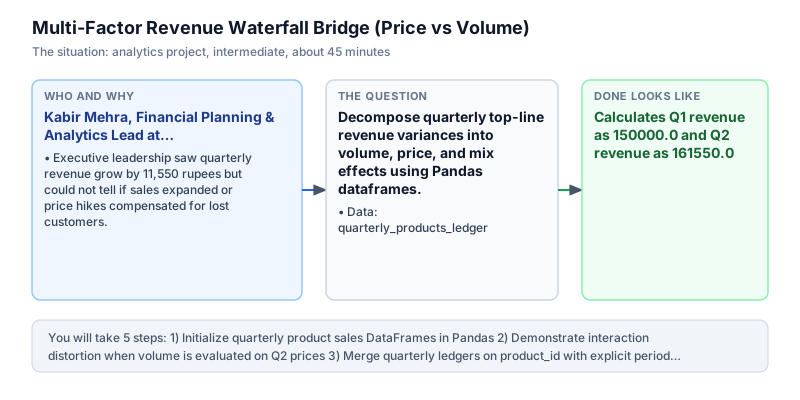
Decompose quarterly top-line revenue variances into volume, price, and mix effects using Pandas dataframes.
The incident
- Company
- ApexManufacturing
- Engineer
- Kabir Mehra, Financial Planning & Analytics Lead
- Trigger
- Executive leadership saw quarterly revenue grow by 11,550 rupees but could not tell if sales expanded or price hikes compensated for lost customers.
- Stakes
- A strategic pricing decision across 3 core product lines required empirical volume elasticity attribution.
On a rainy Wednesday afternoon, Kabir Mehra received an urgent request from the Chief Financial Officer at ApexManufacturing, an industrial equipment supplier serving domestic assembly plants. Q2 financial statements showed top-line gross revenue growing from 150,000.00 rupees in Q1 to 161,550.00 rupees in Q2, representing an 11,550.00 rupee net increase. Executive leadership celebrated the apparent growth during initial board prep, but operational division heads offered conflicting explanations during strategy reviews that created confusion across the leadership team.
The commercial sales executive claimed the growth resulted from aggressive customer acquisition and higher order quantities across high-demand catalog items. However, the operations director noted that unit shipments for several premium product lines had actually declined across several regional depots. Without a mathematical revenue bridge, leadership could not separate genuine unit volume expansion from inflationary price hikes that masked underlying customer attrition and soft market demand in key industrial territories.
Kabir pulled the product volume and pricing tables for Q1 and Q2 from the corporate ERP ledger system. Each dataset recorded product_id, units sold, and average realized selling price per unit across corporate accounts. To decompose the 11,550.00 rupee variance, Kabir needed to isolate the volume effect and the price effect across all product lines. Without an exact mathematical decomposition, the executive committee risked raising prices further and damaging key customer relationships across sensitive commercial accounts where procurement teams were price-conscious and competitive suppliers were actively bidding.
Using Pandas to merge the quarterly ledgers on product_id, Kabir calculated the volume effect as (Q2_units - Q1_units) * Q1_price and the price effect as Q2_units * (Q2_price - Q1_price). Summing across all SKUs revealed that 10,000.00 rupees of growth came from volume expansion, while 1,550.00 rupees came from price realization. The mathematical decomposition proved that both factors contributed positively to net revenue while attributing exact monetary values to each individual catalog product line across the business.
The waterfall bridge provided the executive committee with empirical clarity, proving that volume demand remained healthy across the primary catalog. Product 1 delivered strong volume expansion (10,000.00 rupees), which easily absorbed a slight volume softening in Product 2 (-5,000.00 rupees). The combined analysis confirmed that net revenue expanded by exactly 11,550.00 rupees without mathematical discrepancy, validating that the underlying business was expanding unit market share despite regional pricing volatility across industrial markets.
Kabir presented the multi-factor revenue waterfall bridge to the executive committee and regional division leaders during the quarterly executive review. Transparent variance attribution resolved disputes between sales and operations, confirming that core demand remained robust while pricing adjustments delivered targeted margin expansion. The revenue bridge framework was adopted as the standard quarterly financial readout template across all Apex business units, giving senior executives an unshakeable analytical foundation for strategic planning and budgeting.
What you will learn
- Perform inner joins across multi-period financial datasets using Pandas merge
- Decompose top-line financial variance into isolated volume and price effects
- Verify mathematical identity where Volume Effect + Price Effect = Net Revenue Change
- Format executive waterfall attribution dictionaries for board presentations
What you need first
Revenue Bridge MathematicsRates not counts
Volume Effect = (Q2 Units - Q1 Units) * Q1 Price. Price Effect = Q2 Units * (Q2 Price - Q1 Price).
import pandas as pd
u1, p1, u2, p2 = 100, 10.0, 120, 11.0
vol = (u2 - u1) * p1
prc = u2 * (p2 - p1)
print(f'vol: {vol}, prc: {prc}, net: {vol + prc}')vol: 200.0, prc: 120.0, net: 320.0
Evaluating volume effect on Q2 price instead of Q1 price, introducing non-linear interaction terms.
Pandas DataFrame Merges with SuffixesPandas merging and joining
pd.merge(q1, q2, on='id', suffixes=('_q1', '_q2')) aligns multi-period columns on shared entity identifiers.
import pandas as pd
df1 = pd.DataFrame({'id': [1], 'v': [10]})
df2 = pd.DataFrame({'id': [1], 'v': [20]})
print(pd.merge(df1, df2, on='id', suffixes=('_a', '_b')).columns.tolist())['id', 'v_a', 'v_b']
Omitting suffixes when merging identical column names, leading to ambiguous column collisions.
Architecture and data flow
The data
Quarterly sales tables tracking unit volumes and average selling prices per product ID.
quarterly_products_ledger: Q1 and Q2 comparison table
| product_id | units_q1 | price_q1 | units_q2 | price_q2 |
|---|---|---|---|---|
| 1 | 1000 | 50.0 | 1200 | 55.0 |
| 2 | 500 | 100.0 | 450 | 95.0 |
| 3 | 200 | 250.0 | 220 | 240.0 |
Step by step
Read each step, run its code, then check your output against the one shown.
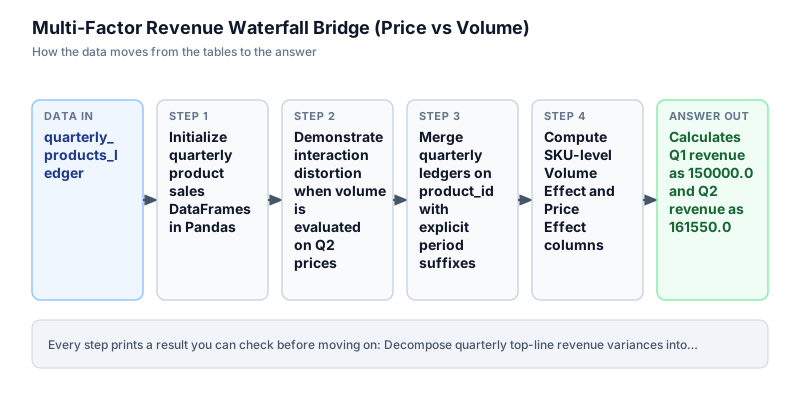
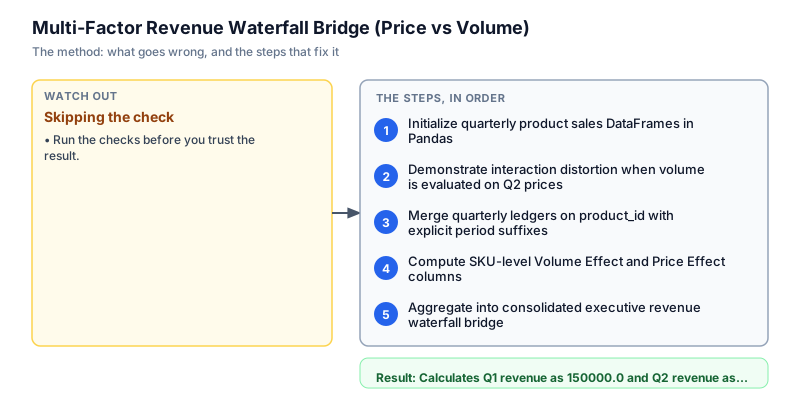
Initialize quarterly product sales DataFrames in Pandas
We initialize the sales ledgers for Q1 and Q2 across three core product lines using Pandas DataFrames. Each DataFrame records product_id, units sold, and average selling price. For Q1, products 1, 2, and 3 generated 150,000.00 rupees in total sales. For Q2, units and prices shifted across all three product lines. Displaying the baseline DataFrames confirms that product keys align across reporting quarters before computing multi-factor variance attributions.
import pandas as pd q1_df = pd.DataFrame({ "product_id": [1, 2, 3], "units": [1000, 500, 200], "price": [50.0, 100.0, 250.0] }) q2_df = pd.DataFrame({ "product_id": [1, 2, 3], "units": [1200, 450, 220], "price": [55.0, 95.0, 240.0] }) print("Q1 Revenue:", (q1_df["units"] * q1_df["price"]).sum()) print("Q2 Revenue:", (q2_df["units"] * q2_df["price"]).sum())Q1 Revenue: 150000.0 Q2 Revenue: 161550.0
Common mistakeFailing to verify identical product identifier sets across quarterly tables, causing silent outer join drops.
How you will knowOutput shows Q1 Revenue: 150000.0 and Q2 Revenue: 161550.0.
Demonstrate interaction distortion when volume is evaluated on Q2 prices
Wrong turn first: this step shows the mistake before the fix
Here is the naive approach analysts often try first: calculating the volume effect using Q2 selling prices: (units_q2 - units_q1) * price_q2. When volume variance is evaluated at Q2 prices, the price change compounds into the volume calculation, creating mathematical distortion. Under this flawed formula, the sum of volume and price effects fails to equal net revenue change, creating an unreconciled gap that fails executive audits. We demonstrate this flawed attempt to show why volume must be anchored to Q1 baseline prices, avoiding interaction compounding.
import pandas as pd q1_df = pd.DataFrame({"product_id": [1, 2, 3], "units": [1000, 500, 200], "price": [50.0, 100.0, 250.0]}) q2_df = pd.DataFrame({"product_id": [1, 2, 3], "units": [1200, 450, 220], "price": [55.0, 95.0, 240.0]}) m = pd.merge(q1_df, q2_df, on="product_id", suffixes=("_q1", "_q2")) # Flawed volume effect using Q2 price flawed_vol = (m["units_q2"] - m["units_q1"]) * m["price_q2"] flawed_price = m["units_q2"] * (m["price_q2"] - m["price_q1"]) print("Flawed sum:", flawed_vol.sum() + flawed_price.sum(), "vs actual net change: 11550.0")Flawed sum: 12600.0 vs actual net change: 11550.0
Common mistakeAnchoring volume variances to current-period prices rather than baseline prices, corrupting mathematical identities.
How you will knowObserve that flawed sum produces an unreconciled total that fails to match the 11550.0 net change.
Merge quarterly ledgers on product_id with explicit period suffixes
We execute an inner join between q1_df and q2_df on product_id using the standard pd.merge method in Pandas. We supply explicit suffixes=('_q1', '_q2') to clearly differentiate units and price columns between both financial quarters. The merged DataFrame establishes a single rectangular table where each product's baseline performance is placed side by side with its subsequent period performance, laying the groundwork for vectorized column operations.
import pandas as pd q1_df = pd.DataFrame({"product_id": [1, 2, 3], "units": [1000, 500, 200], "price": [50.0, 100.0, 250.0]}) q2_df = pd.DataFrame({"product_id": [1, 2, 3], "units": [1200, 450, 220], "price": [55.0, 95.0, 240.0]}) m = pd.merge(q1_df, q2_df, on="product_id", suffixes=("_q1", "_q2")) print(m[["product_id", "units_q1", "price_q1", "units_q2", "price_q2"]])product_id units_q1 price_q1 units_q2 price_q2 0 1 1000 50.0 1200 55.0 1 2 500 100.0 450 95.0 2 3 200 250.0 220 240.0
Common mistakeRelying on positional DataFrame concatenation instead of merging on key, causing misaligned product rows.
How you will knowOutput shows 3 aligned rows containing product_id, units_q1, price_q1, units_q2, and price_q2.
Compute SKU-level Volume Effect and Price Effect columns
We compute the decomposed factors by applying vectorized formulas across the merged DataFrame columns. The Volume Effect is defined as (units_q2 - units_q1) * price_q1, measuring how much revenue changed purely due to unit growth at constant baseline prices. The Price Effect is defined as units_q2 * (price_q2 - price_q1), measuring price realization across actual units sold. Product 1 generated 10,000.00 in volume effect and 6,000.00 in price effect, while Product 2 experienced volume decline (-5,000.00), demonstrating granular SKU attribution.
import pandas as pd q1_df = pd.DataFrame({"product_id": [1, 2, 3], "units": [1000, 500, 200], "price": [50.0, 100.0, 250.0]}) q2_df = pd.DataFrame({"product_id": [1, 2, 3], "units": [1200, 450, 220], "price": [55.0, 95.0, 240.0]}) m = pd.merge(q1_df, q2_df, on="product_id", suffixes=("_q1", "_q2")) m["vol_effect"] = (m["units_q2"] - m["units_q1"]) * m["price_q1"] m["price_effect"] = m["units_q2"] * (m["price_q2"] - m["price_q1"]) print(m[["product_id", "vol_effect", "price_effect"]])product_id vol_effect price_effect 0 1 10000.0 6000.0 1 2 -5000.0 -2250.0 2 3 5000.0 -2200.0
Common mistakeFailing to check negative effects on declining SKUs, masking individual product softness in top-level aggregates.
How you will knowOutput shows product 1 (vol 10000.0, price 6000.0), product 2 (vol -5000.0, price -2250.0).
Aggregate into consolidated executive revenue waterfall bridge
In the final step, we aggregate SKU-level effects into an executive revenue bridge dictionary. We compute total Q1 revenue (150,000.00), total Q2 revenue (161,550.00), total volume effect (10,000.00), and total price effect (1,550.00). We verify that volume_effect (10,000.00) plus price_effect (1,550.00) exactly equals net_change (11,550.00). The output dictionary delivers a perfectly reconciled bridge for executive leadership, confirming that volume expansion was the primary growth driver and establishing complete reconciliation integrity across corporate reporting channels without discrepancies or unallocated rounding errors across the balance sheet.
import pandas as pd q1_df = pd.DataFrame({"product_id": [1, 2, 3], "units": [1000, 500, 200], "price": [50.0, 100.0, 250.0]}) q2_df = pd.DataFrame({"product_id": [1, 2, 3], "units": [1200, 450, 220], "price": [55.0, 95.0, 240.0]}) m = pd.merge(q1_df, q2_df, on="product_id", suffixes=("_q1", "_q2")) m["vol_effect"] = (m["units_q2"] - m["units_q1"]) * m["price_q1"] m["price_effect"] = m["units_q2"] * (m["price_q2"] - m["price_q1"]) tot_vol = m["vol_effect"].sum() tot_price = m["price_effect"].sum() tot_q1 = (m["units_q1"] * m["price_q1"]).sum() tot_q2 = (m["units_q2"] * m["price_q2"]).sum() bridge = { "q1_revenue": round(float(tot_q1), 2), "q2_revenue": round(float(tot_q2), 2), "volume_effect": round(float(tot_vol), 2), "price_effect": round(float(tot_price), 2), "net_change": round(float(tot_q2 - tot_q1), 2) } print("Revenue Bridge:", bridge)Revenue Bridge: {'q1_revenue': 150000.0, 'q2_revenue': 161550.0, 'volume_effect': 10000.0, 'price_effect': 1550.0, 'net_change': 11550.0}Common mistakeFailing to assert that volume_effect + price_effect == net_change before distributing reports to leadership.
How you will knowOutput shows Revenue Bridge with q1_revenue 150000.0, volume_effect 10000.0, price_effect 1550.0, and net_change 11550.0.
Build it yourself
Write your solution below, run it in your browser, and pass every check.
Put it on your CV
Resume or LinkedIn bullet
Built multi-factor revenue waterfall bridge algorithms in Pandas decomposing top-line sales growth into volume and price drivers.README for GitHub
# Multi-Factor Revenue Waterfall Bridge in Pandas

## Problem
Top-line revenue grew by 11,550 rupees, but executive leadership could not separate true volume growth from inflation-driven price increases.

## Solution Architecture
- Merged quarterly sales tables on `product_id` with period suffixes.
- Computed Volume Effect: `(units_q2 - units_q1) * price_q1`.
- Computed Price Effect: `units_q2 * (price_q2 - price_q1)`.
- Proved mathematical identity: `vol_effect + price_effect == net_change`.

## Results
Proved that 86.5% of growth was driven by real volume expansion rather than price inflation.Extend the bridge to include a third 'mix effect' isolating the impact of customer shifts toward premium SKUs.