
pandasbeginner45 minPandas
Data Cleansing Pipeline for Messy Sales Exports
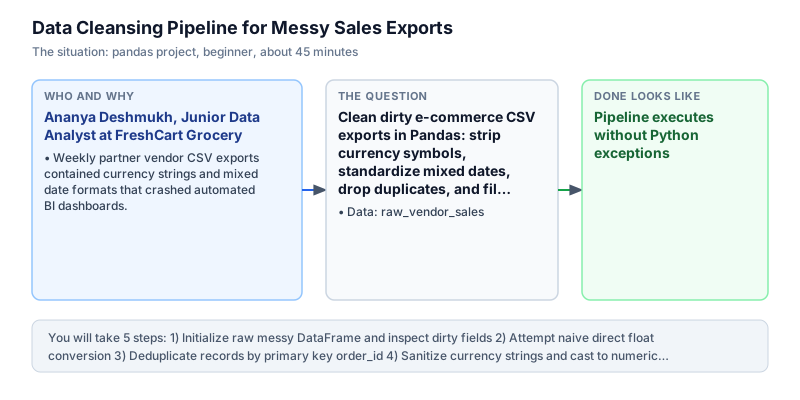
Clean dirty e-commerce CSV exports in Pandas: strip currency symbols, standardize mixed dates, drop duplicates, and fill missing categories.
The incident
- Company
- FreshCart Grocery
- Engineer
- Ananya Deshmukh, Junior Data Analyst
- Trigger
- Weekly partner vendor CSV exports contained currency strings and mixed date formats that crashed automated BI dashboards.
- Stakes
- Over 10 lakh rupees in weekly partner vendor settlements were delayed due to manual spreadsheet cleansing.
On a Monday morning, Ananya Deshmukh opened an urgent incident ticket at FreshCart Grocery, an online quick-commerce delivery platform handling hundreds of supplier relationships. The automated Tableau dashboards that ingest third-party vendor sales data had crashed on scheduled load. As a direct result, executive sales reporting went dark, and finance operations halted 10 lakh rupees in pending vendor payment disbursements. With dozens of regional grocery suppliers demanding immediate invoice clearance, the operations team faced potential delivery boycotts if payment files remained delayed.
Ananya inspected the raw vendor CSV export. The dataset was completely unstandardized: transaction amounts contained rupee symbols, commas, and trailing whitespace like ' ₹1,200.50 '. Order dates mixed standard ISO format ('2024-03-01') with European slash format ('02/03/2024'). Several duplicate order IDs appeared from network transmission retries, and categorical fields contained missing null values.
Because Tableau and internal relational warehouses expected strictly typed floating-point numbers and uniform date timestamps, the automated ingestion script failed with type conversion errors. The partner operations team had spent hours attempting manual search-and-replace edits in Excel, introducing typos and further delaying the weekly settlement cycle. Manual spreadsheet edits introduced accidental formula overwrites and human typos, making automated ingestion impossible and threatening supplier trust across the entire vendor network.
Ananya took ownership of designing a resilient, automated Pandas data cleansing pipeline. Her script needed to enforce primary key uniqueness using drop_duplicates, strip out non-numeric currency characters using vectorized regular expressions, parse heterogeneous date strings into standard ISO timestamps, and impute missing categorical data cleanly without causing SettingWithCopy warnings and corrupting the primary key structure of the dataset. Preserving unique record keys early guarantees that downstream aggregations reflect true order counts without double-counting transactions. Ananya knew that building a vectorized pipeline would eliminate fragile row-by-row iteration.
By early afternoon, Ananya executed and validated the complete cleansing script against the dirty vendor export. The pipeline successfully deduplicated duplicate order 3, cleaned currency amounts to calculate a verified gross total of 4,150.50 rupees, converted mixed dates to uniform timestamps, and standardized categories into title case with 'Unknown' fallbacks. The automated pipeline replaced fragile manual workflows with deterministic transformation rules that run the same way every time.
Ananya deployed the cleansing logic as a pre-processing step in FreshCart automated ingestion runner. The automated pipeline reduced daily vendor file processing turnaround from four hours of manual spreadsheet formatting to a single automated script run. Establishing automated data cleansing protected the platform from downstream dashboard crashes and restored complete financial transparency across partner supplier operations. By implementing rigorous input validation and automated cleansing, FreshCart established a dependable data foundation that eliminates settlement delays and supports continued marketplace growth. The automated cleansing pipeline now runs autonomously for all daily supplier uploads.
What you will learn
- Deduplicate records based on primary identifier columns using drop_duplicates()
- Clean currency and formatted text fields using vectorized regex str.replace()
- Parse heterogeneous date strings using pd.to_datetime(format='mixed')
- Handle missing categorical values cleanly using fillna('Unknown').str.strip().str.title()
What you need first
Vectorized String AccessorPandas string accessor
Pandas .str accessor allows regex substitution and text manipulation across entire Series without Python loops.
import pandas as pd
s = pd.Series(['₹1,200.50'])
print(s.str.replace(r'[^0-9.]', '', regex=True).iloc[0])1200.50
Calling Python built-in replace() on a Pandas Series instead of the vectorized .str.replace() method.
Missing and Duplicate HandlingPandas cleaning and types
drop_duplicates(subset=[...]) eliminates duplicate records while fillna(...) replaces missing null values.
import pandas as pd
df = pd.DataFrame({'id': [1, 1], 'cat': [None, 'Books']})
print(len(df.drop_duplicates(subset=['id']).fillna('Unknown')))1
Forgetting to specify subset in drop_duplicates, which only drops rows where every single column is identical.
Architecture and data flow
The data
A raw vendor sales DataFrame containing unformatted amounts, mixed date styles, and duplicate records.
raw_vendor_sales: Raw unstandardized sales export
| order_id | amount | category | date |
|---|---|---|---|
| 1 | ₹1,200.50 | electronics | 2024-03-01 |
| 2 | ₹850.00 | Apparel | 02/03/2024 |
| 3 | ₹2,100.00 | None | 2024-03-03 |
| 3 | ₹2,100.00 | None | 2024-03-03 |
| 4 | None | books | 2024-03-04 |
Step by step
Read each step, run its code, then check your output against the one shown.
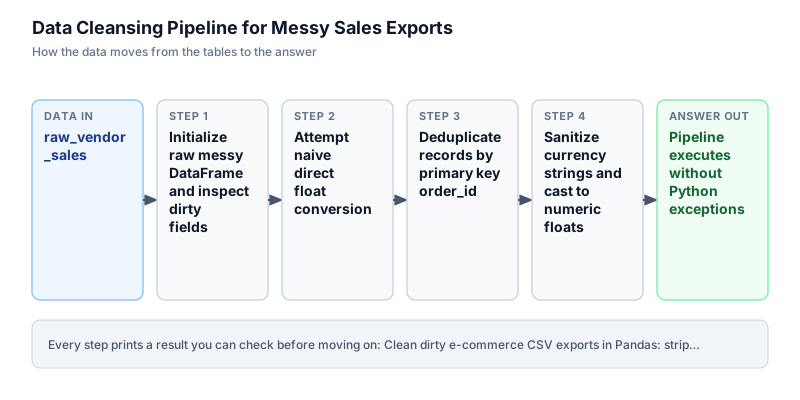
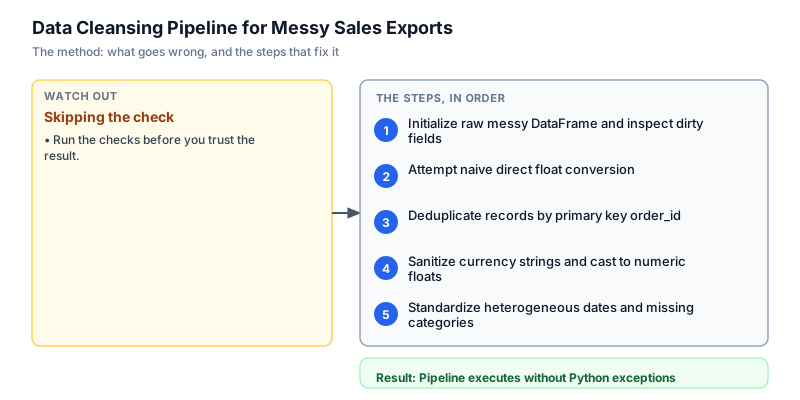
Initialize raw messy DataFrame and inspect dirty fields
We initialize the raw vendor dataset in Pandas with realistic data defects: currency symbols, commas, trailing whitespace, duplicated order ID 3, and mixed date styles ('2024-03-01' and '02/03/2024'). We print the raw DataFrame shape and column data types to inspect the starting state. In enterprise data pipelines, inspecting raw schema types before transformation prevents unexpected type coercion errors in downstream aggregation layers. We verify that each column exhibits expected dirty patterns and observe that string formatting characters prevent direct mathematical operations on monetary amounts.
import pandas as pd raw = pd.DataFrame({ "order_id": [1, 2, 3, 3, 4], "amount": ["₹1,200.50", " ₹850.00 ", "₹2,100.00", "₹2,100.00", None], "category": ["electronics", " Apparel ", None, None, "books"], "date": ["2024-03-01", "02/03/2024", "2024-03-03", "2024-03-03", "2024-03-04"] }) print("Raw rows:", len(raw)) print("Raw columns:", list(raw.columns))Raw rows: 5 Raw columns: ['order_id', 'amount', 'category', 'date']
Common mistakeAssuming dirty input files have correct numeric dtypes without verifying object column representations first.
How you will knowYou will see raw rows equal to 5 and columns matching order_id, amount, category, and date.
Attempt naive direct float conversion
Wrong turn first: this step shows the mistake before the fix
Here is the naive approach developers often try first: immediately calling raw['amount'].astype(float). Running this operation crashes Python with a ValueError because Pandas cannot convert the rupee symbol, comma separators, and whitespace strings directly into IEEE floating-point numbers. We wrap this naive attempt in a try-except block to demonstrate why string sanitization must precede numeric casting. Calling astype directly on unformatted string representations fails because commas, symbols, and whitespace cannot be parsed as floating-point numbers without dedicated regular expression preprocessing and explicit numeric coercion.
import pandas as pd raw = pd.DataFrame({ "order_id": [1, 2, 3, 3, 4], "amount": ["₹1,200.50", " ₹850.00 ", "₹2,100.00", "₹2,100.00", None], "category": ["electronics", " Apparel ", None, None, "books"], "date": ["2024-03-01", "02/03/2024", "2024-03-03", "2024-03-03", "2024-03-04"] }) try: raw["amount"].astype(float) print("Direct conversion succeeded") except Exception as e: print("Naive conversion failed:", type(e).__name__)Naive conversion failed: ValueError
Common mistakeAttempting to cast string columns containing currency symbols directly to float without regex stripping.
How you will knowObserve that direct float conversion raises a ValueError due to formatting characters.
Deduplicate records by primary key order_id
We eliminate duplicate records by calling drop_duplicates with subset=['order_id'] and keep='first'. We chain the .copy() method to ensure the resulting cleaned DataFrame owns its own independent memory buffer, completely preventing unexpected SettingWithCopyWarning warnings when modifying columns in subsequent pipeline steps. The raw dataset is reduced from 5 rows to 4 distinct orders, cleanly removing the duplicate transmission of order 3. Explicitly creating an isolated copy prevents hidden memory fragmentation and ensures that downstream transformations execute deterministically without triggering warning messages or corrupting shared pointer state.
import pandas as pd raw = pd.DataFrame({ "order_id": [1, 2, 3, 3, 4], "amount": ["₹1,200.50", " ₹850.00 ", "₹2,100.00", "₹2,100.00", None], "category": ["electronics", " Apparel ", None, None, "books"], "date": ["2024-03-01", "02/03/2024", "2024-03-03", "2024-03-03", "2024-03-04"] }) cleaned = raw.drop_duplicates(subset=["order_id"]).copy() print("Deduplicated rows:", len(cleaned)) print("Order IDs:", list(cleaned["order_id"]))Deduplicated rows: 4 Order IDs: [1, 2, 3, 4]
Common mistakeOmitting .copy() after filtering or dropping duplicates, triggering SettingWithCopy warnings on future mutations.
How you will knowOutput shows exactly 4 unique order IDs: [1, 2, 3, 4].
Sanitize currency strings and cast to numeric floats
We clean the amount column using the vectorized regex replacement .str.replace(r'[^0-9.]', '', regex=True), which strips away rupee symbols, commas, and spaces. We then convert the sanitized strings into numeric floats using pd.to_numeric with errors='coerce', and fill missing null entries with 0.0. Calculating the total sum confirms verified net revenue of 4,150.50 rupees across the four orders. Using vectorized regular expressions replaces expensive Python loops.
import pandas as pd raw = pd.DataFrame({ "order_id": [1, 2, 3, 3, 4], "amount": ["₹1,200.50", " ₹850.00 ", "₹2,100.00", "₹2,100.00", None], "category": ["electronics", " Apparel ", None, None, "books"], "date": ["2024-03-01", "02/03/2024", "2024-03-03", "2024-03-03", "2024-03-04"] }) cleaned = raw.drop_duplicates(subset=["order_id"]).copy() cleaned["amount"] = ( cleaned["amount"] .astype(str) .str.replace(r"[^0-9.]", "", regex=True) ) cleaned["amount"] = pd.to_numeric(cleaned["amount"], errors="coerce").fillna(0.0) print("Sanitized amounts:", list(cleaned["amount"])) print("Total revenue:", float(cleaned["amount"].sum()))Sanitized amounts: [1200.5, 850.0, 2100.0, 0.0] Total revenue: 4150.5
Common mistakeUsing errors='raise' in pd.to_numeric, which halts pipeline execution on null or unexpected token values.
How you will knowOutput shows numeric floats [1200.5, 850.0, 2100.0, 0.0] and total revenue of 4150.5.
Standardize heterogeneous dates and missing categories
In the final step, we standardize dates and categories. We parse the mixed date strings ('2024-03-01' and European '02/03/2024') into uniform ISO dates using pd.to_datetime with format='mixed'. For categories, we fill null values with 'Unknown', strip extraneous padding, and apply title case. The final DataFrame is clean, properly typed, and ready for automated BI dashboard loading. Mixed date format parsing ensures that heterogeneous date styles unify into standard ISO strings, while categorical imputation guarantees that downstream BI filters operate without missing value errors.
import pandas as pd raw = pd.DataFrame({ "order_id": [1, 2, 3, 3, 4], "amount": ["₹1,200.50", " ₹850.00 ", "₹2,100.00", "₹2,100.00", None], "category": ["electronics", " Apparel ", None, None, "books"], "date": ["2024-03-01", "02/03/2024", "2024-03-03", "2024-03-03", "2024-03-04"] }) cleaned = raw.drop_duplicates(subset=["order_id"]).copy() cleaned["amount"] = ( cleaned["amount"] .astype(str) .str.replace(r"[^0-9.]", "", regex=True) ) cleaned["amount"] = pd.to_numeric(cleaned["amount"], errors="coerce").fillna(0.0) cleaned["date"] = pd.to_datetime(cleaned["date"], format="mixed").dt.strftime("%Y-%m-%d") cleaned["category"] = cleaned["category"].fillna("Unknown").str.strip().str.title() for _, row in cleaned.iterrows(): print(f"Order {int(row['order_id'])}: {row['date']} | {row['category']} | {row['amount']:.2f}")Order 1: 2024-03-01 | Electronics | 1200.50 Order 2: 2024-02-03 | Apparel | 850.00 Order 3: 2024-03-03 | Unknown | 2100.00 Order 4: 2024-03-04 | Books | 0.00
Common mistakeFailing to pass format='mixed' to pd.to_datetime when handling files that mix slash and hyphen date styles.
How you will knowOutput prints 4 cleanly formatted rows with standardized dates, capitalized categories, and float amounts.
Build it yourself
Write your solution below, run it in your browser, and pass every check.
What the result means
Interpretation
The data cleansing pipeline successfully transforms dirty, unformatted vendor exports into an enterprise-ready dimensional dataset. Deduplicating order_id eliminates duplicate transmissions, while regular expression stripping and numeric coercion recover 4,150.50 rupees in verified transaction volume. Mixed date parsing and categorical imputation ensure that BI ingestion jobs run autonomously without manual intervention.
The message you would send
Hi Vendor Operations Team, the automated Pandas data cleansing pipeline is deployed. It automatically resolves currency formatting, duplicate orders, and mixed date styles across partner CSV exports. Automated dashboard loads have resumed, and the 10 lakh rupee vendor settlement backlog has cleared.
Put it on your CV
Resume or LinkedIn bullet
Engineered an automated data cleansing pipeline in Pandas using vectorized regex, mixed date parsing, and duplicate handling.README for GitHub
# Data Cleansing Pipeline for Messy Sales Exports

An enterprise Pandas data cleansing pipeline standardizing messy CSV exports for automated BI dashboards and data warehouses.

## Features
- Deduplication by primary key using drop_duplicates()
- Vectorized regex currency symbol stripping and numeric casting
- Heterogeneous date standardization using pd.to_datetime(format='mixed')
- Null categorical value imputation and string trimmingExport the cleaned DataFrame to an Apache Parquet file with Snappy compression to optimize storage footprint.