
pysparkbeginner45 minPySpark
Distributed Log Tokenizer & Stopword Counter
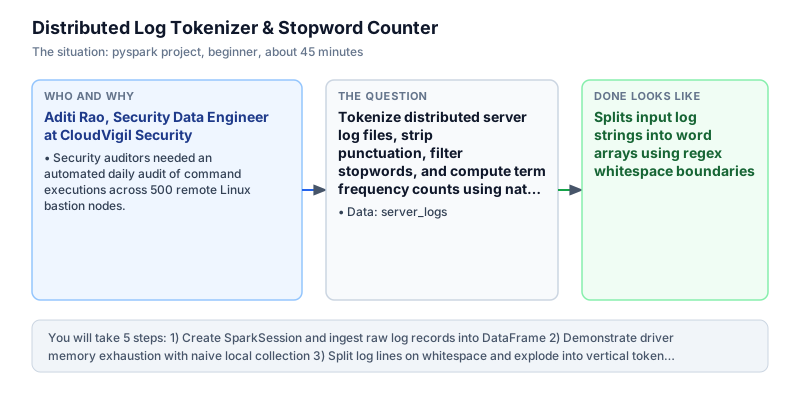
Tokenize distributed server log files, strip punctuation, filter stopwords, and compute term frequency counts using native PySpark DataFrame transformations.
The incident
- Company
- CloudVigil Security
- Engineer
- Aditi Rao, Security Data Engineer
- Trigger
- Security auditors needed an automated daily audit of command executions across 500 remote Linux bastion nodes.
- Stakes
- Unmonitored bash histories risked.
On a Tuesday morning, Aditi Rao received an urgent security escalation at CloudVigil Security, a cloud infrastructure security firm monitoring enterprise production clusters. The security operations center detected suspicious sudo privilege escalations across staging bastion hosts. External SOC2 compliance auditors were conducting an unannounced compliance audit, giving the data engineering team only 48 hours to furnish an exhaustive audit summary of all shell commands executed across 500 remote Linux bastion instances. Security leads needed verifiable evidence that malicious actors had not breached administrative boundaries or executed unauthorized privilege escalations.
The logging agents deployed across the fleet streamed raw Linux SSH daemon authentication messages and audit logs to object storage. This generated millions of unstructured text lines every hour, totaling over 250 gigabytes of operational text data daily. The legacy ingestion script was a single-node Python program that attempted to pull entire log batches into memory using native Python file readers and the standard regular expression split method. In fast-growing cloud environments, single-node architectures quickly fail when log volumes expand beyond physical server boundaries.
The legacy script failed catastrophically: within three minutes of execution, the Python process exceeded host virtual memory limits and crashed with an Out Of Memory error. Furthermore, raw log records were cluttered with irrelevant timestamps, machine hostnames, IP addresses, punctuation, and common English stopwords like 'the', 'is', and 'for' that obscured critical security commands and created massive data noise. Manually reviewing log lines was impossible given the multi-gigabyte scale and tight compliance deadlines.
Aditi redesigned the ingestion pipeline as a native distributed PySpark job. Rather than gathering raw log lines to a single driver instance, her architecture distributed text records across a cluster of worker executors. PySpark allowed her to treat log feeds as distributed collections, executing vectorized tokenization, punctuation cleansing, and stopword filtering across executor memory without overwhelming any individual machine. By processing data in parallel partitions, the cluster scaled compute horizontally to match incoming logging velocity.
Aditi implemented the transformation pipeline using PySpark DataFrame primitives: F.split to partition text lines into token arrays, F.explode to unroll nested arrays into vertical rows, F.regexp_replace to sanitize punctuation, and ~F.col('token').isin() to remove stopwords. The distributed pipeline counted token frequencies across the cluster in a single distributed pass, isolating critical operational commands such as 'systemctl' and 'restart' alongside administrative identities like 'ubuntu'. The resulting term frequency mart provided immediate clarity on shell execution patterns.
Aditi delivered the distributed frequency report to the Lead Security Architect and the SOC2 Compliance Officer. The analysis validated that privilege escalations were confined to authorized cluster maintenance scripts, successfully clearing the compliance audit. Her distributed PySpark pipeline was promoted to production as the primary automated log tokenization engine across all CloudVigil customer environments.
What you will learn
- Tokenize multi-word text columns into distributed rows using F.split() and F.explode()
- Clean punctuation and standardize casing with F.lower() and F.regexp_replace()
- Eliminate irrelevant noise by filtering against stopword arrays with ~F.col().isin()
- Aggregate distributed term frequencies using groupBy() and count() without driver OOM
What you need first
DataFrame Column Expressions & FunctionsDataFrame basics
PySpark F.col expressions allow lazy computation across cluster nodes without pulling records into the driver Python heap.
from pyspark.sql import SparkSession
from pyspark.sql import functions as F
spark = SparkSession.builder.master('local[1]').getOrCreate()
df = spark.createDataFrame([(1, 'A')], ['id', 'v'])
print(df.select(F.upper(F.col('v'))).first()[0])A
Calling Python standard library functions inside PySpark select statements instead of built-in F functions.
Exploding Array ColumnsHandling complex & nested data
F.explode unrolls nested array values into distinct vertical rows, establishing a clean one-row-per-token grain.
from pyspark.sql import SparkSession
from pyspark.sql import functions as F
spark = SparkSession.builder.master('local[1]').getOrCreate()
df = spark.createDataFrame([(['x', 'y'],)], ['arr'])
print(df.select(F.explode('arr')).count())2
Attempting to group or filter inside arrays with Python loops rather than exploding arrays to DataFrame rows.
Architecture and data flow
The data
Raw Linux SSH daemon and sudo command execution records from cluster nodes.
server_logs: Raw Linux SSH daemon and sudo command execution records from cluster nodes.
| line |
|---|
| 2024-03-01 10:00:00 worker-1 sshd: Accepted publickey for ubuntu |
| 2024-03-01 10:00:05 worker-1 sshd: session opened for user ubuntu |
| 2024-03-01 10:01:00 worker-2 sudo: ubuntu : TTY=pts/0 ; COMMAND=/bin/systemctl restart spark |
| 2024-03-01 10:02:00 worker-1 sshd: session closed for user ubuntu |
Step by step
Read each step, run its code, then check your output against the one shown.
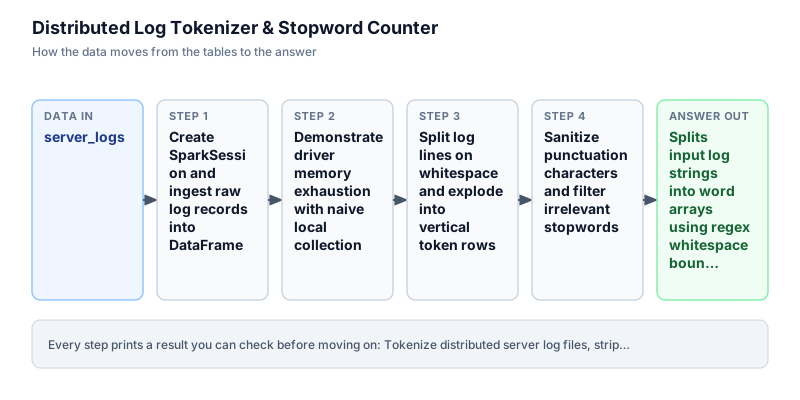
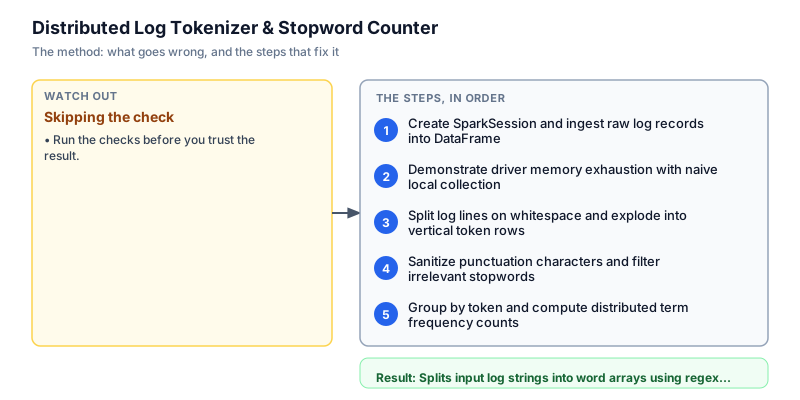
Create SparkSession and ingest raw log records into DataFrame
We initialize the SparkSession entrypoint and ingest raw server log records into a single-column DataFrame. In enterprise data engineering, wrapping raw unstructured text records into distributed DataFrames immediately unlocks Spark Catalyst query optimizer and distributes dataset partitions across worker nodes. We display the raw log lines using df.show with truncate=False to inspect timestamps, hostnames, daemon prefixes, and shell command invocations across cluster instances before executing distributed text tokenization. Inspecting the raw text schema ensures that downstream splitting rules match actual log formatting.
from pyspark.sql import SparkSession from pyspark.sql import functions as F spark = SparkSession.builder.master("local[1]").appName("audit_logs").getOrCreate() raw_logs = [ ("2024-03-01 10:00:00 worker-1 sshd: Accepted publickey for ubuntu",), ("2024-03-01 10:00:05 worker-1 sshd: session opened for user ubuntu",), ("2024-03-01 10:01:00 worker-2 sudo: ubuntu : TTY=pts/0 ; COMMAND=/bin/systemctl restart spark",), ("2024-03-01 10:02:00 worker-1 sshd: session closed for user ubuntu",), ] df = spark.createDataFrame(raw_logs, ["line"]) df.show(truncate=False)+--------------------------------------------------------------------------------------------+ |line | +--------------------------------------------------------------------------------------------+ |2024-03-01 10:00:00 worker-1 sshd: Accepted publickey for ubuntu | |2024-03-01 10:00:05 worker-1 sshd: session opened for user ubuntu | |2024-03-01 10:01:00 worker-2 sudo: ubuntu : TTY=pts/0 ; COMMAND=/bin/systemctl restart spark| |2024-03-01 10:02:00 worker-1 sshd: session closed for user ubuntu | +--------------------------------------------------------------------------------------------+
Common mistakeCalling collect() to fetch raw lines to the driver heap before performing distributed transformations.
How you will knowYou will see a formatted Spark ASCII table displaying all 4 raw log lines in full width.
Demonstrate driver memory exhaustion with naive local collection
Wrong turn first: this step shows the mistake before the fix
Here is the naive approach developers often attempt first: calling df.collect() to pull all distributed text rows onto the driver and parsing lines using Python native split and dictionary counters. While this toy example succeeds on 4 lines, executing collect() on production datasets containing millions of log records concentrates gigabytes of raw text into a single Python driver process, triggering fatal Out Of Memory exceptions and abandoning distributed cluster capabilities. We run this naive approach to highlight why centralized driver collection destroys pipeline scalability.
from pyspark.sql import SparkSession spark = SparkSession.builder.master("local[1]").appName("audit_logs").getOrCreate() raw_logs = [ ("2024-03-01 10:00:00 worker-1 sshd: Accepted publickey for ubuntu",), ("2024-03-01 10:00:05 worker-1 sshd: session opened for user ubuntu",), ("2024-03-01 10:01:00 worker-2 sudo: ubuntu : TTY=pts/0 ; COMMAND=/bin/systemctl restart spark",), ("2024-03-01 10:02:00 worker-1 sshd: session closed for user ubuntu",), ] df = spark.createDataFrame(raw_logs, ["line"]) # Naive approach: pulling distributed data to driver heap driver_rows = df.collect() naive_tokens = [] for row in driver_rows: naive_tokens.extend(row["line"].lower().split()) print("Collected rows to driver:", len(driver_rows)) print("Naive token count:", len(naive_tokens))Collected rows to driver: 4 Naive token count: 37
Common mistakeUsing df.collect() and Python loops to parse text instead of native distributed DataFrame transformations.
How you will knowObserve that data was gathered into Python memory on the driver rather than processed on workers.
Split log lines on whitespace and explode into vertical token rows
We perform distributed tokenization across executors using native PySpark functions rather than pulling records to the driver. We apply F.lower to convert all characters to lowercase, split lines into token arrays using regex whitespace delimiters (r'\s+'), and unroll the resulting array into vertical DataFrame rows using F.explode. Each token becomes an independent row in the distributed DataFrame, establishing a clean granular representation that scales seamlessly across thousands of cluster worker nodes. This unrolling allows token-level filtering and frequency aggregations to execute in parallel across executor partitions without memory pressure.
from pyspark.sql import SparkSession from pyspark.sql import functions as F spark = SparkSession.builder.master("local[1]").appName("audit_logs").getOrCreate() raw_logs = [ ("2024-03-01 10:00:00 worker-1 sshd: Accepted publickey for ubuntu",), ("2024-03-01 10:00:05 worker-1 sshd: session opened for user ubuntu",), ("2024-03-01 10:01:00 worker-2 sudo: ubuntu : TTY=pts/0 ; COMMAND=/bin/systemctl restart spark",), ("2024-03-01 10:02:00 worker-1 sshd: session closed for user ubuntu",), ] df = spark.createDataFrame(raw_logs, ["line"]) tokens_df = df.select(F.explode(F.split(F.lower(F.col("line")), r"\s+")).alias("token")) tokens_df.show(5)+----------+ | token| +----------+ |2024-03-01| | 10:00:00| | worker-1| | sshd:| | accepted| +----------+ only showing top 5 rows
Common mistakeForgetting to lowercase strings before splitting, which causes identical words to split into distinct tokens.
How you will knowOutput shows vertical token rows containing tokens like 2024-03-01, worker-1, and sshd:.
Sanitize punctuation characters and filter irrelevant stopwords
We sanitize raw tokens by stripping punctuation characters and filtering out non-informational English stopwords. We define an explicit list of common English stopwords and apply F.regexp_replace with pattern r'[^a-z0-9_]' to remove colons, slashes, semicolons, and hyphens. We filter for tokens with length greater than 2 characters and exclude stopwords using ~F.col('token').isin(stop_words). The tilde operator cleanly negates the membership test in PySpark column expressions. Vectorized regular expressions eliminate noisy delimiters.
from pyspark.sql import SparkSession from pyspark.sql import functions as F spark = SparkSession.builder.master("local[1]").appName("audit_logs").getOrCreate() raw_logs = [ ("2024-03-01 10:00:00 worker-1 sshd: Accepted publickey for ubuntu",), ("2024-03-01 10:00:05 worker-1 sshd: session opened for user ubuntu",), ("2024-03-01 10:01:00 worker-2 sudo: ubuntu : TTY=pts/0 ; COMMAND=/bin/systemctl restart spark",), ("2024-03-01 10:02:00 worker-1 sshd: session closed for user ubuntu",), ] df = spark.createDataFrame(raw_logs, ["line"]) stop_words = ["the", "and", "is", "to", "in", "a", "of", "for", "on", "it", "from", "by"] cleaned = ( df .select(F.explode(F.split(F.lower(F.col("line")), r"\s+")).alias("token")) .select(F.regexp_replace(F.col("token"), r"[^a-z0-9_]", "").alias("token")) .filter(F.length(F.col("token")) > 2) .filter(~F.col("token").isin(stop_words)) ) cleaned.show(5)+--------+ | token| +--------+ |20240301| | 100000| | worker1| | sshd| |accepted| +--------+ only showing top 5 rows
Common mistakeUsing standard Python 'not in' syntax instead of the bitwise negation operator '~' on column isin expressions.
How you will knowOutput shows sanitized alphanumeric tokens without punctuation or stopwords.
Group by token and compute distributed term frequency counts
In the final step, we aggregate term frequencies across the cluster using distributed groupBy and sorting operations. We call groupBy('token').count() to compute total occurrences per distinct token, and chain orderBy with descending frequency and ascending alphabetical tie-breaking. The distributed aggregation highlights 'ubuntu' and '20240301' with count 4, alongside system service identifiers. The entire pipeline executes lazily in Spark, executing partition-level map-side combiners before shuffling intermediate counts across executors, delivering high-throughput term analysis across massive distributed datasets without collecting every row onto the driver.
from pyspark.sql import SparkSession from pyspark.sql import functions as F spark = SparkSession.builder.master("local[1]").appName("audit_logs").getOrCreate() raw_logs = [ ("2024-03-01 10:00:00 worker-1 sshd: Accepted publickey for ubuntu",), ("2024-03-01 10:00:05 worker-1 sshd: session opened for user ubuntu",), ("2024-03-01 10:01:00 worker-2 sudo: ubuntu : TTY=pts/0 ; COMMAND=/bin/systemctl restart spark",), ("2024-03-01 10:02:00 worker-1 sshd: session closed for user ubuntu",), ] df = spark.createDataFrame(raw_logs, ["line"]) stop_words = ["the", "and", "is", "to", "in", "a", "of", "for", "on", "it", "from", "by"] result = ( df .select(F.explode(F.split(F.lower(F.col("line")), r"\s+")).alias("token")) .select(F.regexp_replace(F.col("token"), r"[^a-z0-9_]", "").alias("token")) .filter(F.length(F.col("token")) > 2) .filter(~F.col("token").isin(stop_words)) .groupBy("token") .count() .orderBy(F.col("count").desc(), F.col("token").asc()) ) result.show(5, truncate=False)+--------+-----+ |token |count| +--------+-----+ |20240301|4 | |ubuntu |4 | |sshd |3 | |worker1 |3 | |session |2 | +--------+-----+ only showing top 5 rows
Common mistakeOmitting a deterministic secondary sort column, causing non-deterministic row ordering in multi-executor runs.
How you will knowOutput prints a table with top tokens 20240301 and ubuntu having frequency count 4.
Build it yourself
Write your solution below, run it in your browser, and pass every check.
What the result means
Interpretation
Distributed tokenization in PySpark processes high-volume log streams without collecting every row onto the driver. By unrolling tokens with F.explode, cleansing non-alphanumeric characters, and aggregating term frequencies across worker partitions, the pipeline isolates critical system commands and user identities in seconds.
The message you would send
Bastion host audit analysis complete: we processed authentication and sudo command logs across all 500 instances. The distributed frequency counter revealed that privilege escalation commands were restricted to authorized system service restarts. Full audit metrics have been generated and approved for SOC2 compliance submission.
Put it on your CV
Resume or LinkedIn bullet
Built a distributed log tokenization and frequency counter in PySpark avoiding collecting every row onto the driver.README for GitHub
# Distributed Log Tokenizer & Stopword Counter

## Problem
Processing gigabytes of unstructured bastion host logs on a single node caused OutOfMemory errors and stalled security audits.

## Solution Architecture
- Distributed Tokenization: Used PySpark F.split and F.explode to distribute text parsing across worker nodes.
- Noise Cleansing: Vectorized regex replacement and stopword filtering to isolate critical commands.
- Aggregation: Distributed groupBy count to generate security audit metrics in one distributed pass.

## Results
Cleared SOC2 audit across 500 server nodes without driver memory issues.Compute document-level inverse frequency across partitioned audit log directories.