
Overview
A Spark DataFrame looks like a table, but its rows may be spread across many workers. Start with SparkSession, read data, inspect the schema, select columns, and filter rows.
On this page8 sections
What you will do
A new engineer loads the orders table in Spark and tries to print the first row with the habits they learned in pandas. It works, but the data lives on many machines, and nobody can say which rows are where.
A Spark DataFrame looks like a table, but its rows are spread across workers. In this lesson you will load one, look at its columns, keep the columns and rows you need, and learn why nothing runs until you ask for a result.
What is a Spark DataFrame?
A DataFrame is a table with named columns, and every column has a type such as text, whole number or decimal. A pandas DataFrame and a SQL table work the same way from the outside.
The difference is where the rows live. In pandas all rows sit in one computer's memory. In Spark the rows are cut into chunks called partitions, and the chunks sit on many worker machines.
- Many partitions on workers
- Column names and types (schema)
- One table you can query
You still write code as if it were one table. Spark handles the splitting and the travelling for you.
How do you work with a DataFrame?
You use a few short methods. select picks columns, filter picks rows, and show prints a few rows so you can look at them.
- spark.table('orders')
- .select('order_id', ...)
- .filter(cancelled)
- show(10)
Each method returns a new DataFrame. The old one is never changed. That is why you can write the steps one after another and read them from top to bottom.
Before you change anything, look at what you loaded. printSchema lists every column with its type. show prints a few rows. Together they tell you what one row means.
Words you will see in this lesson
Six words. The rest of the lesson uses only these.
| Word | What it means |
|---|---|
| DataFrame | A table that Spark spreads across machines |
| SparkSession | The front door to Spark |
| Schema | The column names and types of a table |
| select | Choose columns |
| filter | Keep only the rows that match |
| Lazy | Nothing runs until an action asks for a result |
Why this skill
Why look at the data before you change it?
Every Spark job starts by loading a table. If you skip the look, you build on guesses.
For example, you might assume a status is always lowercase, but some rows say Paid. Or you might assume an id is a number, when it is text like ORD-0001. A wrong guess does not crash the job. It quietly drops rows or gives wrong totals.
Three quick checks before you build on a table
| What to check | What can go wrong | How to check |
|---|---|---|
| Column types | A total stored as text cannot be added up | printSchema() |
| Sample rows | Odd casing or spelling in a value | show(10) |
| Empty values | Rows silently dropped by a filter | filter(col.isNull()) |
These two habits, printSchema and show, come before joins, windows and everything else in Spark.
Why does Spark wait before it runs anything?
In pandas, a line like df[df.total > 100] runs at once. The rows are in memory, so the answer comes back straight away.
In Spark, select and filter do not touch the data. Spark only writes the step down in a plan.
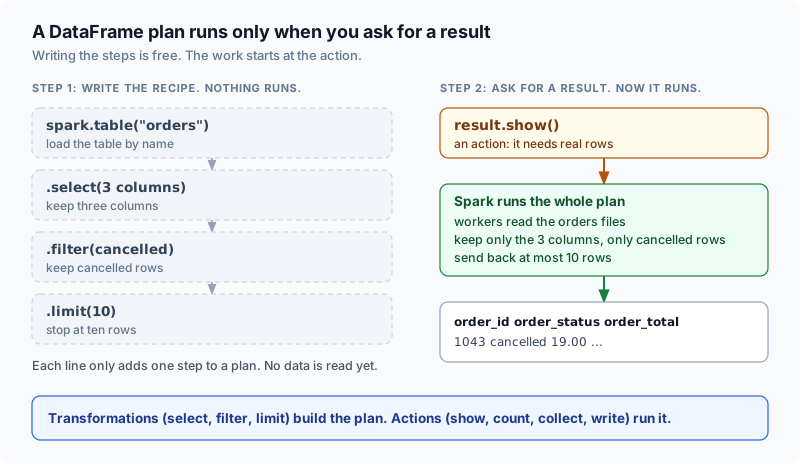
Transformations build a plan. Actions run it.
A transformation is a step that makes a new DataFrame, such as select, filter or limit. An action is a request for a real result. show, count, collect and write are actions.
When you call an action, Spark looks at the whole plan, finds a cheaper way to run it, and sends the work to the workers. Because it saw every step first, it can skip work you did not need.
How the code works
How do you load a table?
pd.read_csv('file.csv') becomes spark.read.csv(path). pd.read_parquet('file.parquet') becomes spark.read.parquet(path). df.head(10) becomes df.show(10). df.dtypes becomes df.printSchema(). The ideas are the same. The words differ.
spark.table("orders") loads a table by its name. A catalog, which is a list of table names and where their files live, tells Spark where to look. Most company platforms work this way.
To read files straight from storage, you use spark.read.parquet or spark.read.csv with a path. The previous lesson covers those.
table() and read both give you a plan. Neither one reads the data yet.
How does printSchema show the column types?
printSchema prints the columns as a small tree. Each line is a column name, its type and whether it may be empty.
- orders Schema TreeA schema tree like the one printSchema() prints
- ├── order_id: string (nullable = true)
- ├── order_status: string (nullable = true)
- ├── order_total: double (nullable = true)
- └── created_at: timestamp (nullable = true)
Look at order_total. It is double, which is a decimal number, so sum and avg will work. If it said string, the totals would be text and the maths would fail or give nulls.
When a type is wrong, fix it early with cast, before you build more steps on top.
Worked examples
How do you inspect a loaded table in Python?
Run the example below in this tab. Read the input, follow the code, then check the output matches what you expect.
orders = spark.table("orders")

orders.printSchema()
orders.show(10, truncate=False)
PySpark-to-Pandas translation for basic DataFrame operations.
| Need | PySpark expression | Pandas equivalent |
|---|---|---|
| Load table | spark.table('orders') | pd.read_parquet('orders.parquet') |
| Preview rows | df.show(10) | df.head(10) |
| Check schema | df.printSchema() | df.dtypes |
| Select columns | df.select('a', 'b') | df[['a', 'b']] |
| Filter rows | df.filter(condition) | df.loc[mask] |
| Row count | df.count() | len(df) |
Notice how printSchema renders the column definitions while show prints the formatted preview grid.
How do select and filter narrow your DataFrame?
select keeps only the columns you name. Real tables often have dozens of columns, and most of them are not needed for one question.
With a Parquet table, Spark then reads only those columns from storage. Less data to read means a faster job.
filter keeps only the rows where a condition is true. where does the same thing under another name.
Both return a new DataFrame. The table you started from stays as it was.
from pyspark.sql import functions as F

result = (
    spark.table("orders")
    .select("order_id", "order_status", "order_total")
    .filter(F.col("order_status") == "cancelled")
    .limit(10)
)
result.show()Place filters and column selections as early as possible in the chain. Spark can push these operations toward the data source, reducing I/O and shuffle volume. This is the equivalent of adding a WHERE clause close to the FROM in SQL.
A null is an empty value. A filter such as order_total > 100 is neither true nor false for a row where order_total is null, so that row is dropped.
If you need to keep or find the empty rows, say so with isNull or isNotNull.
Why are strict data types necessary in production?
Parquet files remember the type of every column, so Spark gets the schema for free.
CSV and JSON files do not. If you let Spark guess, it reads the file once just to look, and the guess can change from run to run. For text files, write the schema yourself.
Named columns with types let Spark check your code before it runs.
The four types you will see most often
| Type | What it holds | Example |
|---|---|---|
| string | Text | ORD-0001, paid |
| long | Whole numbers | 3, 1042 |
| double | Decimal numbers | 612.07 |
| timestamp | A date and a time | 2026-08-02 16:33:28 |
A type is a promise about every value in the column. Because of that promise, Spark can store the data compactly and warn you when a step does not make sense, for example adding up text.
How do you chain DataFrame operations cleanly?
Real Spark code chains the steps inside brackets, one step per line. It reads like a recipe, from top to bottom.
Give a DataFrame its own variable only when that step has a meaning of its own, such as valid_orders below.
from pyspark.sql import functions as F

valid_orders = (
    spark.table("orders")
    .select("order_id", "order_status", "order_total")
    .filter(F.col("order_id").isNotNull())
    .filter("order_total >= 0")
)

valid_orders.show(5)- Load through the catalog or a file reader.
- Check the schema and a small sample.
- Select only the columns you need.
- Filter invalid or irrelevant rows.
- Trigger an action to inspect or materialize.
A 10-row display looks cheap, but upstream joins, sorts, or aggregations still execute. Use show for inspection, not as evidence that the full plan is fast.
Common beginner questions
What common traps catch beginners when using DataFrames?
The biggest trap for people who know pandas is collect. In pandas all rows are already in your process, so reading them all is fine.
In Spark, df.collect() pulls every row from every worker onto one machine, the driver. On a big table the driver runs out of memory and the job fails with an OutOfMemoryError.
To look at a few rows, use show, take or limit. To save a large result, use df.write.
A second surprise: show(10) prints only ten rows, but Spark still runs every step before it. A cheap-looking show can sit on top of an expensive join.
Contrasting single-machine memory habits with distributed execution
| Operation | Single-Node (pandas) | Distributed (Spark) |
|---|---|---|
| df.collect() | N/A (already in local RAM) | Dangerous: pulls all cluster rows to driver RAM |
| df.head(N) | Instant slice of local array | Triggers DAG execution plan for N rows |
| df.filter() | Computes boolean mask in RAM | Appends filter operator to lazy Catalyst plan |
Two questions come up again and again. First: what if the table is bigger than memory? pandas fails. Spark can move some data to local disk while it works, so many large jobs still finish. One huge partition or a collect can still run out of memory.
Second: is filter different from where? No. where is another name for filter.
What is the difference between select and filter?
select chooses columns vertically, while filter chooses rows horizontally. Use both to prune unnecessary data as early as possible.
Is show() the same as pandas head()?
Conceptually yes: both display a small sample. But show() is an action that triggers execution of the entire plan. In pandas, head() is instant because the data is already in memory.
What is column pruning?
When you select specific columns, Spark reads only those columns from Parquet files, skipping everything else. This dramatically reduces I/O for wide tables.
What happens if a DataFrame exceeds executor RAM?
Unlike pandas, Spark can spill shuffle and aggregation data to local executor disk, so many jobs larger than memory still complete. It is not a guarantee, because a single huge partition can still run out of memory.
What comes next
What comes after mastering basic DataFrame operations?
You can now describe a Spark DataFrame in one sentence: a table split across workers, where every step is only a plan until an action runs it.
Load table from catalog or path into lazy DataFrame plan.
- Storage / Catalog
- SparkSession
- DataFrame Plan
Inspect column names, data types, and nullability with printSchema.
- printSchema()
- Column Types
- Nullability Check
Project columns early to trigger Parquet column pruning.
- select(cols)
- Column Pruning
- Reduced I/O
Filter rows early and inspect bounded sample with show.
- filter(condition)
- limit(10)
- show() Action
Next you will learn Column expressions: how to make a new column, branch with when and otherwise, and use Spark's built-in functions so your own Python never slows the job down.
Project columns early, filter rows close to the source, and let lazy evaluation optimize your pipeline end to end.
Practice
Load orders with spark.table('orders'). Select order_id, order_status, and order_total. Filter to cancelled orders. Limit to 10 rows. Assign to result and call show().
You are rehearsing the standard first pass: load, inspect, project, filter, sample.
Going further: why filter conditions need & and brackets
A filter condition on a DataFrame is a Column object, not a True or False value. That means the Python words and, or and not cannot combine conditions, and the symbols & | ~ need brackets around each part. Getting this wrong is one of the most common first errors.
The program below tries the Python word and, and then the right form. Predict which one raises an error.
from pyspark.sql import SparkSession, functions as F

spark = SparkSession.builder.master("local[2]").getOrCreate()

orders = spark.createDataFrame(
    [("A1", "paid", 900), ("A2", "paid", 120), ("A3", "cancelled", 900), ("A4", "refunded", 50)],
    ["order_id", "status", "total"],
)

try:
    orders.filter((F.col("status") == "paid") and (F.col("total") > 500))
except ValueError as exc:
    print(type(exc).__name__, "-", str(exc).split(":")[0])

orders.filter((F.col("status") == "paid") & (F.col("total") > 500)).show()PySparkValueError - [CANNOT_CONVERT_COLUMN_INTO_BOOL] Cannot convert column into bool +--------+------+-----+ |order_id|status|total| +--------+------+-----+ | A1| paid| 900| +--------+------+-----+
Python's and needs a plain True or False from each side, and a Column has none yet, because nothing has run. The symbol & builds a new combined Column instead, and Spark works it out later for every row.
The brackets matter because & binds tighter than == and >.
| You want | Write | Not |
|---|---|---|
| Both conditions | (a) & (b) | a and b |
| Either condition | (a) | (b) | a or b |
| Not this condition | ~(a) | not a |
| Compare first, then combine | (F.col("x") == 1) & (F.col("y") > 2) | F.col("x") == 1 & F.col("y") > 2 |
Try a new scenario
You need orders that are either cancelled or refunded, and also have a total above 100. Write the filter, and say what goes wrong if you forget the brackets around the first two conditions.
Work it out, then open the answer
Write ((F.col("status") == "cancelled") | (F.col("status") == "refunded")) & (F.col("total") > 100). Without the inner brackets, Python applies | before ==, so it tries to combine the text "cancelled" with a Column using |, and the result is an error or a wrong condition. Each comparison needs its own brackets.
Is there a shorter way for several values?
Yes. F.col("status").isin("cancelled", "refunded") tests one column against a list of values, so you only need & for the total check. It is shorter and harder to get wrong.
Close the lesson and explain it
Without scrolling up, explain why a Spark filter uses & instead of and, and why every comparison inside it needs its own brackets.
Practicals · load into the editor
After you read the theory, run these in the pane on the right. They execute in this tab, no cluster.
Finished this lesson?
Mark it as read when you could explain it to someone else.
Practice this
Same ideas as interview drills. These challenges open in the studio with a dataset and tests already set up.
- Add Derived ColumnInterview-style drill: Add full_name by joining first_name and last_name with a space.Studiobeginnerpyspark12 min
- Explode Array ColumnInterview-style drill: Explode tags arrays into 1 row per tag.Studiobeginnerpyspark12 min
- Filter and Select ColumnsInterview-style drill: Keep purchase rows with amount > 100 and project user_id, amount.Studiobeginnerpyspark12 min