
Overview
CASE WHEN maps values into labels. It is the if/else of SQL, evaluated per row.
On this page8 sections
The table we keep using
The ShopKart status column holds several different words, but the finance team only wants 3 groups: complete, dropped and other. You could write one query per status. CASE labels every row in a single query instead.
What is CASE?
CASE is SQL's if/else. For each row it tests conditions in order and returns the result of the first one that is true. Use it to map codes to labels, bucket numbers and flag rows without leaving the query.
paid becomes complete. cancelled becomes dropped. Anything else becomes other.
What are the real statuses?
We use the real orders table, 180 rows. Predict: how many distinct statuses does it hold?
SELECT order_status, COUNT(*) AS orders
FROM orders
GROUP BY order_status
ORDER BY orders DESC;order_status orders paid 93 cancelled 30 pending 29 refunded 28
Four statuses: paid, cancelled, pending and refunded.
Words you will see in this lesson
Six words. The rest of the lesson uses only these.
| Word | What it means |
|---|---|
| CASE | SQL's if and else |
| WHEN | One condition inside a CASE |
| THEN | The value to use when the condition is true |
| ELSE | The value to use when no condition is true |
| Mapping | Turning many raw values into a few clean ones |
| Bucket | A group that many raw values are put into, such as paid or failed |
What we need from it
Why not filter each status separately?
A dashboard needs 3 buckets: complete, dropped and other. Without CASE, analysts run one query per status and paste numbers into a slide. One missed status and the slide is wrong.
CASE puts the mapping in one place. A reviewer reads ELSE 'other' and knows that a new status will show up there instead of disappearing.
Write the mapping once, and let ELSE catch what you did not expect.
Trace it step by step
How does CASE decide?
- Test the WHEN conditions from top to bottom.
- Return the THEN value of the first condition that is true.
- If none is true, return ELSE. With no ELSE, the result is NULL.
Always write ELSE. Unmatched rows should be visible.
| Pattern | Example | Use when |
|---|---|---|
| Map labels | WHEN status = 'paid' THEN 'complete' | Governed names for dashboards |
| Bucket numbers | WHEN total >= 100 THEN 'high' | Size bands, risk scores |
| Flag rows | WHEN hours_late > 24 THEN 1 ELSE 0 | Late vs on time |
What does the mapping do to real rows?
Predict: what group does a refunded order fall into?
SELECT
  order_id,
  order_status,
  CASE
    WHEN order_status = 'paid'      THEN 'complete'
    WHEN order_status = 'cancelled' THEN 'dropped'
    ELSE 'other'
  END AS status_group
FROM orders
ORDER BY order_id
LIMIT 6;order_id order_status status_group ORD-0001 paid complete ORD-0002 refunded other ORD-0003 paid complete ORD-0004 cancelled dropped ORD-0005 paid complete ORD-0006 paid complete
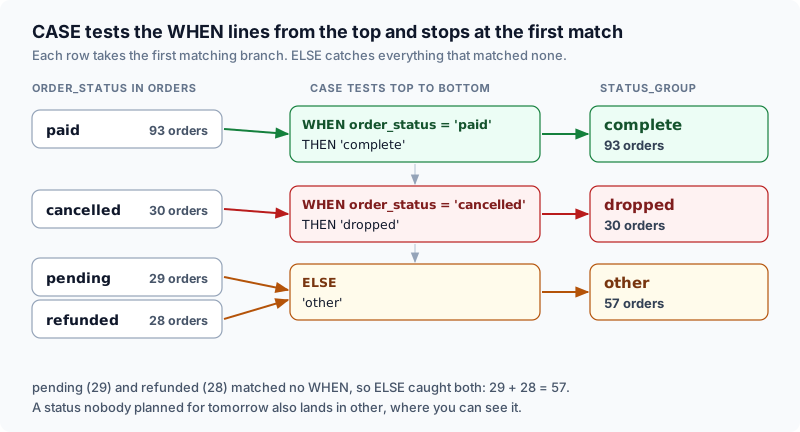
Pending and refunded both fall to other. If a new status appears tomorrow, it lands there as well, where you can see it.
Same table, next cut
How many orders are in each group?
CASE can sit inside GROUP BY. This is how dashboards get a label column from raw codes.
SELECT
  CASE
    WHEN order_status = 'paid'      THEN 'complete'
    WHEN order_status = 'cancelled' THEN 'dropped'
    ELSE 'other'
  END AS status_group,
  COUNT(*) AS orders
FROM orders
GROUP BY 1
ORDER BY orders DESC;status_group orders complete 93 other 57 dropped 30
93 complete, 30 dropped, and 57 other, which is pending 29 plus refunded 28. The 3 groups add back to 180, so no row was lost.
How do you bucket a number?
Use ranges, with the largest threshold first. WHEN order_total >= 1000 must come before >= 500, or every large order would match the wider branch first and stay there.
SELECT order_id, order_total,
  CASE
    WHEN order_total >= 1000 THEN 'high'
    WHEN order_total >= 500  THEN 'mid'
    ELSE 'low'
  END AS size_band
FROM orders
ORDER BY order_id
LIMIT 6;order_id order_total size_band ORD-0001 612.07 mid ORD-0002 446.7 low ORD-0003 1104.32 high ORD-0004 339.9 low ORD-0005 261.73 low ORD-0006 431.34 low
Now swap the first two branches and see the damage.
SELECT
  CASE
    WHEN order_total >= 500  THEN 'mid'
    WHEN order_total >= 1000 THEN 'high'
    ELSE 'low'
  END AS size_band,
  COUNT(*) AS orders
FROM orders
GROUP BY 1
ORDER BY 1;size_band orders low 107 mid 73
There is no 'high' band at all, because every total of 1,000 or more was caught by the >= 500 branch first. Put the strictest condition first.
Put the strictest condition first. Wide conditions at the top swallow the rows you meant for later branches.
What goes wrong when you test for NULL with =?
A comparison with NULL is never true. WHEN x = NULL never fires, so the row falls to ELSE.
SELECT
  COUNT(*) FILTER (WHERE reading IS NULL) AS missing_readings,
  SUM(CASE WHEN reading = NULL THEN 1 ELSE 0 END)    AS counted_with_equals,
  SUM(CASE WHEN reading IS NULL THEN 1 ELSE 0 END)   AS counted_with_is_null
FROM telemetry;missing_readings counted_with_equals counted_with_is_null 25 0 25
25 readings are missing, but the equals version counted none of them. Use IS NULL.
What are the two forms of CASE?
Searched CASE has a full condition in each WHEN, as above. Simple CASE compares one expression with listed values and is shorter for exact matches.
SELECT order_status,
  CASE order_status
    WHEN 'paid' THEN 1
    WHEN 'refunded' THEN 1
    ELSE 0
  END AS counts_toward_revenue_review
FROM orders
GROUP BY order_status
ORDER BY order_status;order_status counts_toward_revenue_review cancelled 0 paid 1 pending 0 refunded 1
How do you count several things in one pass?
Put CASE inside an aggregate. SUM of a 1/0 flag counts rows that meet a condition, so one scan produces several totals side by side.
SELECT
  SUM(CASE WHEN order_status = 'paid'      THEN 1 ELSE 0 END) AS paid_orders,
  SUM(CASE WHEN order_status = 'cancelled' THEN 1 ELSE 0 END) AS cancelled_orders,
  ROUND(SUM(CASE WHEN order_status = 'paid' THEN order_total ELSE 0 END), 2) AS paid_revenue
FROM orders;paid_orders cancelled_orders paid_revenue 93 30 43606.63
Three totals from one pass over the table. The ELSE 0 matters: without it a CASE returns NULL for rows that do not match, and a SUM over no matching rows would come back as NULL instead of 0.
CASE is the SQL cousin of if/elif/else. In pandas you will see np.where or .map for the same job. In PySpark you will see F.when().otherwise().
How does the whole lesson replay on the status column?
orders holds 180 rows with four statuses: paid 93, cancelled 30, pending 29, refunded 28.
- 4 statuses
CASE tests paid first. Paid orders become complete, cancelled become dropped, anything else becomes other.
- WHEN paid
- WHEN cancelled
- ELSE
Grouping by the label gives 93, 30 and 57. They add to 180, so no row was lost.
- 93 + 30 + 57
Branch order matters. Put the strictest threshold first or the high band disappears.
- order of WHEN
NULL needs IS NULL. A test with = NULL never fires.
- IS NULL
CASE inside SUM makes several counts in one scan.
- conditional aggregation
Six things every data engineer must know about CASE:
- CASE returns the result of the first true WHEN, and nothing else is tested.
- Always write ELSE. Without it, unmatched rows become NULL.
- Order the branches from strictest to widest.
- Use IS NULL, never = NULL.
- CASE works in SELECT, GROUP BY and inside aggregates such as SUM.
- Check that the group counts add up to the table's row count.
Common beginner questions
Can CASE live in WHERE?
Yes, but a plain boolean is usually clearer. CASE is most useful in SELECT lists and in GROUP BY labels.
What if two WHEN clauses are true?
Only the first runs. That is why order is part of the policy.
Is CASE slow?
A CASE expression is evaluated row by row and is usually cheap next to joins and sorts. The bigger risk is a wrong label, not speed. If a query is slow, read its plan first.
What comes next
You can now map and bucket values. The next lesson is deduplication: keep 1 row per event when copies arrive. CASE often labels the winner after you rank the copies.
Practice
Run Sample to bucket order totals. Then complete Exercise: return order_id, order_status, and status_group mapping paid to complete, cancelled to dropped, and everything else to other. Limit 15.
Going further: CASE decides the order too
The lesson used CASE to label rows. It can also decide how rows are sorted. A plain ORDER BY on a text column sorts alphabetically, which is rarely the order a person means. A support team wants urgent tickets first, and the alphabet says otherwise.
Here is a table of 5 tickets. Predict what ORDER BY priority gives, then what the CASE version gives.
The tickets table.
| ticket_id | priority | opened |
|---|---|---|
| T1 | low | 2026-09-01 |
| T2 | urgent | 2026-09-03 |
| T3 | medium | 2026-09-02 |
| T4 | high | 2026-09-02 |
| T5 | urgent | 2026-09-01 |
SELECT ticket_id, priority
FROM tickets
ORDER BY priorityticket_id priority T4 high T1 low T3 medium T2 urgent T5 urgent
Alphabetically urgent lands last. Give each word a rank with CASE and sort by that rank, then by the date opened as a tie-break, so the oldest urgent ticket comes first.
SELECT ticket_id, priority
FROM tickets
ORDER BY CASE priority
           WHEN 'urgent' THEN 1
           WHEN 'high'   THEN 2
           WHEN 'medium' THEN 3
           ELSE 4
         END,
openedticket_id priority T5 urgent T2 urgent T4 high T3 medium T1 low
T5 comes before T2 because both are urgent and T5 was opened first. The CASE value is used only for sorting, and it does not appear in the result unless you also add it to the SELECT list.
Try a new scenario
A new priority called critical is added to the data, and nobody updates the query. Where does it sort, and how would you make the query fail loudly instead?
Work it out, then open the answer
It falls into the ELSE branch, so it sorts with the lowest priority, after low and medium tickets, which is the opposite of what critical means. To fail loudly, drop the ELSE or give it a rank that is easy to spot, then check for rows that return NULL or the ELSE rank before the report is published. A new category should never be silently treated as the least important.
Can I sort by the CASE result without repeating it?
Yes. Put the CASE in the SELECT list with an alias such as priority_rank, then write ORDER BY priority_rank. Most engines accept an alias in ORDER BY. This also lets you see the rank next to each row while you are checking the logic.
Close the lesson and explain it
Without scrolling up, explain why ORDER BY on a text column does not give a business order, and write the CASE expression that fixes it.
Practicals · load into the editor
After you read the theory, run these in the pane on the right. They execute in this tab, no cluster.
Finished this lesson?
Mark it as read when you could explain it to someone else.
Practice this
Same ideas as interview drills. These challenges open in the studio with a dataset and tests already set up.