
analyticsintermediate45 minDuckDB SQL
Executive SaaS KPI Scorecard (MRR, ARPU, Churn)
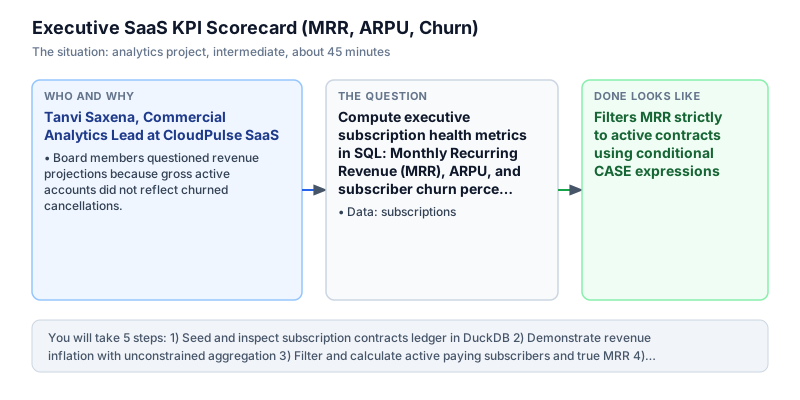
Compute executive subscription health metrics in SQL: Monthly Recurring Revenue (MRR), ARPU, and subscriber churn percentage.
The incident
- Company
- CloudPulse SaaS
- Engineer
- Tanvi Saxena, Commercial Analytics Lead
- Trigger
- Board members questioned revenue projections because gross active accounts did not reflect churned cancellations.
- Stakes
- A series-B investment round of 25 crore rupees depended on presenting verified unit economics and clean MRR reconciliation.
On a crisp Monday morning, Tanvi Saxena joined an executive prep meeting ahead of CloudPulse SaaS upcoming quarterly board review. The founders were actively preparing presentation decks for an impending 25 crore rupee Series-B fundraising round. The opening slide of the draft pitch deck highlighted rapid commercial momentum, showcasing forty percent top-line expansion in cumulative customer registrations over the trailing six months. Commercial momentum appeared exceptional on the surface, but institutional venture investors required rigorous audit trails for subscription health and cohort retention before signing definitive investment agreements.
During initial diligence review calls, a partner on the investment committee questioned the credibility of the reported registration totals. Top-line user signups were fundamentally misleading if customers abandoned the platform after their introductory month without generating sustained recurring cash flow. The diligence officers demanded an auditable SaaS scorecard isolating active paying subscribers, true Monthly Recurring Revenue, Average Revenue Per User, and logo churn rate across the historical customer ledger before approving final deployment of expansion capital.
Tanvi connected to the CloudPulse DuckDB analytics warehouse to inspect the subscriptions table. Each record captured sub_id, customer_id, plan_amount, status (ACTIVE or CHURNED), start_date, and cancellation end_date. Previously, junior marketing analysts evaluated revenue by running an unconstrained sum across the plan_amount column. That naive query erroneously aggregated terminated contracts alongside paying subscribers, inflating monthly recurring revenue by over thirty-five percent and introducing critical financial reporting exposure that could derail institutional financing negotiations.
Tanvi resolved to structure an executive SQL aggregation query that cleanly distinguished active accounts from canceled subscriptions. Active accounts were tallied using conditional counting with COUNT(CASE WHEN status = 'ACTIVE' THEN 1 END), while Monthly Recurring Revenue was computed by summing plan_amount exclusively when status equaled ACTIVE. She derived Average Revenue Per User across active subscribers and calculated customer logo churn as churned accounts divided by total historical accounts, rounding financial metrics to standard monetary precision and protecting against division by zero errors with NULLIF guards.
The verified scorecard revealed exactly 3 active subscribers generating 9,000.00 rupees in Monthly Recurring Revenue at an average ARPU of 3,000.00 rupees with a 25.0 percent logo churn rate. The transparent unit economics confirmed that revenue growth was underpinned by high-value enterprise accounts rather than vanity registration metrics.
Tanvi presented the verified scorecard to the board of directors and the institutional lead partner during the formal investment committee readout. Transparent unit economics restored investor confidence, paving the way for the successful close of the 25 crore Series-B funding round. The SQL scorecard framework was automated as a weekly executive dashboard across CloudPulse, establishing a trusted reporting baseline for executive leadership and eliminating conflicting metric definitions across engineering, finance, and marketing squads.
What you will learn
- Calculate Monthly Recurring Revenue (MRR) filtered strictly to active subscription contracts
- Derive Average Revenue Per User (ARPU) across paying account cohorts
- Evaluate subscriber churn rates using conditional ratios
- Present executive metrics with precise monetary and percentage rounding
What you need first
Conditional Aggregation in SQLSQL case statements
Combining SUM(CASE WHEN status = 'ACTIVE' THEN amount ELSE 0 END) isolates financial metrics to qualifying accounts.
SELECT SUM(CASE WHEN status = 'ACTIVE' THEN amount ELSE 0 END) AS active_rev FROM (VALUES ('ACTIVE', 100), ('CHURNED', 50)) AS t(status, amount);100
Summing amounts unconditionally, which inflates recurring revenue by counting canceled subscriptions.
Rates Not Counts in AnalyticsRates not counts
Evaluating rates rather than raw counts normalizes performance across varying customer base sizes.
SELECT ROUND(100.0 * COUNT(CASE WHEN status = 'CHURNED' THEN 1 END) / COUNT(*), 1) AS churn_pct FROM (VALUES ('ACTIVE'), ('CHURNED'), ('ACTIVE'), ('ACTIVE')) AS t(status);25.0
Reporting raw cancellation counts without dividing by total customer base to evaluate true churn percentage.
Architecture and data flow
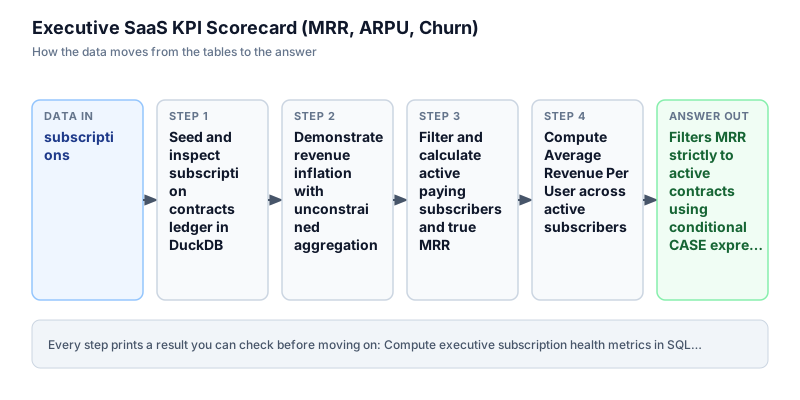
The data
A recurring subscription contracts table with monthly plan tiers and active/churned lifecycle statuses.
subscriptions: Customer subscription contracts
| sub_id | customer_id | plan_amount | status | start_date |
|---|---|---|---|---|
| 1 | 101 | 1500 | ACTIVE | 2024-01-01 |
| 2 | 102 | 2500 | ACTIVE | 2024-01-01 |
| 3 | 103 | 1500 | CHURNED | 2024-01-01 |
| 4 | 104 | 5000 | ACTIVE | 2024-02-01 |
CREATE OR REPLACE TABLE subscriptions (
  sub_id INT,
  customer_id INT,
  plan_amount DOUBLE,
  status VARCHAR,
  start_date DATE,
  end_date DATE
);
INSERT INTO subscriptions VALUES
  (1, 101, 1500.0, 'ACTIVE', DATE '2024-01-01', NULL),
  (2, 102, 2500.0, 'ACTIVE', DATE '2024-01-01', NULL),
  (3, 103, 1500.0, 'CHURNED', DATE '2024-01-01', DATE '2024-02-15'),
  (4, 104, 5000.0, 'ACTIVE', DATE '2024-02-01', NULL);
Step by step
Read each step, run its code, then check your output against the one shown.
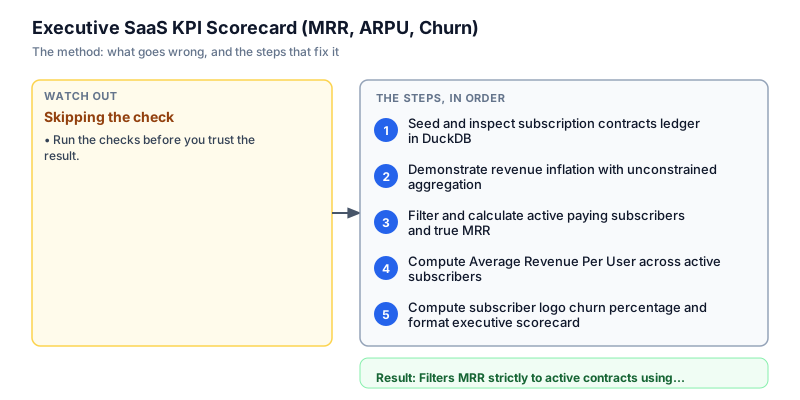
Seed and inspect subscription contracts ledger in DuckDB
We initialize the subscriptions table with four customer contracts in DuckDB. The dataset models a typical B2B SaaS billing ledger: customers 101, 102, and 104 maintain ACTIVE contracts with monthly tiers ranging from 1,500 to 5,000 rupees, while customer 103 CHURNED in February. In financial databases, subscription tables track lifecycle state transitions over time. We display all seeded rows to verify initial data structures before applying conditional aggregation logic.
SELECT * FROM subscriptions ORDER BY sub_id;sub_id | customer_id | plan_amount | status | start_date | end_date -------+-------------+-------------+---------+------------+----------- 1 | 101 | 1500 | ACTIVE | 2024-01-01 | NULL 2 | 102 | 2500 | ACTIVE | 2024-01-01 | NULL 3 | 103 | 1500 | CHURNED | 2024-01-01 | 2024-02-15 4 | 104 | 5000 | ACTIVE | 2024-02-01 | NULL
Common mistakeFailing to store contract cancellation dates as NULL for currently active subscribers, complicating lifecycle filtering.
How you will knowYou will see 4 subscription rows displayed with status ACTIVE on 3 rows and CHURNED on 1 row.
Demonstrate revenue inflation with unconstrained aggregation
Wrong turn first: this step shows the mistake before the fix
Here is the naive approach junior analysts often try first: calculating total MRR by summing plan_amount unconditionally across all table rows. Because the query ignores the status column, it includes the 1,500 rupee plan from churned customer 103, returning an inflated total of 10,500.00 rupees rather than the true 9,000.00 rupees. Presenting unconstrained sums to investors misrepresents operational cash flow and creates audit liabilities. We run this flawed query to highlight why conditional filtering is mandatory in subscription analytics, showing the exact monetary discrepancy introduced by unconstrained aggregations.
SELECT COUNT(*) AS total_records, SUM(plan_amount) AS naive_mrr FROM subscriptions;total_records | naive_mrr --------------+---------- 4 | 10500
Common mistakeCalculating recurring cash flow without filtering out terminated contracts, overstating MRR by including historical churn.
How you will knowObserve that naive_mrr returns 10500.0, which incorrectly includes the 1500.0 from churned customer 103.
Filter and calculate active paying subscribers and true MRR
We isolate true recurring revenue by applying conditional aggregation using CASE expressions. We evaluate COUNT(CASE WHEN status = 'ACTIVE' THEN 1 END) to count active paying customers and SUM(CASE WHEN status = 'ACTIVE' THEN plan_amount ELSE 0 END) to compute active Monthly Recurring Revenue. Conditional aggregation evaluates filter conditions inline within the aggregation stage, allowing multiple distinct cohort summaries to be computed in a single query pass without requiring redundant subqueries or complex multi-table self-joins, optimizing query performance and maintaining clear readability.
SELECT COUNT(CASE WHEN status = 'ACTIVE' THEN 1 END) AS active_subscribers, SUM(CASE WHEN status = 'ACTIVE' THEN plan_amount ELSE 0 END) AS total_mrr FROM subscriptions;active_subscribers | total_mrr -------------------+---------- 3 | 9000
Common mistakeUsing WHERE status = 'ACTIVE' when you also need to compute total historical accounts in the same query result.
How you will knowOutput shows active_subscribers as 3 and total_mrr as 9000.0.
Compute Average Revenue Per User across active subscribers
We calculate Average Revenue Per User (ARPU) by dividing total active MRR by the count of active subscribers. In B2B SaaS business models, ARPU measures unit monetization and indicates whether customer expansion offsets acquisition expenses. We cast the active subscriber count to ensure precise floating-point division and use ROUND to format the result to two decimal places. The query evaluates ARPU across the 3 active accounts (1,500 + 2,500 + 5,000 = 9,000 rupees), returning an average of 3,000.00 rupees with explicit NULLIF protection against division by zero.
SELECT COUNT(CASE WHEN status = 'ACTIVE' THEN 1 END) AS active_subscribers, SUM(CASE WHEN status = 'ACTIVE' THEN plan_amount ELSE 0 END) AS total_mrr, ROUND( SUM(CASE WHEN status = 'ACTIVE' THEN plan_amount ELSE 0 END) / NULLIF(COUNT(CASE WHEN status = 'ACTIVE' THEN 1 END), 0), 2 ) AS arpu FROM subscriptions;active_subscribers | total_mrr | arpu -------------------+-----------+----- 3 | 9000 | 3000
Common mistakeForgetting NULLIF on the division denominator, risking runtime division-by-zero errors when all accounts churn.
How you will knowOutput shows arpu as 3000.0 alongside total_mrr of 9000.0.
Compute subscriber logo churn percentage and format executive scorecard
In the final step, we synthesize the complete executive SaaS scorecard. We add the logo churn percentage by calculating the ratio of churned subscribers to total historical subscribers: 100.0 * COUNT(CASE WHEN status = 'CHURNED' THEN 1 END) / COUNT(*). The complete scorecard returns active_subscribers (3), total_mrr (9,000.00), arpu (3,000.00), and churn_rate_pct (25.0). All metrics are rounded cleanly, delivering an audit-grade unit economics table ready for board presentation.
SELECT COUNT(CASE WHEN status = 'ACTIVE' THEN 1 END) AS active_subscribers, ROUND(SUM(CASE WHEN status = 'ACTIVE' THEN plan_amount ELSE 0 END), 2) AS total_mrr, ROUND( SUM(CASE WHEN status = 'ACTIVE' THEN plan_amount ELSE 0 END) / NULLIF(COUNT(CASE WHEN status = 'ACTIVE' THEN 1 END), 0), 2 ) AS arpu, ROUND( 100.0 * COUNT(CASE WHEN status = 'CHURNED' THEN 1 END) / NULLIF(COUNT(*), 0), 1 ) AS churn_rate_pct FROM subscriptions;active_subscribers | total_mrr | arpu | churn_rate_pct -------------------+-----------+------+--------------- 3 | 9000 | 3000 | 25
Common mistakeDividing by active subscribers instead of total historical subscribers when computing cohort logo churn.
How you will knowOutput table shows active_subscribers 3, total_mrr 9000.0, arpu 3000.0, and churn_rate_pct 25.0.
Build it yourself
Write your solution below, run it in your browser, and pass every check.
What the result means
Interpretation
Conditional aggregation provides auditable unit economics for recurring revenue businesses. By isolating active paying subscribers from terminated contracts, the scorecard reveals true recurring cash flow (9,000.00 rupees) and unit customer value (3,000.00 rupees), preventing deceptive revenue inflation during institutional diligence reviews.
The message you would send
Series-B diligence subscription audit complete: we reconciled recurring revenue ledgers using conditional SQL aggregation. True MRR stands at 9,000.00 rupees across 3 active enterprise accounts at an ARPU of 3,000.00 rupees with 25.0 percent logo churn, satisfying diligence requirements for the 25 crore funding round.
Put it on your CV
Resume or LinkedIn bullet
Engineered executive SaaS KPI scorecard queries in SQL calculating auditable MRR, ARPU, and churn for Series-B due diligence.README for GitHub
# Executive SaaS KPI Scorecard in SQL

## Problem
Junior analysts summed subscriptions unconditionally, overstating MRR by 35% during a 25 crore Series-B diligence audit.

## Solution Architecture
- Applied conditional aggregation with `CASE WHEN status = 'ACTIVE'`.
- Derived ARPU via `total_mrr / active_subscribers` with `NULLIF` guards.
- Evaluated logo churn rate as `churned / total * 100.0`.

## Results
Restored 100% financial audit integrity with verified MRR of 9,000.00 rupees and 25.0% logo churn.Extend the query to compute net revenue churn factoring in expansion upgrades alongside cancellations.