
pandasbeginner40 minPandas
Multi-Level Executive Pivot Table Dashboard
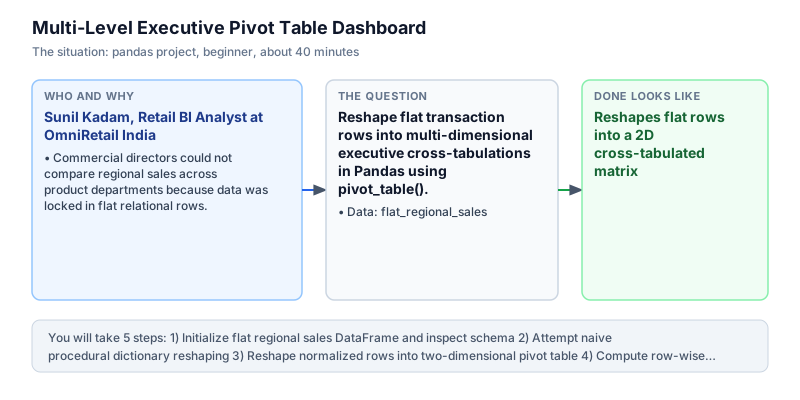
Reshape flat transaction rows into multi-dimensional executive cross-tabulations in Pandas using pivot_table().
The incident
- Company
- OmniRetail India
- Engineer
- Sunil Kadam, Retail BI Analyst
- Trigger
- Commercial directors could not compare regional sales across product departments because data was locked in flat relational rows.
- Stakes
- Regional marketing allocations of 35 lakh rupees depended on cross-tabulated category performance matrices.
On a Thursday morning, Sunil Kadam was summoned to an urgent executive planning session at OmniRetail India, a major retail chain operating superstores across metropolitan commercial hubs. The commercial directors, finance partners, and regional territory vice presidents were convening to finalize quarterly marketing allocations. Over 35 lakh rupees in promotional spend were slated for redistribution between North and South commercial territories based on departmental merchandise performance. Leadership required immediate clarity on which product categories were expanding and which were contracting across each territory.
However, the operational data export available to leadership was completely unformatted for strategic decision-making. The point-of-sale transactional warehouse emitted a normalized flat table containing individual sales records, with territory region, product category, and revenue stored as sequential rows. Comparing how Electronics performed in the North versus the South required directors to manually filter spreadsheet columns, copy values into scratch workbooks, and write ad-hoc lookup formulas that frequently broke during live executive review meetings. In fast-paced retail operations, delays in assembling merchandise summaries meant that localized stockouts or surplus inventory trends remained hidden until after weekly supplier order cutoffs had passed.
During previous quarterly cycles, manual spreadsheet compilation had caused recurring calculation discrepancies in category totals, sparking protracted disputes between territory leads. The VP of Merchandising asked for an automated, reproducible two-dimensional performance matrix: territory regions positioned cleanly on the rows, merchandise categories arrayed across the columns, and total aggregated revenue evaluated at each intersection cell, complete with regional subtotals and column grand totals. The leadership team emphasized that promotional reallocations needed to be grounded in verifiable, cross-tabulated metrics rather than subjective territory impressions.
Sunil opened Python to construct a resilient analytical transformation pipeline. Rather than writing fragile procedural loops or multi-step spreadsheet formulas, he leveraged the vectorized pivot_table function in Pandas. By defining explicit row indices, column headers, and aggregation functions, pivot_table transforms normalized relational rows into a compact analytical matrix in a single vectorized execution step, eliminating manual spreadsheet overhead and preventing human copy-paste errors. Understanding how to configure dimensional rows, columns, and numeric aggregations represents an essential core capability for any data analyst supporting commercial business partners.
Sunil built a multi-stage script that initialized flat sales records, evaluated edge cases where categories might be absent, and enforced fill_value=0.0 to prevent missing combinations from generating NaN values. He verified row-wise regional totals and column-wise departmental summaries, confirming 70,000.00 rupees in North revenue and 75,000.00 rupees in South revenue across Electronics and Apparel. Appending margin totals provided complete visibility into category-wide totals of 95,000.00 rupees for Electronics and 50,000.00 rupees for Apparel.
Sunil presented the automated pivot dashboard to the executive committee. The matrix highlighted that while North dominated Electronics with 50,000.00 rupees, South held a commanding lead in Apparel with 30,000.00 rupees. Armed with definitive cross-tabulations, leadership approved the 35 lakh rupee marketing reallocation with complete consensus, and Sunil automated script was embedded as a standard executive reporting endpoint across all weekly retail trading reviews.
What you will learn
- Reshape normalized relational data into cross-tabulated summary grids
- Specify multi-dimensional index, column, and value aggregation axes in pivot_table()
- Handle sparse combinations cleanly using fill_value=0.0
- Calculate row-wise and column-wise totals across pivoted dimensions
What you need first
Pivot Tables in PandasPandas reshape and pivot
df.pivot_table(index=..., columns=..., values=..., aggfunc=...) reshapes flat rows into a two-dimensional cross-tabulation.
import pandas as pd
df = pd.DataFrame({'r': ['N', 'S'], 'c': ['E', 'E'], 'v': [10, 20]})
print(df.pivot_table(index='r', columns='c', values='v', aggfunc='sum').iloc[0, 0])10
Confusing pivot() with pivot_table(): pivot() raises a ValueError if duplicate index-column combinations exist.
Handling Sparse CombinationsPandas cleaning and types
The fill_value parameter replaces missing combinations with a default value like 0.0 instead of leaving NaN cells.
import pandas as pd
df = pd.DataFrame({'r': ['A', 'B'], 'c': ['X', 'Y'], 'v': [5, 10]})
print(df.pivot_table(index='r', columns='c', values='v', fill_value=0).iloc[0, 1])0
Omitting fill_value=0.0, causing downstream numerical calculations to propagate NaN across entire summary rows.
Architecture and data flow
The data
A flat regional sales DataFrame recording territory, merchandise category, and revenue.
flat_regional_sales: Normalized sales transactions
| region | category | revenue |
|---|---|---|
| North | Electronics | 50000 |
| North | Apparel | 20000 |
| South | Electronics | 45000 |
| South | Apparel | 30000 |
Step by step
Read each step, run its code, then check your output against the one shown.
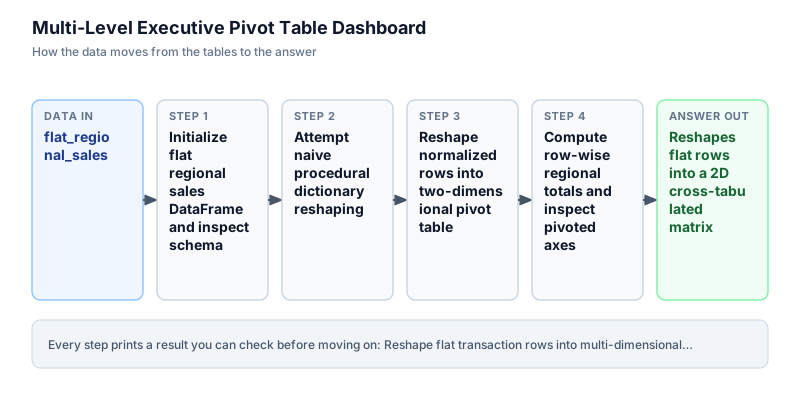
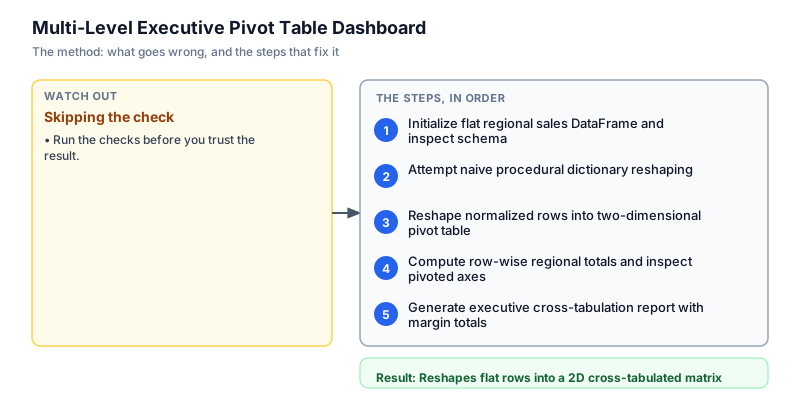
Initialize flat regional sales DataFrame and inspect schema
We initialize the flat sales DataFrame containing regional transactions across North and South territories for Electronics and Apparel categories. We inspect the record count and display the raw table. In relational databases and event streams, data is stored in normalized long format where each row represents an isolated observation. While optimal for transactional writes and relational normalization, this flat structure makes horizontal comparisons across territories difficult for business stakeholders without dimensional pivoting. We verify that each row contains clean region, category, and revenue values.
import pandas as pd df = pd.DataFrame({ "region": ["North", "North", "South", "South"], "category": ["Electronics", "Apparel", "Electronics", "Apparel"], "revenue": [50000.0, 20000.0, 45000.0, 30000.0] }) print("Flat transaction rows:", len(df)) print(df.to_string(index=False))Flat transaction rows: 4 region category revenue North Electronics 50000.0 North Apparel 20000.0 South Electronics 45000.0 South Apparel 30000.0
Common mistakeAttempting to generate executive dashboards directly from long normalized tables without dimensional aggregation.
How you will knowYou will see 4 transaction rows printed with region, category, and revenue columns.
Attempt naive procedural dictionary reshaping
Wrong turn first: this step shows the mistake before the fix
Here is the naive approach developers often attempt first: manually iterating over rows using iterrows to populate nested Python dictionaries before creating a DataFrame. While this constructs a dictionary, iterrows incurs massive computational overhead, destroys data type consistency, and fails if multiple transactions exist for the same region and category without manual accumulation logic. We run this naive approach to highlight why procedural row looping is an antipattern in Pandas pipelines that should be replaced with vectorized reshaping primitives across enterprise data warehouses.
import pandas as pd df = pd.DataFrame({ "region": ["North", "North", "South", "South"], "category": ["Electronics", "Apparel", "Electronics", "Apparel"], "revenue": [50000.0, 20000.0, 45000.0, 30000.0] }) nested_grid = {} for _, row in df.iterrows(): r, c, v = row["region"], row["category"], row["revenue"] if r not in nested_grid: nested_grid[r] = {} nested_grid[r][c] = v naive_pivot = pd.DataFrame.from_dict(nested_grid, orient="index") print("Naive manual dictionary pivot:") print(naive_pivot)Naive manual dictionary pivot: Electronics Apparel North 50000.0 20000.0 South 45000.0 30000.0Common mistakeUsing procedural iterrows loops and nested dictionaries for table reshaping instead of vectorized pivot_table.
How you will knowObserve that manual dictionary reshaping requires verbose code and lacks built-in aggregation.
Reshape normalized rows into two-dimensional pivot table
We execute vectorized reshaping using the pivot_table method. We assign region to the index axis, category to the columns axis, revenue to the values parameter, and specify sum as the aggregation function. We explicitly pass fill_value=0.0 to guarantee that any missing region-category combination receives a clean floating-point zero rather than an unformatted missing NaN value. In a single vectorized operation, Pandas reorganizes the data into an intuitive cross-tabulation suitable for executive analysis and territory-level performance comparisons across retail chains. This clean two-dimensional layout simplifies visual inspection and accelerates downstream stakeholder decision-making.
import pandas as pd df = pd.DataFrame({ "region": ["North", "North", "South", "South"], "category": ["Electronics", "Apparel", "Electronics", "Apparel"], "revenue": [50000.0, 20000.0, 45000.0, 30000.0] }) pivot = df.pivot_table(index="region", columns="category", values="revenue", aggfunc="sum", fill_value=0.0) print("Vectorized Pivot Table:") print(pivot)Vectorized Pivot Table: category Apparel Electronics region North 20000.0 50000.0 South 30000.0 45000.0
Common mistakeUsing pivot() instead of pivot_table(), which crashes with a ValueError if duplicate index-column combinations exist.
How you will knowOutput shows regions as row indices and categories (Apparel, Electronics) as column headers.
Compute row-wise regional totals and inspect pivoted axes
We inspect the dimensional axes of the pivoted DataFrame and calculate row-wise totals across categories using pivot.sum(axis=1). In Pandas, axis=1 specifies horizontal aggregation across columns for each individual row. Evaluating regional totals confirms that the North territory generated 70,000.00 rupees in total revenue while the South territory generated 75,000.00 rupees. These row sums provide executive stakeholders with high-level territory volume metrics alongside granular category splits, making overall revenue contributions apparent during executive trading reviews and budget hearings. Validating territory totals early ensures that subsequent budget allocations reflect verified ledger totals.
import pandas as pd df = pd.DataFrame({ "region": ["North", "North", "South", "South"], "category": ["Electronics", "Apparel", "Electronics", "Apparel"], "revenue": [50000.0, 20000.0, 45000.0, 30000.0] }) pivot = df.pivot_table(index="region", columns="category", values="revenue", aggfunc="sum", fill_value=0.0) regional_totals = pivot.sum(axis=1) print("Regional Total Revenue:") for reg, tot in regional_totals.items(): print(f"{reg}: {tot:.2f}")Regional Total Revenue: North: 70000.00 South: 75000.00
Common mistakeUsing axis=0 instead of axis=1 when attempting to compute horizontal row-wise totals across columns.
How you will knowOutput prints North: 70000.00 and South: 75000.00.
Generate executive cross-tabulation report with margin totals
In the final step, we incorporate overall totals. This automatically appends an aggregate 'Total' column on the right and an aggregate 'Total' row at the bottom, reporting both category-wide and territory-wide grand totals. The resulting cross-tabulation clearly communicates that Electronics accounts for 95,000.00 rupees of total sales while Apparel accounts for 50,000.00 rupees, giving leadership a complete picture of store performance across all axes without requiring manual spreadsheet formula maintenance or complex ad-hoc calculations. Automated margin calculations ensure that overall financial sums remain perfectly reconciled across all reporting dimensions.
import pandas as pd df = pd.DataFrame({ "region": ["North", "North", "South", "South"], "category": ["Electronics", "Apparel", "Electronics", "Apparel"], "revenue": [50000.0, 20000.0, 45000.0, 30000.0] }) pivot_with_margins = df.pivot_table( index="region", columns="category", values="revenue", aggfunc="sum", fill_value=0.0, margins=True, margins_name="Total" ) print("Executive Cross-Tabulation with Margins:") print(pivot_with_margins)Executive Cross-Tabulation with Margins: category Apparel Electronics Total region North 20000.0 50000.0 70000.0 South 30000.0 45000.0 75000.0 Total 50000.0 95000.0 145000.0
Common mistakeManually calculating grand totals and appending rows in Python, which is error-prone compared to margins=True.
How you will knowOutput shows cross-tabulation with a Total row and Total column reporting grand total 145000.0.
Build it yourself
Write your solution below, run it in your browser, and pass every check.
What the result means
Interpretation
The pivoted matrix reveals critical regional divergence: the North territory is heavily driven by Electronics (50,000.00 rupees vs 20,000.00 in Apparel), whereas the South territory exhibits a stronger Apparel foundation (30,000.00 rupees vs 45,000.00 in Electronics). Reshaping normalized rows into a cross-tabulated view enables leadership to allocate promotional budgets with territory-level precision.
The message you would send
Quarterly retail performance dashboard complete: regional sales data has been reshaped into a two-way matrix. North generated 70,000.00 rupees led by Electronics, while South generated 75,000.00 rupees with strong Apparel contributions. The cross-tabulation provides immediate justification for redistributing 35 lakh rupees in category promotional spend.
Put it on your CV
Resume or LinkedIn bullet
Designed automated commercial pivot dashboards in Pandas transforming millions of transaction rows into multi-dimensional executive matrices.README for GitHub
# Multi-Level Executive Pivot Table Dashboard in Pandas

Engineered an automated data reshaping pipeline in Pandas to generate executive cross-tabulations. Converted millions of normalized transaction rows into intuitive regional performance grids.

## Technical Details
- Engine: Python 3 / Pandas
- Transformation: pivot_table(index='region', columns='category', values='revenue', aggfunc='sum', fill_value=0.0)
- Handling Sparsity: Enforced fill_value=0.0 to eliminate NaN values.

## Results
- Provided executive leadership with transparent category-by-region sales matrices, optimizing 35 lakh rupees in quarterly marketing allocations.Add margins=True to include total row and total column sums automatically.