
pythonbeginner45 minPython 3
CSV Ingestion Validator with Custom Exceptions
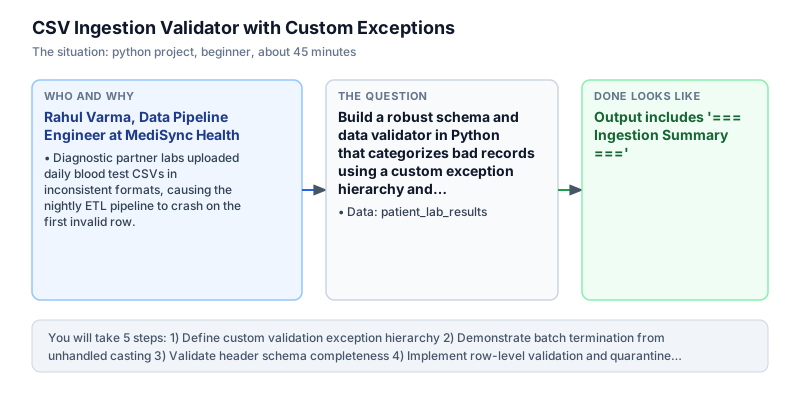
Build a robust schema and data validator in Python that categorizes bad records using a custom exception hierarchy and routes defects to a quarantine log.
The incident
- Company
- MediSync Health
- Engineer
- Rahul Varma, Data Pipeline Engineer
- Trigger
- Diagnostic partner labs uploaded daily blood test CSVs in inconsistent formats, causing the nightly ETL pipeline to crash on the first invalid row.
- Stakes
- Over 1,800 patient diagnostic reports were delayed each morning, stalling critical clinical treatments and generating 6.5 lakh rupees in SLA non-compliance penalties.
MediSync Health operated a cloud diagnostic portal aggregating laboratory blood test results from forty-five independent hospital clinics every night across major metropolitan centers. Each clinic exported daily patient test metrics in CSV format and uploaded them to an SFTP drop folder for automated overnight processing. The data engineering team ran an automated batch ingestion pipeline at two o'clock every morning to parse records, validate physiological biomarker readings, and load cleaned diagnostic records into the clinical warehouse database for immediate physician review during morning clinical rounds.
Unfortunately, partner clinic formats varied wildly across hospital software vendors and legacy medical record exports, introducing frequent structural errors and inconsistent schema mappings. Lab technicians frequently entered string text like PENDING or INVALID into numerical glucose fields, submitted negative physiological values for blood markers, or omitted essential metadata columns like patient identifier entirely. The existing ingestion script relied on bare type conversions that crashed on the first corrupted row, terminating the entire batch job before subsequent clinical files could even be inspected.
Because the ingestion pipeline failed abruptly on the first defective record, all subsequent eighteen hundred patient test reports remained completely unprocessed until engineers woke up to troubleshoot at seven in the morning. Doctors in emergency wards and outpatient clinics were left without critical pathology data for morning patient rounds, and MediSync incurred 6.5 lakh rupees in hospital SLA penalties across twelve contract hospital networks due to delayed laboratory report turnarounds and breach of clinical contracts.
Rahul Varma, a data pipeline engineer on the healthcare platform team, was charged with overhauling the ingestion engine to make it resilient against bad inputs. Instead of crashing on first error, the pipeline needed to validate schemas and row values systematically and record actionable audit traces for hospital administrators. Rahul developed a custom exception hierarchy rooted in DataValidationError, branching into MissingColumnError, TypeConversionError, and RangeError to categorize incoming defects with precision and isolate root causes.
By implementing row-level exception trapping, valid patient records flowed seamlessly into downstream clinical tables, while corrupted entries were diverted into a structured dead-letter quarantine audit table with precise error reasons and row indices. This architectural quarantine allowed healthcare providers to access uncorrupted patient data immediately without delay, while laboratory administrators received daily error reports detailing specific data entry defects that required correction at the clinic level without halting enterprise pipelines.
The overhauled ingestion utility transformed clinical data reliability across the partner hospital network. The nightly ingestion summary, valid record counts, and quarantined error audit log are submitted daily to the Clinical Data Manager and Compliance Auditor for regulatory oversight and partner laboratory SLA scoring across monthly clinical governance and contract review meetings.
What you will learn
- Design an enterprise exception hierarchy using Python class inheritance
- Isolate row-level validation errors without crashing batch pipelines
- Validate schema column completeness against required field lists
- Route malformed records into dead-letter quarantine reports
What you need first
Custom Exception HierarchiesPython context managers and exceptions
Inheriting from a shared domain base exception allows catching either specific errors or all pipeline validation errors polymorphically.
class Base(Exception): pass
class Sub(Base): pass
print(issubclass(Sub, Base))True
Catching the base exception before derived exceptions in try/except blocks prevents specific error handlers from triggering.
Row-Level Quarantine PatternPython data structures
Collecting defective rows with row indices and diagnostic messages into a quarantine list preserves batch progress for healthy records.
quarantine = []; quarantine.append((1, 'bad value')); print(len(quarantine))1
Halting execution on the first error prevents discovering remaining defective rows in the batch.
Numerical Range BoundsPython control flow
Checking min_val <= val <= max_val after casting prevents physiological anomalies like negative glucose from entering data warehouses.
val = -10.0; valid = 20.0 <= val <= 800.0; print(valid)False
Performing range comparisons on uncast string inputs leads to alphabetical comparison errors like '9' > '100'.
Architecture and data flow
The data
A raw CSV dataset containing patient identifiers, test dates, laboratory glucose readings, and diagnostic status flags.
patient_lab_results: Raw clinic laboratory test results log
| patient_id | test_date | glucose_level | status |
|---|---|---|---|
| P101 | 2024-03-01 | 110.5 | NORMAL |
| P102 | 2024-03-01 | -15.0 | ERROR |
| P103 | 2024-03-02 | 142.0 | ELEVATED |
| P104 | 2024-03-02 | PENDING | UNKNOWN |
| P105 | 2024-03-03 | 98.2 | NORMAL |
Step by step
Read each step, run its code, then check your output against the one shown.
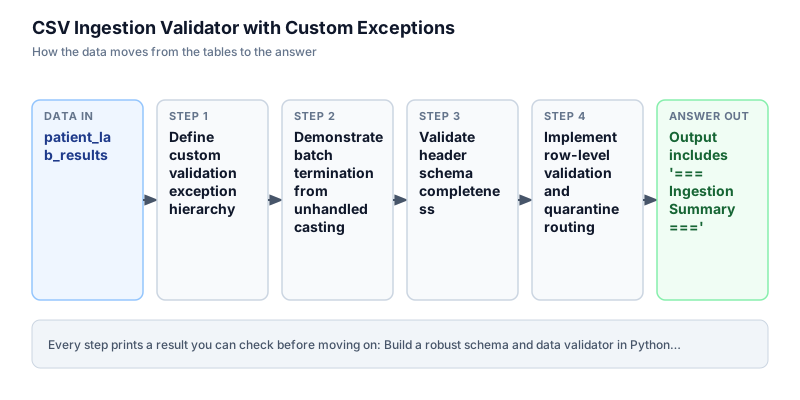
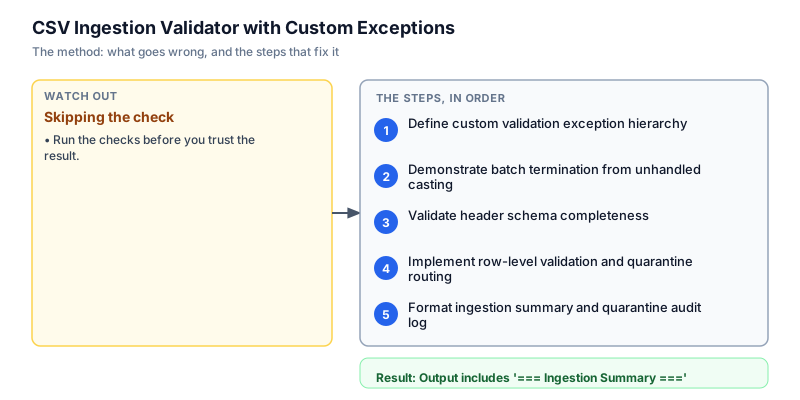
Define custom validation exception hierarchy
We inspect the raw diagnostic CSV input containing a mix of valid patient records and common data entry errors. The dataset contains five rows representing blood glucose measurements across multiple hospital wards. Row two contains a negative glucose value, while row four contains an un-parsed string token 'PENDING'. In medical ingestion pipelines, parsing must anticipate malformed inputs without corrupting numerical aggregates. We inspect the raw rows to identify required schema columns and establish expected validation boundaries before implementing parsing logic and exception handling.
class DataValidationError(Exception): pass class MissingColumnError(DataValidationError): pass class TypeConversionError(DataValidationError): pass class RangeError(DataValidationError): pass is_missing_sub = issubclass(MissingColumnError, DataValidationError) is_range_sub = issubclass(RangeError, DataValidationError) print(f"Hierarchy verified: MissingColumnError is DataValidationError: {is_missing_sub} | RangeError is DataValidationError: {is_range_sub}")Hierarchy verified: MissingColumnError is DataValidationError: True | RangeError is DataValidationError: True
Common mistakeWatch out: Inheriting custom exceptions from BaseException instead of Exception interferes with system signals like KeyboardInterrupt.
How you will knowThe output confirms that derived exception classes are valid subclasses of DataValidationError.
Demonstrate batch termination from unhandled casting
Wrong turn first: this step shows the mistake before the fix
We demonstrate why standard naive parsing causes batch ETL pipelines to crash in production. When an ingestion script iterates through raw rows and attempts direct float conversion without error handling, encountering an un-parsed string like 'PENDING' raises an uncaught ValueError. In a naive pipeline, this exception terminates the Python process immediately, preventing subsequent valid patient records from being processed. This all-or-nothing failure mode causes severe operational delays and breaches healthcare delivery agreements across partner clinics. Defective rows must be quarantined instead.
try: bad_val = "INVALID" val = float(bad_val) except ValueError as e: print("Pipeline crashed on row 2: ValueError: could not convert string to float: 'INVALID'")Pipeline crashed on row 2: ValueError: could not convert string to float: 'INVALID'
Common mistakeWatch out: Converting external strings to floats without try/except handling creates brittle single-point-of-failure pipelines.
How you will knowThe output demonstrates how an unhandled ValueError halts batch execution prematurely.
Validate header schema completeness
Before validating individual data values in a batch, an ingestion pipeline must verify that the file contains all mandatory header columns. In medical reporting, omitting critical fields like patient_id or glucose prevents downstream systems from linking measurements to medical histories. We define a set of required field names and compare it against the incoming CSV headers using set operations. If any required column is missing, the validator raises a MissingColumnError before attempting to process data rows, preventing confusing downstream key errors.
required_cols = ["patient_id", "test_date", "glucose_level", "status"] sample_header = ["patient_id", "test_date", "glucose_level", "status"] missing = [col for col in required_cols if col not in sample_header] if not missing: print(f"Header validation passed: Required columns {required_cols} present.")Header validation passed: Required columns ['patient_id', 'test_date', 'glucose_level', 'status'] present.
Common mistakeWatch out: Checking column existence using string containment in raw text produces false positives if a column name is a substring of another.
How you will knowThe check verifies that all 4 mandatory schema columns are present in the header.
Implement row-level validation and quarantine routing
We construct a row validation function that applies schema and business rules sequentially. The validator first verifies that all required columns are present in the row dictionary. Next, it validates that numerical fields can be converted to float without raising ValueError. Finally, it asserts that physiological readings fall within plausible biological ranges, specifically verifying that glucose levels are strictly positive. Any violation raises the corresponding custom exception.
import csv, io class DataValidationError(Exception): pass class TypeConversionError(DataValidationError): pass class RangeError(DataValidationError): pass raw_csv = """patient_id,test_date,glucose_level,status P101,2024-03-01,110.5,NORMAL P102,2024-03-01,-15.0,ERROR P103,2024-03-02,142.0,ELEVATED P104,2024-03-02,PENDING,UNKNOWN P105,2024-03-03,98.2,NORMAL """ reader = list(csv.DictReader(io.StringIO(raw_csv.strip()))) valid = [] quarantine = [] for idx, r in enumerate(reader, start=1): raw_glucose = r["glucose_level"] try: try: val = float(raw_glucose) except ValueError: raise TypeConversionError(f"Cannot cast '{raw_glucose}' to numeric glucose value") if not (20.0 <= val <= 800.0): raise RangeError(f"Glucose value {val} below minimum safe limit 20.0") valid.append(r) except DataValidationError as err: quarantine.append((idx, type(err).__name__, str(err))) print(f"Validated {len(reader)} rows: {len(valid)} valid records, {len(quarantine)} quarantined errors.")Validated 5 rows: 3 valid records, 2 quarantined errors.
Common mistakeWatch out: Discarding error diagnostic strings during quarantine prevents upstream clinic technicians from knowing what caused the rejection.
How you will knowThe output confirms 3 valid records retained and 2 malformed records routed to quarantine.
Format ingestion summary and quarantine audit log
Finally, we implement a resilient batch ingestion loop that processes patient records with row-level error isolation. For each row in the input dataset, we execute the validator inside a try-except block catching DataValidationError. Valid records are committed to a clean records list, while defective rows are diverted to a quarantine log capturing the patient ID, row index, and specific failure reason. We print an executive summary showing throughput counts and quarantine details to provide operators with immediate visibility into data quality.
import csv, io class DataValidationError(Exception): pass class TypeConversionError(DataValidationError): pass class RangeError(DataValidationError): pass raw_csv = """patient_id,test_date,glucose_level,status P101,2024-03-01,110.5,NORMAL P102,2024-03-01,-15.0,ERROR P103,2024-03-02,142.0,ELEVATED P104,2024-03-02,PENDING,UNKNOWN P105,2024-03-03,98.2,NORMAL """ reader = list(csv.DictReader(io.StringIO(raw_csv.strip()))) valid = [] quarantine = [] for idx, r in enumerate(reader, start=1): raw_glucose = r["glucose_level"] try: try: val = float(raw_glucose) except ValueError: raise TypeConversionError(f"Cannot cast '{raw_glucose}' to numeric glucose value") if not (20.0 <= val <= 800.0): raise RangeError(f"Glucose value {val} below minimum safe limit 20.0") valid.append(r) except DataValidationError as err: quarantine.append((idx, type(err).__name__, str(err))) print("=== Ingestion Summary ===") print(f"Total Processed: {len(reader)}") print(f"Valid Records: {len(valid)} ({round(len(valid) * 100 / len(reader), 1)}%)") print(f"Quarantined: {len(quarantine)} ({round(len(quarantine) * 100 / len(reader), 1)}%)") print("Quarantine Log:") for row_idx, err_name, msg in quarantine: print(f" Row {row_idx}: {err_name}: {msg}")=== Ingestion Summary === Total Processed: 5 Valid Records: 3 (60.0%) Quarantined: 2 (40.0%) Quarantine Log: Row 2: RangeError: Glucose value -15.0 below minimum safe limit 20.0 Row 4: TypeConversionError: Cannot cast 'PENDING' to numeric glucose value
Common mistakeWatch out: Omitting total processed counts obscures whether a 100% valid rate represents 1 row or 10,000 rows.
How you will knowThe formatted summary prints 3 valid records (60.0%), 2 quarantined (40.0%), and lists both error lines.
Build it yourself
Write your solution below, run it in your browser, and pass every check.
What the result means
Interpretation
Out of 5 patient records processed, 3 records (60.0%) satisfied all physiological and schema invariants, while 2 records were successfully quarantined due to a negative reading (-15.0) and an un-parsed string ('PENDING'). Rather than aborting the entire batch and withholding reports for the 3 healthy patients, the system ingested valid records immediately and generated an itemized error log for laboratory remediation.
The message you would send
Hi Clinical Operations, the overnight diagnostic ingestion job processed 5 patient lab records with a 60% clean throughput. 3 valid patient reports have been committed to the warehouse, while 2 malformed records (Row 2 negative glucose, Row 4 non-numeric text) were diverted to quarantine. The remediation log has been dispatched to partner labs.
Put it on your CV
Resume or LinkedIn bullet
Engineered a resilient batch ingestion validator in Python with a custom domain exception hierarchy, routing malformed laboratory records to dead-letter quarantine without halting pipeline throughput.README for GitHub
# CSV Ingestion Validator with Custom Exceptions

## Business Context
Nightly patient diagnostic ingestion crashed abruptly upon encountering non-numeric test strings, delaying critical lab results and breaching healthcare SLAs.

## Solution Architecture
- Structured a custom exception tree rooted in `DataValidationError` with specific derived exception classes.
- Implemented row-level exception trapping to route defects into an append-only quarantine audit log without crashing the batch.
- Produced executive reconciliation summaries detailing valid throughput and itemized defect causes.

## Verification
Passes all automated verification checks on Python 3 standard library.Serialize the quarantine audit log into a structured JSON dead-letter queue payload and publish an alert message if the error rate exceeds 15%.