
Overview
Real jobs meet bad rows and temporary failures. Learn how to choose a path, catch expected errors, and retry without hiding the real problem.
On this page8 sections
What you will do
Real input is messy. One order has an empty total, another has a status you have never seen, and an API call fails once and works on the second try.
The last lesson showed if and for. This one adds the tools that keep a job running through the mess: try and except for errors, while for waiting, break and continue for skipping, and a retry loop that joins them.
What happens when Python hits an error?
By default it stops the whole program at that line. Nothing below it runs. Predict which lines print here.
print(float("12.5"))
print(float("cheap"))
print("done")12.5
Traceback (most recent call last):
File "main.py", line 2, in <module>
print(float("cheap"))
~~~~~^^^^^^^^^
ValueError: could not convert string to float: 'cheap'The first line worked. The second raised a ValueError, which is Python's name for a value of the right kind but with unusable content. The third line, done, never ran.
For one value on your own laptop that is fine. For 100,000 rows in a nightly job, one bad row must not kill the other 99,999.
How do try and except keep the job running?
Put the risky lines under try. If one of them raises the error you named, Python jumps to the except block, runs it, and then carries on after the whole try and except. Predict the four lines.
raw_prices = ["12.5", "cheap", "9"]

for raw in raw_prices:
    try:
        price = float(raw)
        print("price is", price)
    except ValueError:
        print("bad price:", raw)

print("done")price is 12.5 bad price: cheap price is 9.0 done
For cheap, float raised the error, so print("price is", price) was skipped and the except line ran instead. The loop then moved on to 9, and done printed at the end.
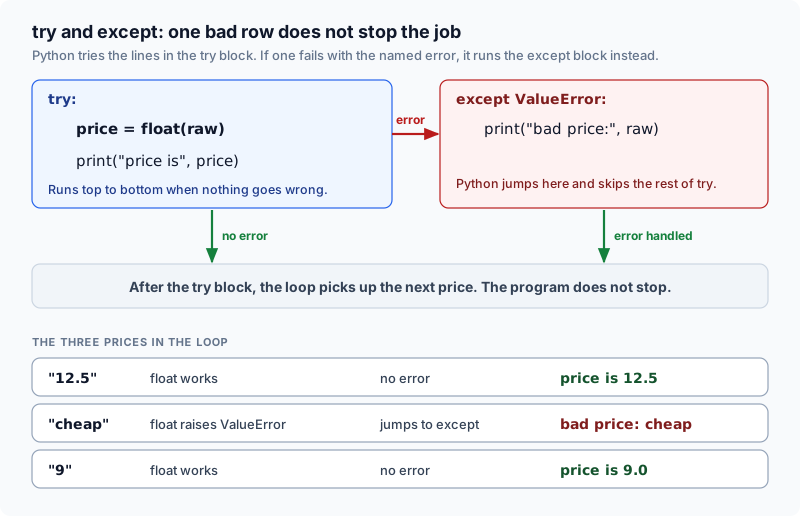
try and except turn a crash into a decision. You choose what to do with the bad row.
Which tool do I use when?
You met if and for in the last lesson. The table adds the rest, and the lesson walks through each row.
Choose the tool from the question you are asking: which branch, how many times, or what if it fails.
| Tool | When to use it | How it stops | Pipeline example |
|---|---|---|---|
| if / elif / else | Different actions per condition | One branch executes | Process paid orders versus cancelled ones |
| for loop | Known collections or fixed attempts | Collection exhausted or break | Iterate order records in a daily batch |
| while loop | Repeat until a condition changes | Condition turns False or break | Poll an export status until complete |
| try / except | An operation might raise an error | Matching except block runs | Catch a network timeout on an API call |
| finally | Cleanup that must always happen | Runs after try and except | Close an open network socket or file handle |
Three loop helpers refine a loop. break leaves the loop at once, continue skips to the next item, and the else on a for loop runs only when no break happened.
Working with order records
We use 4 sample orders across the rest of this lesson. Each row has a status and an amount.
Different statuses need different handling.
| order_id | price | qty | status |
|---|---|---|---|
| ORD-1 | 19.50 | 4 | paid |
| ORD-2 | 8.00 | 2 | cancelled |
| ORD-3 | 12.25 | 2 | paid |
| ORD-4 | 9.00 | 1 | paid |
Python marks a block with indentation, which means the spaces at the start of a line. Everything under if, for, while, try or def is indented by four spaces. Uneven spacing raises an IndentationError before the program starts.
Words you will see in this lesson
Six words. The rest of the lesson uses only these.
| Word | What it means |
|---|---|
| Condition | A test whose answer is True or False |
| if / else | Pick which lines run based on a condition |
| Loop | Repeat the same steps for each item |
| while | A loop that repeats until a condition turns False |
| break | Leave a loop early |
| Retry | Try the same step again after a failure |
Why this skill
Pipelines process variable input data where network connections drop and source schemas drift unexpectedly.
Guarantees of loop termination
When reading or writing loops, verify three structural guarantees:
- What variables change on each iteration?
- What condition determines the branch path?
- What guarantees that the loop will terminate?
Infinite loops consume CPU resources endlessly while delaying downstream transformation jobs.
Exceptions carry diagnostic details about failed operations. Catch them only when your code can recover or log a meaningful alert.
The cost of transient failures
Production pipelines frequently make network requests to external APIs that intermittently return 503 errors.
- 503 timeoutno retry loop
- Job crashespartial batch left
- Reports stallmissing morning metrics
Bounded retries attempt the request up to 3 times before failing. This tolerates brief network glitches while surfacing permanent outages.
Retry transient failures a fixed number of times. Never retry indefinitely and never swallow the error.
How the code works
Python evaluates conditions in sequence, executes matched blocks, and handles raised exceptions.
Branching on order status
Loop over the orders and let each row status pick its execution path.
orders = [
    {"order_id": "ORD-1", "price": 19.50, "qty": 4, "status": "paid"},
    {"order_id": "ORD-2", "price": 8.00, "qty": 2, "status": "cancelled"},
    {"order_id": "ORD-3", "price": 12.25, "qty": 2, "status": "paid"},
]

paid_total = 0.0
for row in orders:
    if row["status"] == "paid":
        subtotal = row["price"] * row["qty"]
        paid_total += subtotal
        print(f"  {row['order_id']}: subtotal {subtotal}")
    elif row["status"] == "cancelled":
        print(f"  {row['order_id']}: skipped (cancelled)")
    else:
        raise ValueError(f"Unknown status: {row['status']}")

print("Paid total:", paid_total)
Predict the paid total before revealing the output below:
  ORD-1: subtotal 78.0
  ORD-2: skipped (cancelled)
  ORD-3: subtotal 24.5
Paid total: 102.5
Orders ORD-1 and ORD-3 updated the total; ORD-2 was skipped.
| order_id | Branch executed | Action taken |
|---|---|---|
| ORD-1 | if status == paid | Added 78.0 to paid_total |
| ORD-2 | elif status == cancelled | Skipped computation |
| ORD-3 | if status == paid | Added 24.5 to paid_total |
Place the most common branch first so the majority of incoming records evaluate on the initial comparison.
The trap with and and or operator precedence
A common logic mistake in conditional checks is assuming that comparisons evaluate strictly left to right. In Python, and binds tighter than or.
country = "IN"
total = 10

# Without parentheses: and binds tighter than or
cond1 = country == "IN" or country == "US" and total > 100
# With parentheses: explicit grouped logic
cond2 = (country == "IN" or country == "US") and total > 100

print("Without parentheses:", cond1)
print("With parentheses:", cond2)
Predict what prints for cond1 when total is only 10: does it evaluate to True or False?
Without parentheses: True
With parentheses: False
Because and has higher precedence, Python grouped country == 'US' and total > 100 first. The condition evaluated to True because country was 'IN'.
Always wrap combined or expressions in explicit parentheses when filtering records.
Defensive else for unexpected values
The else branch handles records that match neither paid nor cancelled. Raising an exception stops the job with a clear error, which your monitoring can turn into an alert.
orders = [
    {"order_id": "ORD-1", "status": "paid"},
    {"order_id": "ORD-5", "status": "refunded"},
]

for row in orders:
    if row["status"] == "paid":
        print(row["order_id"], "paid")
    elif row["status"] == "cancelled":
        print(row["order_id"], "skipped")
    else:
raise ValueError(f"Unknown status: {row['status']}")ORD-1 paid
Traceback (most recent call last):
File "pipeline.py", line 11, in <module>
raise ValueError(f"Unknown status: {row['status']}")
ValueError: Unknown status: refunded
When a payment gateway introduces a new refunded status, the pipeline stops on that record instead of dropping revenue silently.
A visible exception fixed in minutes is far better than silent data corruption found during an audit.
Bounded retries with loop break
A retry loop runs up to 3 attempts. When an attempt succeeds, break exits the loop. If all attempts fail, for/else executes.
Failed attempts catch RuntimeError and retry. Success triggers break immediately.
def flaky_api(attempt: int) -> str:
    """Simulates an API that fails twice before succeeding."""
    if attempt < 3:
        raise RuntimeError("API returned 503")
    return "ok"

result = None
for attempt in range(1, 4):
    try:
        result = flaky_api(attempt)
        print(f"  Attempt {attempt}: SUCCESS")
        break
    except RuntimeError as exc:
        print(f"  Attempt {attempt}: {exc}")
else:
    raise RuntimeError("Failed after 3 attempts")

print("Result:", result)
Predict which attempt succeeds and what prints after the loop exits:
  Attempt 1: API returned 503
  Attempt 2: API returned 503
  Attempt 3: SUCCESS
Result: ok
Attempts 1 and 2 raised RuntimeError and were caught. Attempt 3 succeeded, assigned result, and executed break.
Because break exited the loop on attempt 3, the for loop else block was skipped.
Always set a fixed upper limit like range(1, 4) on retry loops. Retrying without a limit turns temporary network hiccups into permanent hangs.
Traps in poorly constructed retries
Compare an unsafe infinite retry against a bounded retry that catches specific exceptions.
Safe retries combine fixed iteration counts, specific exception classes, and terminal alerts.
| Unsafe pattern | Why it fails in production | Safe replacement |
|---|---|---|
| while True with no counter | Loops forever on permanent errors | for attempt in range(1, 4) |
| except Exception: | Hides coding bugs and syntax typos | except (RuntimeError, ConnectionError): |
| except: pass | Swallows errors and pretends work succeeded | Log error, record attempts, then re-raise |
While loops and termination conditions
A while loop repeats as long as its condition evaluates to True. Every while loop requires an internal state advancement.
checks = ["running", "running", "done"]
i = 0
status = checks[i]
while status != "done":
    print("still", status)
    i += 1
    status = checks[i]
print("finished after", i, "checks")
Predict the number of checks printed before finished:
still running
still running
finished after 2 checks
On each turn, i increments by 1, advancing the status pointer. When status reaches done, the loop condition turns False.
Guaranteed cleanup with finally
A finally block executes whether the try block completes, catches an error, or returns early. Use it for resource cleanup.
def parse_price(raw: str):
    try:
        return float(raw)
    except ValueError:
        print("bad price:", raw)
        return None
    finally:
        print("cleanup check for", raw)

print(parse_price("12.5"))
print(parse_price("cheap"))
Predict the order of printed output for the invalid string cheap:
cleanup check for 12.5
12.5
bad price: cheap
cleanup check for cheap
None
Notice that cleanup printed before returning 12.5 for the valid row, and after the error message for cheap.
In production pipelines, finally guarantees that resources such as open database connections, temporary files, and network sockets are closed properly even when an exception interrupts earlier statements.
Differences between break and continue
continue bypasses remaining lines for the current record. break halts the entire loop immediately upon matching.
orders = [
    {"order_id": "ORD-1", "price": 19.50, "qty": 4, "status": "paid"},
    {"order_id": "ORD-2", "price": 8.00, "qty": 2, "status": "cancelled"},
    {"order_id": "ORD-3", "price": 12.25, "qty": 2, "status": "paid"},
    {"order_id": "ORD-4", "price": 9.00, "qty": 1, "status": "paid"},
]

first_small = None
for row in orders:
    if row["status"] == "cancelled":
        continue
    if row["price"] * row["qty"] < 30:
        first_small = row["order_id"]
        break

print("First small paid order:", first_small)First small paid order: ORD-3
break stops on the first match, leaving later orders unread.
| Order seen | Loop action | Reason |
|---|---|---|
| ORD-1 | Evaluated condition | Subtotal 78.0 is not under 30 |
| ORD-2 | continue executed | Cancelled status bypassed immediately |
| ORD-3 | break executed | Subtotal 24.5 matched condition; loop halted |
| ORD-4 | Never reached | Loop stopped at ORD-3 |
Worked examples
Apply these control flow patterns to real data engineering scenarios.
Catching multiple distinct error types
In ingest pipelines, a single raw dictionary can fail in multiple distinct ways. A column may be missing, or its string value may fail casting.
def parse_order(row: dict) -> str:
    try:
        subtotal = float(row["price"]) * int(row["qty"])
        return f"subtotal: {subtotal}"
    except KeyError as err:
        return f"Missing column: {err}"
    except ValueError as err:
        return f"Malformed number: {err}"

print(parse_order({"price": "19.50", "qty": "4"}))
print(parse_order({"price": "19.50"}))
print(parse_order({"price": "invalid", "qty": "4"}))
Predict what prints for the row missing the qty key:
subtotal: 78.0
Missing column: 'qty'
Malformed number: could not convert string to float: 'invalid'
Each except block handles its specific failure mode appropriately without conflating missing schema fields with corrupted numerical values.
Idempotent processing using set lookups
When a nightly pipeline re-runs, it must avoid double-processing records that were already committed.
settled_ids = {"ORD-1"}
processed = []

incoming = [
    {"order_id": "ORD-1"},
    {"order_id": "ORD-3"},
]

for row in incoming:
    if row["order_id"] in settled_ids:
        print(row["order_id"], "already processed, skipping")
        continue
    settled_ids.add(row["order_id"])
    processed.append(row["order_id"])
    print(row["order_id"], "processed now")

print("Processed IDs:", processed)ORD-1 already processed, skipping ORD-3 processed now Processed IDs: ['ORD-3']
Re-running the batch skips ORD-1 without creating duplicate transactions, processing only newly arrived records.
Isolating bad rows into quarantine
Instead of letting one invalid string halt a 100,000-row batch, partition records into clean and quarantine lists.
raw_records = ["12.50", "corrupted", "88.25", "invalid", "15.00"]
clean_values = []
quarantined = []

for item in raw_records:
    try:
        clean_values.append(float(item))
    except ValueError:
        quarantined.append(item)

print("Clean:", clean_values)
print("Quarantined:", quarantined)Clean: [12.5, 88.25, 15.0] Quarantined: ['corrupted', 'invalid']
Valid records continue into analytics, while unparseable strings are preserved in quarantine for team inspection.
Silent data loss from bare except
Wrapping record parsing in a bare except block hides bugs and results in silent data loss.
rows = [{"user_id": "U1"}, {"user_id": "U2"}]
loaded = 0

for row in rows:
    try:
        cid = row["customer_id"]
        loaded += 1
    except:
        pass

print("Loaded count:", loaded)Loaded count: 0
When the upstream source renamed customer_id to user_id, every row raised KeyError.
The bare except swallowed every error, leading the job to report success while loading zero records.
Writing except: or except Exception: catches typos and unexpected bugs along with expected failures. Always name the specific exception you intend to handle.
Replay on 3 orders
The for loop processes ORD-1, ORD-2, and ORD-3 sequentially.
- orders
- for row
if/elif routes records: paid adds subtotal, cancelled skips, unexpected raises.
- row
- branch
- total 102.5
A flaky call raises RuntimeError twice, and bounded retries catch both attempts.
- fetch
- RuntimeError
- retry
Attempt 3 succeeds and break exits the loop; for/else raises only if all attempts fail.
- attempt 3
- break
- result ok
Catching only RuntimeError ensures unexpected programming bugs surface immediately.
- except RuntimeError
- bugs surface
Four operational rules for pipeline control flow:
- Identify the variable that changes on each turn, the branch condition, and the termination guarantee.
- Raise an explicit exception in the else branch to detect upstream schema drift immediately.
- Bound every retry loop with a fixed iteration count and catch only expected exception classes.
- Use break to halt on first match, continue to skip invalid rows, and never use bare except.
Common beginner questions
When do I use for versus while?
Use for when iterating over a known collection, a range of attempts, or a fixed dataset. Use while when waiting for an external condition to change, such as polling an export job until its status turns complete. Every while loop must advance its own termination condition.
What is the difference between break and continue?
break terminates the entire loop immediately and skips any remaining items. continue aborts only the current iteration and jumps directly to the next item in the collection.
What does the else clause on a for loop do?
The else block runs only if the loop completed all iterations without encountering a break statement. In retry loops, hitting break indicates success, so the else block provides the natural location to raise a terminal error after all attempts fail.
Why is except Exception considered risky in data pipelines?
except Exception catches almost all runtime errors, including misspelled variable names, missing keys, and TypeErrors. Catching it blindly conceals real defects and makes debugging difficult. Always specify the exact exception you expect to recover from.
What comes next
You now control execution paths, handle runtime errors, and write bounded retry loops. Next, you will package pipeline transformations into reusable, testable functions and modules.
Practice
In the exercise, wrap flaky() in a retry loop allowing at most 3 attempts. Catch RuntimeError specifically, print SUCCESS when an attempt succeeds, and store 'ok' in result.
Going further: what does an if actually test?
An if does not only compare numbers. Python turns any value into True or False, and a handful of values count as False: 0, an empty string, an empty list, an empty dictionary and None. That is useful, and it hides a trap when the number 0 is a real answer.
The program below checks 8 values with a bare if. Predict which ones take the if branch before you open the output.
values = [0, 1, "", "paid", [], [1], {}, None]
for v in values:
    if v:
        print(repr(v), "-> truthy")
    else:
print(repr(v), "-> falsy")0 -> falsy
1 -> truthy
'' -> falsy
'paid' -> truthy
[] -> falsy
[1] -> truthy
{} -> falsy
None -> falsyFalsy values. Everything else is truthy.
| Value | Counts as | Typical meaning in a pipeline |
|---|---|---|
| 0 or 0.0 | False | A real zero, such as 0 returns |
| "" (empty text) | False | A field that arrived blank |
| [] or {} | False | No rows or no keys |
| None | False | No value at all |
| Any other value | True | Data is present |
The trap is a field where 0 is valid. A refund amount of 0 and a missing refund amount are different facts, yet a bare if treats them the same. Predict what the two checks below print for a refund of 0.
refund = 0

if refund:
    print("bare if: refund recorded")
else:
    print("bare if: no refund")

if refund is not None:
    print("is not None: refund recorded")
else:
print("is not None: no refund")bare if: no refund is not None: refund recorded
Try a new scenario
A pipeline reads rows[0] only if rows is not empty. A teammate writes if rows == None. For an empty list, does that check protect the code, and what would you write instead?
Work it out, then open the answer
It does not protect it. An empty list is not None, so rows == None is False and the code goes on to read rows[0], which raises an IndexError. Write if rows: (or if len(rows) > 0:) to test for emptiness. Use is None only when None is the specific value you want to detect.
Why is is None preferred over == None?
None exists only once in a Python program, so is None asks the exact question: is this the None value. It also cannot be fooled by an object that defines its own equality. For a beginner the practical rule is: use is None and is not None when you mean missing, and a bare if when you mean empty or zero.
Close the lesson and explain it
Without scrolling up, name 3 values that count as False and explain why a bare if is risky for a numeric field where 0 is a valid answer.
Practicals · load into the editor
After you read the theory, run these in the pane on the right. They execute in this tab, no cluster.
Finished this lesson?
Mark it as read when you could explain it to someone else.
Practice this
Same ideas as interview drills. These challenges open in the studio with a dataset and tests already set up.
- 3SumInterview-style drill: All unique triplets that sum to zero, sorted.Studiobeginnerpython10 min
- Container With Most WaterInterview-style drill: Max area formed by two vertical lines and the x-axis.Studiobeginnerpython10 min
- Merge Two Sorted ListsInterview-style drill: Merge two sorted lists in linear time without calling sort.Studiobeginnerpython10 min