
pythonbeginner45 minPython 3
Web Server Log Parser & Metrics Aggregator
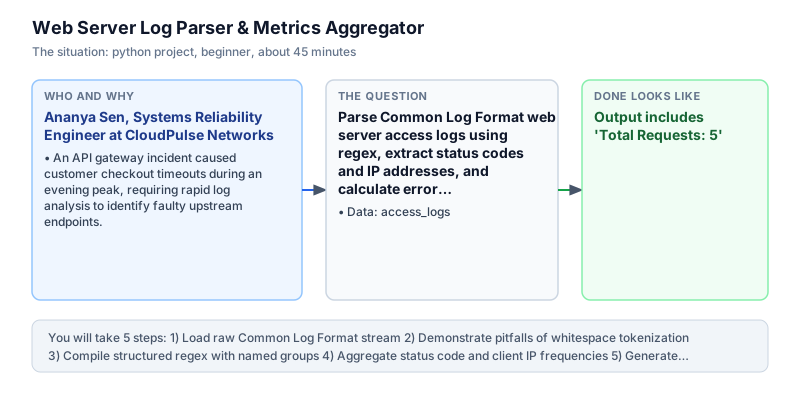
Parse Common Log Format web server access logs using regex, extract status codes and IP addresses, and calculate error rates.
The incident
- Company
- CloudPulse Networks
- Engineer
- Ananya Sen, Systems Reliability Engineer
- Trigger
- An API gateway incident caused customer checkout timeouts during an evening peak, requiring rapid log analysis to identify faulty upstream endpoints.
- Stakes
- Over 12,000 active shoppers faced intermittent 502 gateway timeouts, risking 14 lakh rupees in abandoned carts while engineers manually inspected gigabytes of raw server logs.
During a high-traffic promotional flash sale on a Friday evening, CloudPulse Networks experienced sudden latency spikes across its primary API gateway cluster. Customers attempting to complete checkouts complained of recurring HTTP 500 internal server errors and 502 bad gateway responses. The incident response commander urgently needed an accurate triage readout summarizing aggregate request volume, error proportions, and offending client IP addresses across production instances before customer churn escalated into permanent account cancellations across regional shopping territories.
The platform engineering infrastructure produced standard Common Log Format access logs across fifteen container instances deployed behind the regional load balancer. Every incoming web request generated a single structured text line recording client IP, identification tokens, timestamp brackets, quoted HTTP request paths, numerical status codes, and transferred byte payloads. However, because no centralized indexing dashboard had been provisioned for the newly deployed checkout microservice, on-call developers were reduced to running slow, ad-hoc shell commands across individual server nodes to diagnose customer impact while the outage continued to escalate across availability zones.
The commercial stakes were substantial: over twelve thousand active shoppers were attempting to complete high-value transactions during the promotional window. Finance monitoring flagged that more than fourteen lakh rupees in gross merchandise volume sat stalled in incomplete checkout funnels, while automated alerts flooded engineering Slack channels with unhelpful generic alerts and conflicting error traces. Manual grep commands executed against fifty-gigabyte log archives proved far too sluggish, consuming valuable triage minutes while shoppers abandoned their carts and shared negative feedback on social media.
Ananya Sen, a systems reliability engineer on the platform operations team, was tasked with constructing a lightweight, reproducible Python parser. The script needed to ingest raw access log text, extract key fields including client IP, timestamp, HTTP verb, URL path, and HTTP status code, and generate a concise operational health readout. Crucially, the solution needed to execute without relying on heavy external dependencies that required remote compilation or third-party package managers.
Ananya designed the ingestion script using Python built-in re regular expression engine and the collections.Counter utility. By employing named capture groups, the parser safely isolated status codes and client IP addresses while ignoring benign header noise. Furthermore, by categorizing status codes into 2xx successes and 4xx or 5xx error blocks, the script computed reliable service error ratios to quantify blast radius accurately under extreme load conditions without distorting historical uptime baselines.
Running against an incident log snapshot, the parser revealed that an individual client IP address was sending rapid repeated requests to the payment endpoint, triggering backend resource exhaustion. Armed with this insight, the infrastructure team applied rate limiting and restored normal service within minutes. The operational incident summary, request volume counts, and endpoint error distribution were delivered directly to the Platform Engineering Lead and the Incident Commander for the post-mortem review.
What you will learn
- Parse Common Log Format text using regular expression named groups
- Aggregate categorical frequencies with Python collections.Counter
- Calculate operational error rates and top-k client metrics
- Format clean console operational diagnostics for incident triage
What you need first
Regular ExpressionsPython regex and log processing
Regular expressions allow structured field extraction from unstructured text lines using named capture groups like (?P<ip>\S+).
import re; m = re.search(r"(?P<code>\d{3})", "HTTP 200 OK"); print(m.group("code"))200
Unescaped literal characters like [. in log patterns match arbitrary characters or break syntax.
Frequency Counting with CounterPython hash maps
The collections.Counter class provides high-performance multiset counting and a most_common(n) method to retrieve top occurrences.
from collections import Counter; c = Counter(['200', '500', '200']); print(c.most_common(1)[0])('200', 2)Calling most_common(1)[0] on an empty Counter raises an IndexError when no log lines matched.
Error Rate CalculationPython control flow
Filtering HTTP response codes by numerical value (status >= 400) isolates client and server errors to compute availability percentages.
codes = [200, 200, 500]; errs = sum(1 for c in codes if c >= 400); print(round(errs * 100 / len(codes), 1))33.3
Comparing string status codes with integer inequalities like '500' >= 400 raises a TypeError in Python 3.
Architecture and data flow
The data
Raw Common Log Format (CLF) web server access records with client IP, timestamp, HTTP request line, status code, and byte count.
access_logs: Raw Common Log Format web server access lines
| raw_log_entry |
|---|
| 192.168.1.1 - - [10/Oct/2024:14:32:10 +0000] "GET /api/v1/checkout HTTP/1.1" 200 1240 |
| 10.0.0.1 - - [10/Oct/2024:14:32:11 +0000] "POST /api/v1/pay HTTP/1.1" 500 450 |
| 192.168.1.1 - - [10/Oct/2024:14:32:12 +0000] "GET /api/v1/cart HTTP/1.1" 200 890 |
| 172.16.0.5 - - [10/Oct/2024:14:32:13 +0000] "GET /favicon.ico HTTP/1.1" 404 180 |
| 192.168.1.1 - - [10/Oct/2024:14:32:14 +0000] "POST /api/v1/pay HTTP/1.1" 200 512 |
Step by step
Read each step, run its code, then check your output against the one shown.
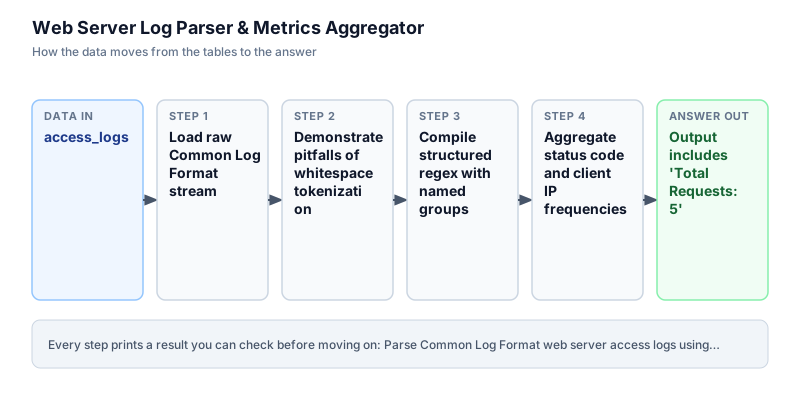
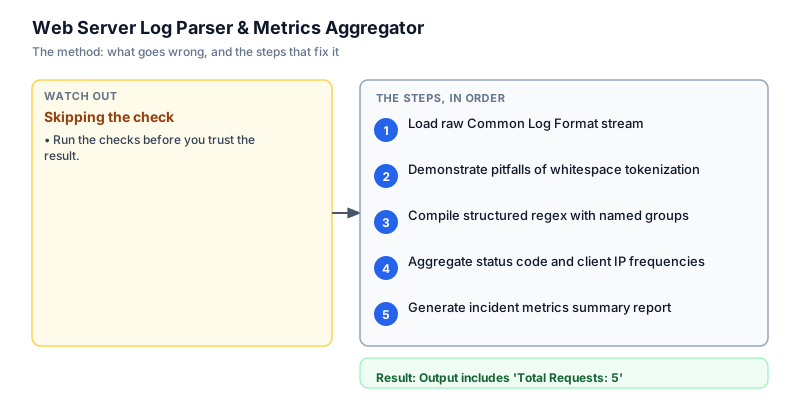
Load raw Common Log Format stream
We initialize the raw access log string containing standard Common Log Format lines. In real production environments, these log lines stream from file tailers like FluentBit or systemd journal logs. Initializing a clean multiline string allows deterministic testing of string splitting, whitespace sanitization, and line counting. We filter out empty lines to ensure that blank trailing lines do not artificially inflate the total request count during downstream metric aggregation across distributed server nodes. Each non-empty line represents a discrete client request that must be validated.
logs = """192.168.1.1 - - [10/Oct/2024:14:32:10 +0000] "GET /api/v1/checkout HTTP/1.1" 200 1240 10.0.0.1 - - [10/Oct/2024:14:32:11 +0000] "POST /api/v1/pay HTTP/1.1" 500 450 192.168.1.1 - - [10/Oct/2024:14:32:12 +0000] "GET /api/v1/cart HTTP/1.1" 200 890 172.16.0.5 - - [10/Oct/2024:14:32:13 +0000] "GET /favicon.ico HTTP/1.1" 404 180 192.168.1.1 - - [10/Oct/2024:14:32:14 +0000] "POST /api/v1/pay HTTP/1.1" 200 512 """ raw_lines = [l.strip() for l in logs.strip().split("\n") if l.strip()] print(f"raw_lines_loaded: {len(raw_lines)}")raw_lines_loaded: 5
Common mistakeWatch out: Splitting on newline without filtering out empty lines results in blank string elements that cause IndexError during regex matching.
How you will knowThe output confirms exactly 5 non-empty log lines ready for pattern extraction.
Demonstrate pitfalls of whitespace tokenization
Wrong turn first: this step shows the mistake before the fix
Beginners frequently try to parse access logs using line.split(' '). We demonstrate why this naive tokenization fails on web server logs. Standard CLF format includes bracketed timestamps containing spaces and quoted HTTP request lines with multiple words. As shown by the output, splitting on spaces yields ten disconnected tokens where timestamps and HTTP verbs are fragmented across arbitrary indices. This makes extracting the status code or URL path unreliable and brittle when log schemas vary. A dedicated parser must respect syntactic quoting boundaries rather than naive delimiters.
first_line = '192.168.1.1 - - [10/Oct/2024:14:32:10 +0000] "GET /api/v1/checkout HTTP/1.1" 200 1240' tokens = first_line.split(" ") print(f"tokens_found: {len(tokens)} | third_token: {tokens[3]}")tokens_found: 10 | third_token: [10/Oct/2024:14:32:10
Common mistakeWatch out: Space-splitting breaks down because timestamp timezones and quoted request lines introduce variable space counts.
How you will knowThe naive approach shows broken timestamp fragments rather than atomic structured records.
Compile structured regex with named groups
To robustly extract fields from raw access lines, we compile a regular expression with named capture groups. The pattern captures the client IP address, skips identd and user fields, matches bracketed timestamps, extracts the HTTP method and URI path from the quoted request line, and isolates the 3-digit status code. Using named groups ensures self-documenting code and prevents index offset errors when regex fields change over time across evolving server configurations. If any malformed line fails to match the pattern, it can be quarantined cleanly without crashing the loop.
import re logs = """192.168.1.1 - - [10/Oct/2024:14:32:10 +0000] "GET /api/v1/checkout HTTP/1.1" 200 1240 10.0.0.1 - - [10/Oct/2024:14:32:11 +0000] "POST /api/v1/pay HTTP/1.1" 500 450 192.168.1.1 - - [10/Oct/2024:14:32:12 +0000] "GET /api/v1/cart HTTP/1.1" 200 890 172.16.0.5 - - [10/Oct/2024:14:32:13 +0000] "GET /favicon.ico HTTP/1.1" 404 180 192.168.1.1 - - [10/Oct/2024:14:32:14 +0000] "POST /api/v1/pay HTTP/1.1" 200 512 """ pattern = re.compile( r'^(?P<ip>\S+) \S+ \S+ \[[^\]]+\] "(?P<method>\S+) (?P<path>\S+) [^"]+" (?P<status>\d{3}) (?P<bytes>\d+)' ) raw_lines = [l.strip() for l in logs.strip().split("\n") if l.strip()] valid_matches = [pattern.match(line) for line in raw_lines if pattern.match(line)] print(f"valid_matches: {len(valid_matches)}/{len(raw_lines)}")valid_matches: 5/5
Common mistakeWatch out: Forgetting raw string notation r'...' causes escape sequences like \d to be interpreted as literal characters.
How you will knowAll 5 log lines match the compiled regex pattern cleanly without rejection.
Aggregate status code and client IP frequencies
Once log lines are matched into structured groups, we feed the extracted attributes into collections.Counter instances. Counter provides an optimized multiset implementation in CPython, automatically incrementing frequency counts as values are iterated. We aggregate status codes to observe HTTP outcome distributions, and client IP addresses to identify high-volume callers. We inspect the resulting frequency dictionaries to verify accurate tallying across repeated values in the sample window. This aggregation provides the raw numerical frequencies necessary to calculate downstream service availability and client abuse metrics.
import re from collections import Counter logs = """192.168.1.1 - - [10/Oct/2024:14:32:10 +0000] "GET /api/v1/checkout HTTP/1.1" 200 1240 10.0.0.1 - - [10/Oct/2024:14:32:11 +0000] "POST /api/v1/pay HTTP/1.1" 500 450 192.168.1.1 - - [10/Oct/2024:14:32:12 +0000] "GET /api/v1/cart HTTP/1.1" 200 890 172.16.0.5 - - [10/Oct/2024:14:32:13 +0000] "GET /favicon.ico HTTP/1.1" 404 180 192.168.1.1 - - [10/Oct/2024:14:32:14 +0000] "POST /api/v1/pay HTTP/1.1" 200 512 """ pattern = re.compile( r'^(?P<ip>\S+) \S+ \S+ \[[^\]]+\] "(?P<method>\S+) (?P<path>\S+) [^"]+" (?P<status>\d{3}) (?P<bytes>\d+)' ) raw_lines = [l.strip() for l in logs.strip().split("\n") if l.strip()] valid_matches = [pattern.match(l) for l in raw_lines if pattern.match(l)] status_counts = Counter(m.group("status") for m in valid_matches) ip_counts = Counter(m.group("ip") for m in valid_matches) print(f"Status counts: {dict(status_counts)} | IP counts: {dict(ip_counts)}")Status counts: {'200': 3, '500': 1, '404': 1} | IP counts: {'192.168.1.1': 3, '10.0.0.1': 1, '172.16.0.5': 1}Common mistakeWatch out: Feeding None values from unmatched lines into Counter counts None as a legitimate key rather than alerting on syntax errors.
How you will knowStatus 200 shows 3 occurrences, while client IP 192.168.1.1 shows 3 requests.
Generate incident metrics summary report
In this final milestone, we compute the operational metrics required for incident triage. We sum all requests with status codes greater than or equal to 400 to quantify overall error count and error percentage across the sample window. We invoke ip_counts.most_common(1)[0] to identify the top calling client IP address and evaluate whether traffic is skewed. Finally, we iterate through sorted status codes to print an incident summary table. This concise diagnostic readout provides on-call engineers with the exact operational telemetry required during incident triage to identify whether service degradation is systemic or concentrated.
import re from collections import Counter logs = """192.168.1.1 - - [10/Oct/2024:14:32:10 +0000] "GET /api/v1/checkout HTTP/1.1" 200 1240 10.0.0.1 - - [10/Oct/2024:14:32:11 +0000] "POST /api/v1/pay HTTP/1.1" 500 450 192.168.1.1 - - [10/Oct/2024:14:32:12 +0000] "GET /api/v1/cart HTTP/1.1" 200 890 172.16.0.5 - - [10/Oct/2024:14:32:13 +0000] "GET /favicon.ico HTTP/1.1" 404 180 192.168.1.1 - - [10/Oct/2024:14:32:14 +0000] "POST /api/v1/pay HTTP/1.1" 200 512 """ pattern = re.compile( r'^(?P<ip>\S+) \S+ \S+ \[[^\]]+\] "(?P<method>\S+) (?P<path>\S+) [^"]+" (?P<status>\d{3}) (?P<bytes>\d+)' ) raw_lines = [l.strip() for l in logs.strip().split("\n") if l.strip()] valid_matches = [pattern.match(l) for l in raw_lines if pattern.match(l)] status_counts = Counter(m.group("status") for m in valid_matches) ip_counts = Counter(m.group("ip") for m in valid_matches) total = len(valid_matches) errors = sum(c for s, c in status_counts.items() if int(s) >= 400) top_ip, top_ip_count = ip_counts.most_common(1)[0] print(f"Total Requests: {total}") print(f"Error Responses: {errors} ({round(errors * 100 / total, 1)}%)") print(f"Top Client IP: {top_ip} ({top_ip_count} hits)") print("Status Codes:") for s, c in sorted(status_counts.items()): print(f" {s}: {c}")Total Requests: 5 Error Responses: 2 (40.0%) Top Client IP: 192.168.1.1 (3 hits) Status Codes: 200: 3 404: 1 500: 1
Common mistakeWatch out: Calling most_common(1)[0] on an empty Counter raises IndexError if no log records were matched.
How you will knowThe report confirms 5 total requests, 2 errors (40.0%), and lists all status code counts.
Build it yourself
Write your solution below, run it in your browser, and pass every check.
What the result means
Interpretation
The readout shows a 40.0% error rate during the sampled window, dominated by an HTTP 500 internal server error and an HTTP 404 missing resource. Furthermore, IP 192.168.1.1 accounted for 60% of all traffic (3 out of 5 requests). This traffic concentration signals an aggressive polling client or misconfigured frontend loop, directing engineers to rate-limit the calling client rather than blindly restarting database instances.
The message you would send
Hi SRE Team, incident triage analysis on the gateway access log shows a 40.0% error rate (2 of 5 requests) during the outage window. IP 192.168.1.1 drove 60% of total volume with 3 requests, including a failed POST /api/v1/pay call. We recommend rate-limiting this client while inspecting the payment service logs.
Put it on your CV
Resume or LinkedIn bullet
Built a zero-dependency Common Log Format parser in Python using regular expressions and collections.Counter, extracting real-time error rates and traffic concentration.README for GitHub
# Web Server Log Parser & Metrics Aggregator

## Business Context
Unstructured gateway logs complicated real-time incident triage during checkout service degradations.

## Solution Architecture
- Compiled a high-performance regular expression using named capture groups to tokenize standard CLF logs.
- Populated `collections.Counter` multisets to aggregate HTTP response status codes and caller IPs.
- Calculated error proportions and surfaced traffic concentration vectors directly in console output.

## Verification
Passes all automated verification checks on Python 3 standard library.Extend the regex parser to calculate total bandwidth bytes per IP address and write an incident triage report to a local markdown file.