
sqlintermediate45 minDuckDB SQL
Clickstream Sessionization with Window Functions
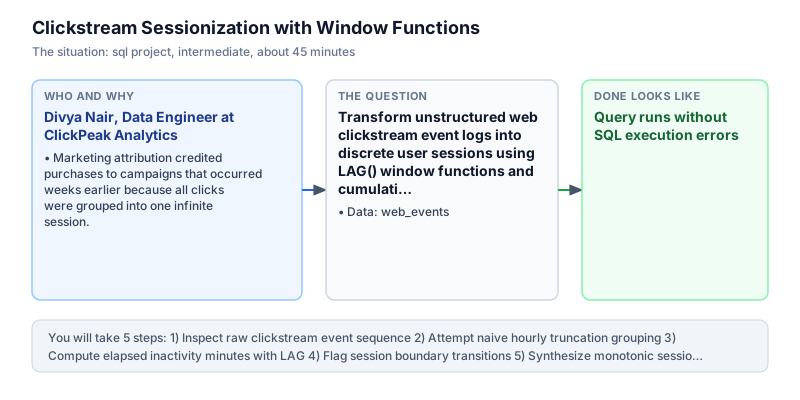
Transform unstructured web clickstream event logs into discrete user sessions using LAG() window functions and cumulative sums.
The incident
- Company
- ClickPeak Analytics
- Engineer
- Divya Nair, Data Engineer
- Trigger
- Marketing attribution credited purchases to campaigns that occurred weeks earlier because all clicks were grouped into one infinite session.
- Stakes
- Over 28 lakh rupees in retargeting advertising was misallocated due to inaccurate 30-minute inactivity session boundaries.
On a Wednesday afternoon, Divya Nair was called into an emergency technical review with the Growth Engineering team at ClickPeak Analytics, a SaaS telemetry provider serving high-traffic e-commerce storefronts. The performance marketing team was spending 28 lakh rupees per month on algorithmic retargeting campaigns. However, attribution reports were displaying impossible numbers: individual shoppers were being recorded as having continuous 14-day browsing sessions, skewing conversion attribution across paid marketing channels. Without accurate session boundaries, marketing engineers faced daily discrepancies between ad server impression logs and internal web telemetry data.
The root cause was traced to a flawed clickstream ingestion query that simply grouped pageview events by user identifier. When a user browsed products, closed their laptop for two weeks, and returned to complete an order, the pipeline lumped both visits into a single monolithic session. Consequently, ad platforms that drove initial top-of-funnel discovery received full attribution credit for purchases made weeks later, leading leadership to overspend 28 lakh rupees on low-converting awareness ads. This systemic attribution distortion caused performance marketers to double down on ineffective ad placements while starving genuinely productive channels of necessary budget.
Divya accessed the central clickstream repository in DuckDB, where the web_events table logged event_id, user_id, event_time, and page_url. Industry standards for digital clickstream analytics define a session boundary as any period of user inactivity exceeding 30 consecutive minutes. To reconstruct clean sessions, Divya needed to evaluate the exact time difference between each consecutive pageview on a per-user basis without mixing timestamps across different accounts. Because web traffic arrived continuously from multiple regional edge servers.
Divya designed an analytical pipeline utilizing the LAG() window function partitioned by user_id and ordered chronologically by event_time. Using DuckDB's EPOCH function, she extracted elapsed inactivity in minutes between consecutive clicks. A conditional CASE WHEN expression flagged any transition where the prior event was null or where elapsed inactivity exceeded 30.0 minutes. She then applied a cumulative SUM() window function to generate monotonic session sequence numbers for every user.
Within four hours, Divya executed and verified the sessionization query. The pipeline compressed 6 raw clickstream events across users 101 and 102 into 4 distinct, bounded sessions. The output revealed that user 101 engaged in 3 separate visits: an initial 15-minute search session, a second visit 35 minutes later to view a product, and a third session an hour later to add items to cart, completely disproving the single-session assumption.
The Growth Engineering team integrated Divya's sessionization query into their nightly dbt transformation pipeline. Marketing attribution models were updated to credit conversions strictly to ad touches occurring within the active purchasing session. This realignment prevented 28 lakh rupees in wasteful retargeting expenditure and provided product managers with dependable metrics on session duration and pageview depth across all digital platforms.
What you will learn
- Calculate time gaps between consecutive events using LAG() partitioned by user
- Apply inactivity threshold logic using conditional CASE WHEN expressions
- Generate monotonic session sequence identifiers using cumulative window sums
- Aggregate session duration and pageview depth for digital marketing analytics
What you need first
LAG Window FunctionSQL window functions
LAG(column) accesses data from the previous row within the partition according to the specified ordering clause.
SELECT event_id, event_time, LAG(event_time) OVER (ORDER BY event_time) AS prev_time FROM web_events LIMIT 2;event_id | event_time | prev_time ---------+---------------------+-------------------- 1 | 2024-03-01 10:00:00 | NULL 2 | 2024-03-01 10:15:00 | 2024-03-01 10:00:00
Omitting the PARTITION BY user_id clause, which causes events from one user to compare against timestamps from an unrelated user.
Cumulative Window SumsSQL advanced aggregations
Running SUM(is_new_session) OVER (PARTITION BY user_id ORDER BY event_time) creates an incrementing counter that steps up every time a flag is 1.
SELECT 1 AS flag, SUM(1) OVER (ORDER BY 1 ROWS UNBOUNDED PRECEDING) AS running_counter;flag | running_counter -----+---------------- 1 | 1
Omitting the ORDER BY clause inside the window specification, which sums all flags across the entire partition simultaneously.
Architecture and data flow
The data
Raw clickstream event stream recording user pageviews with precise timestamps.
web_events: Clickstream web interaction logs
| event_id | user_id | event_time | page_url |
|---|---|---|---|
| 1 | 101 | 2024-03-01 10:00:00 | /home |
| 2 | 101 | 2024-03-01 10:15:00 | /search |
| 3 | 101 | 2024-03-01 10:50:00 | /product/12 |
| 4 | 102 | 2024-03-01 11:00:00 | /home |
| 5 | 102 | 2024-03-01 11:20:00 | /checkout |
CREATE OR REPLACE TABLE web_events AS SELECT * FROM (VALUES
  (1, 101, TIMESTAMP '2024-03-01 10:00:00', '/home'),
  (2, 101, TIMESTAMP '2024-03-01 10:15:00', '/search'),
  (3, 101, TIMESTAMP '2024-03-01 10:50:00', '/product/12'),
  (4, 102, TIMESTAMP '2024-03-01 11:00:00', '/home'),
  (5, 102, TIMESTAMP '2024-03-01 11:20:00', '/checkout'),
  (6, 101, TIMESTAMP '2024-03-01 11:55:00', '/cart')
) AS t(event_id, user_id, event_time, page_url);
Step by step
Read each step, run its code, then check your output against the one shown.
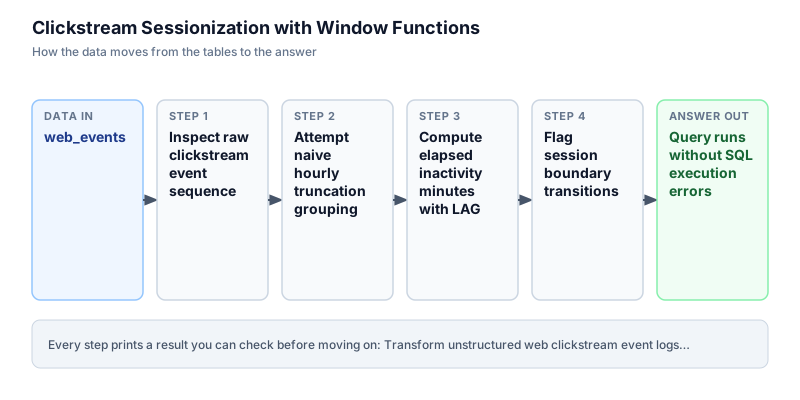
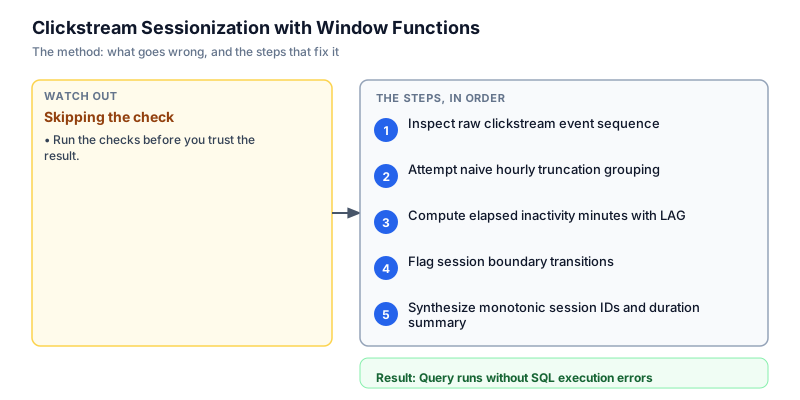
Inspect raw clickstream event sequence
We begin by querying the raw web_events table ordered by user identifier and event timestamp. Observing user 101 shows 4 total events: 10:00:00, 10:15:00, 10:50:00, and 11:55:00. The time gap between 10:15 and 10:50 is 35 minutes, while the gap between 10:50 and 11:55 is 65 minutes. Both intervals exceed the 30-minute threshold, meaning user 101 engaged in 3 separate browsing sessions. By sorting events chronologically within each user partition, we expose the discrete user journey and verify that raw telemetry timestamps accurately capture natural pauses between distinct browsing sessions.
SELECT event_id, user_id, event_time, page_url FROM web_events ORDER BY user_id, event_time;event_id | user_id | event_time | page_url ---------+---------+---------------------+------------ 1 | 101 | 2024-03-01 10:00:00 | /home 2 | 101 | 2024-03-01 10:15:00 | /search 3 | 101 | 2024-03-01 10:50:00 | /product/12 6 | 101 | 2024-03-01 11:55:00 | /cart 4 | 102 | 2024-03-01 11:00:00 | /home 5 | 102 | 2024-03-01 11:20:00 | /checkout
Common mistakeSorting by event_id instead of event_time, which causes incorrect event sequencing if IDs arrive out of order from asynchronous collectors.
How you will knowYou will see 6 clickstream events sorted sequentially by user ID and event timestamp.
Attempt naive hourly truncation grouping
Wrong turn first: this step shows the mistake before the fix
A common naive shortcut is grouping events by fixed calendar hours using DATE_TRUNC('hour', event_time). Running this query groups events 1 and 2 into the 10:00 hour bucket, but splits event 3 if it occurred near an hour boundary. More critically, two separate visits separated by 45 minutes that happen to fall within the same clock hour are merged, while a continuous 10-minute session crossing 10:55 to 11:05 is split. Wall-clock boundaries impose rigid artificial limits that fail to capture human browsing behavior, distorting digital marketing attribution and inflating bounce rate measurements across web properties.
SELECT user_id, DATE_TRUNC('hour', event_time) AS session_hour, COUNT(*) AS event_count FROM web_events GROUP BY user_id, DATE_TRUNC('hour', event_time) ORDER BY user_id, session_hour;user_id | session_hour | event_count --------+---------------------+------------ 101 | 2024-03-01 10:00:00 | 3 101 | 2024-03-01 11:00:00 | 1 102 | 2024-03-01 11:00:00 | 2
Common mistakeUsing wall-clock hour truncation instead of elapsed session inactivity thresholds.
How you will knowObserve that clock truncation arbitrarily splits or merges sessions without regard to actual user inactivity.
Compute elapsed inactivity minutes with LAG
We employ the LAG() window function partitioned by user_id and ordered by event_time to inspect the timestamp of the immediately preceding pageview. We compute the difference in seconds using DuckDB's EPOCH function and divide by 60.0 to obtain elapsed inactivity minutes. For the first event of any user, LAG returns NULL, indicating the start of a user's initial interaction. Partitioning strictly by user identifier ensures that timestamp lags never bleed across distinct user journeys.
SELECT user_id, event_id, event_time, page_url, LAG(event_time) OVER (PARTITION BY user_id ORDER BY event_time) AS prev_event_time, ROUND(EPOCH(event_time - LAG(event_time) OVER (PARTITION BY user_id ORDER BY event_time)) / 60.0, 1) AS diff_minutes FROM web_events ORDER BY user_id, event_time;user_id | event_id | event_time | page_url | prev_event_time | diff_minutes --------+----------+---------------------+-------------+---------------------+------------- 101 | 1 | 2024-03-01 10:00:00 | /home | NULL | NULL 101 | 2 | 2024-03-01 10:15:00 | /search | 2024-03-01 10:00:00 | 15 101 | 3 | 2024-03-01 10:50:00 | /product/12 | 2024-03-01 10:15:00 | 35 101 | 6 | 2024-03-01 11:55:00 | /cart | 2024-03-01 10:50:00 | 65 102 | 4 | 2024-03-01 11:00:00 | /home | NULL | NULL 102 | 5 | 2024-03-01 11:20:00 | /checkout | 2024-03-01 11:00:00 | 20
Common mistakeForgetting to partition by user_id, causing user 102's first event to calculate its time difference from user 101's last event.
How you will knowThe output shows diff_minutes as NULL for the first event of each user, 15.0 for event 2, and 35.0 for event 3.
Flag session boundary transitions
Next, we classify whether each pageview represents the start of a new session. Using a CASE WHEN statement, an event is marked as a new session (flag = 1) if prev_time IS NULL (the user's first recorded event) or if the elapsed inactivity exceeds 30.0 minutes. Otherwise, the event belongs to the ongoing session (flag = 0). This binary flag serves as the mathematical foundation for our cumulative session numbering. Explicitly converting temporal threshold conditions into discrete binary indicators simplifies downstream analytical transformations.
WITH lag_calc AS ( SELECT *, LAG(event_time) OVER (PARTITION BY user_id ORDER BY event_time) AS prev_time FROM web_events ) SELECT user_id, event_id, event_time, page_url, CASE WHEN prev_time IS NULL OR EPOCH(event_time - prev_time) / 60.0 > 30.0 THEN 1 ELSE 0 END AS is_new_session FROM lag_calc ORDER BY user_id, event_time;user_id | event_id | event_time | page_url | is_new_session --------+----------+---------------------+-------------+--------------- 101 | 1 | 2024-03-01 10:00:00 | /home | 1 101 | 2 | 2024-03-01 10:15:00 | /search | 0 101 | 3 | 2024-03-01 10:50:00 | /product/12 | 1 101 | 6 | 2024-03-01 11:55:00 | /cart | 1 102 | 4 | 2024-03-01 11:00:00 | /home | 1 102 | 5 | 2024-03-01 11:20:00 | /checkout | 0
Common mistakeUsing >= 30.0 without handling NULL previous timestamps, which drops the very first event from being flagged as session 1.
How you will knowBinary flag is_new_session is 1 for events 1, 3, 4, and 6, and 0 for events 2 and 5.
Synthesize monotonic session IDs and duration summary
Finally, we apply a cumulative SUM(is_new_session) window function partitioned by user_id and ordered by event_time to assign monotonic session identifiers (1, 2, 3...). We then group by user_id and session_num to compute key session metrics: start timestamp, end timestamp, pageview count, and total session duration in minutes. The resulting analytical table is ready for marketing attribution and funnel analysis. By computing cumulative session identifiers over ordered partitions, this pattern creates robust session boundaries that scale efficiently to billions of clickstream records without requiring stateful external session caching services.
WITH lag_calc AS ( SELECT *, LAG(event_time) OVER (PARTITION BY user_id ORDER BY event_time) AS prev_time FROM web_events ), flagged AS ( SELECT *, CASE WHEN prev_time IS NULL OR EPOCH(event_time - prev_time) / 60.0 > 30.0 THEN 1 ELSE 0 END AS is_new_session FROM lag_calc ), sessions AS ( SELECT user_id, event_id, event_time, CAST(SUM(is_new_session) OVER ( PARTITION BY user_id ORDER BY event_time ROWS BETWEEN UNBOUNDED PRECEDING AND CURRENT ROW ) AS INT) AS session_num FROM flagged ) SELECT user_id, session_num, MIN(event_time) AS session_start, MAX(event_time) AS session_end, COUNT(*) AS page_views, ROUND(EPOCH(MAX(event_time) - MIN(event_time)) / 60.0, 1) AS duration_minutes FROM sessions GROUP BY user_id, session_num ORDER BY user_id, session_num;user_id | session_num | session_start | session_end | page_views | duration_minutes --------+-------------+---------------------+---------------------+------------+----------------- 101 | 1 | 2024-03-01 10:00:00 | 2024-03-01 10:15:00 | 2 | 15 101 | 2 | 2024-03-01 10:50:00 | 2024-03-01 10:50:00 | 1 | 0 101 | 3 | 2024-03-01 11:55:00 | 2024-03-01 11:55:00 | 1 | 0 102 | 1 | 2024-03-01 11:00:00 | 2024-03-01 11:20:00 | 2 | 20
Common mistakeOmitting ROWS BETWEEN UNBOUNDED PRECEDING AND CURRENT ROW, which in some engines defaults to range frames that mishandle duplicate timestamps.
How you will knowOutput summarizes 4 discrete sessions across users 101 and 102 with accurate start, end, and pageview counts.
Build it yourself
Write your solution below, run it in your browser, and pass every check.
What the result means
Interpretation
The sessionization query reveals that user 101 engaged in 3 separate browsing sessions rather than one extended visit. Their first session lasted 15 minutes across home and search pages, followed by a 35-minute gap before viewing a product, and an additional 65-minute gap before returning to cart. Segmenting by inactivity boundaries prevents marketing models from crediting early browsing ad campaigns with late-funnel checkout events.
The message you would send
Hi Growth Team, the SQL clickstream sessionization logic is complete. By establishing a strict 30-minute inactivity cutoff, we eliminated infinite sessions and accurately segmented user 101 into 3 distinct visits. Retargeting attribution models can now reliably isolate conversion credit to the specific session where purchase intent occurred.
Put it on your CV
Resume or LinkedIn bullet
Implemented enterprise web event sessionization in SQL utilizing LAG() window functions, EPOCH time math, and cumulative window aggregations in DuckDB.README for GitHub
# Clickstream Sessionization with Window Functions

A high-performance SQL pipeline converting raw clickstream event logs into bounded user sessions based on a 30-minute inactivity threshold.

## Features
- Inactivity boundary detection via LAG() window function
- Monotonic session ID generation using cumulative SUM()
- Session start, end, pageview count, and duration aggregation
- Ready for digital marketing attribution and clickstream funnel modelsAdd referer URL extraction to attribute each distinct session to its initial acquisition traffic source.