
Overview
The driver builds the plan and sends work to executors. Executors process partitions. Transformations describe work first, while an action such as count or write starts the job.
On this page8 sections
The picture
A ShopKart engineer writes df.filter(...).groupBy(...).agg(...) in PySpark. It reads like pandas, but when they call show() nothing happens for a while, and then everything happens at once.
The reason is that the code you write builds a plan on the driver, and the work only runs on executors when you ask for a result.
How is an Apache Spark cluster structured?
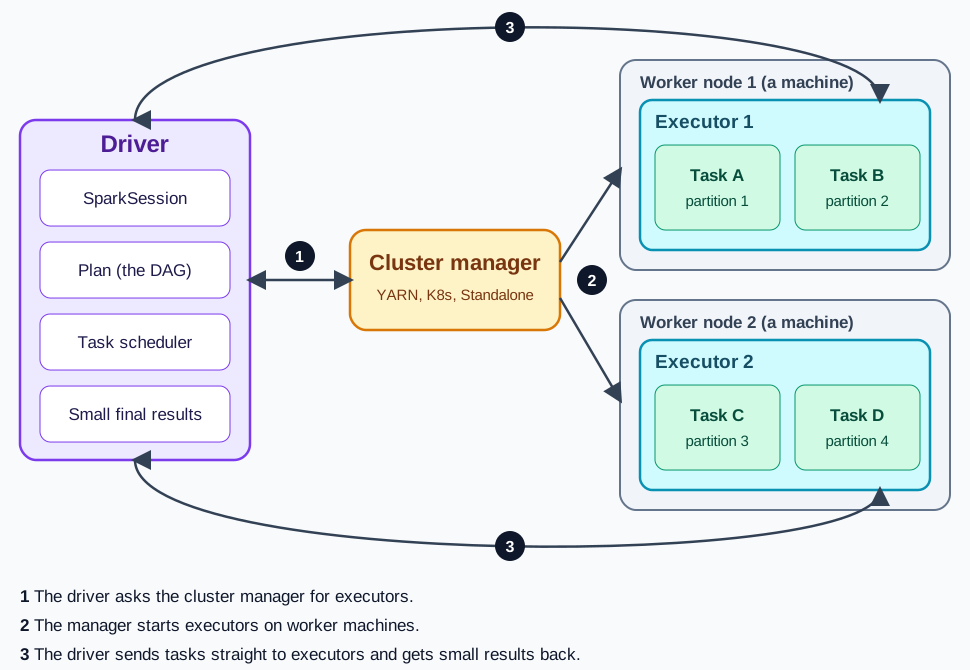
The driver sends tasks. Executors process data partitions in parallel.
Apache Spark is a distributed computing engine for processing large datasets across many machines.
Unlike pandas, which runs on a single computer and holds all data in memory, Spark splits data into partitions and processes them in parallel across a cluster of machines.
- Driver Application
- DAG Scheduler
- Worker Executors
- Partition Tasks
Spark has 2 key components. The driver is the coordinator: it runs your Python script, builds a plan of what work to do, and schedules tasks.
Executors are the workers: they receive tasks from the driver, process partitions of data, and return results. You can think of the driver as a foreman giving instructions and executors as crews doing the physical work.
Spark uses lazy evaluation: when you write commands like filter() or select(), nothing actually happens yet. Spark just records the instructions.
The real work begins only when you trigger an action like count(), show(), or write(). This lets Spark optimize the entire sequence of operations before executing them.
Words you will see in this lesson
Six words. The rest of the lesson uses only these.
| Word | What it means |
|---|---|
| Driver | The program that plans the work and hands it out |
| Executor | A worker process that runs the tasks |
| Partition | One slice of the data |
| RDD | Spark's older, low-level way to hold data |
| Lazy | Nothing runs until an action asks for a result |
| Action | A call such as count() that makes Spark run the plan |
Why this shape
Why does distributed architecture matter for large datasets?
Pandas works well for datasets that fit in your laptop's memory, typically up to a few gigabytes.
When your data grows to hundreds of gigabytes or terabytes, a single machine cannot hold it all. Spark distributes data and processing across dozens or hundreds of machines, making it possible to process datasets that are too large for pandas.
The driver is one small process. The executors are many, and they hold the data.
| Architecture Component | Memory Profile | Operational Responsibility |
|---|---|---|
| Driver Process | Single JVM process with modest RAM | Runs application script, coordinates DAG |
| Worker Executors | Distributed across cluster worker nodes | Processes partition data slices in parallel |
Understanding the driver-executor architecture is essential because common mistakes stem from not understanding which component does what.
Calling collect() on 1 billion rows is a prime example. The driver is small. If you try to pull all the data onto the driver, it can run out of memory and the job can fail.
Walk the boxes
What distinct roles do the driver and executors play?
In this editor, we simulate Spark's API using pandas underneath. The architecture and performance guidance describes real Apache Spark. You practice the verbs and thinking patterns here; in production, these run on actual clusters.
The driver is a single process that runs your application code. It creates a SparkSession, builds query plans, and coordinates the cluster. Think of it as the office that sends instructions. It should not hold the entire dataset.
- Spark Cluster HierarchyDriver and worker node hierarchy in a Spark cluster
- ├── Driver Process (Coordinator)
- │ ├── SparkSession
- │ └── DAG Scheduler
- └── Worker Compute Nodes
- ├── Executor 1 (Tasks on Partitions)
- └── Executor 2 (Tasks on Partitions)
Executors are long-running worker processes on cluster machines. Each executor runs tasks and stores cached partition data.
A task typically handles 1 partition, so more executors and partitions mean more parallelism across your cluster.
In pandas, df = pd.read_csv(...) loads everything into one machine's RAM. In Spark, df = spark.read.parquet(...) creates a plan to read from distributed storage. The data stays distributed across executors until you explicitly collect it.
Why are DataFrames preferred over lower-level RDDs?
Spark has two APIs for working with data. RDDs (Resilient Distributed Datasets) are the older, lower-level API: collections of Python objects without column structure.
DataFrames are the newer, recommended API: tables with named columns and types, similar to relational tables.
- Your DataFrame code
- Spark's plan
- A cheaper plan chosen
- Fast code generated
DataFrames are almost always the right choice. They give Spark's optimizer (Catalyst) enough information to rearrange operations, skip unnecessary columns, and generate efficient code.
RDDs bypass these optimizations and force more work through Python serialization overhead.
A matching example
How does code define an RDD versus a DataFrame?
Run the example below in this tab. Read the input, follow the code, then check the output matches what you expect.
# RDD: lower-level, no column structure
rdd = spark.sparkContext.parallelize([("A", 10), ("B", 20)])

# DataFrame: named columns, optimizer-visible
df = spark.createDataFrame(rdd, ["zone", "parcel_count"])
df.printSchema()
df.show()
Notice how the DataFrame prints a clean schema with column names and data types, whereas the RDD is an opaque collection of raw Python tuples.
How do lazy transformations differ from eager actions?
Transformations like select, filter, withColumn, and groupBy add steps to a plan but do not execute anything. They return a new DataFrame that describes what should happen.
You can chain many transformations together without moving any bytes over the cluster network.
Transformations build plans. Actions demand results. Lazy evaluation means nothing runs until an action.
| Operation | Category | What happens |
|---|---|---|
| select(...) | Transformation | Adds a projection to the plan. No data moves. |
| filter(...) | Transformation | Adds a row predicate to the plan. No data moves. |
| count() | Action | Triggers execution. Returns one number to the driver. |
| show(20) | Action | Triggers execution. Prints up to 20 rows. |
| collect() | Action | Triggers execution. Returns ALL rows to the driver. |
| write.parquet(...) | Action | Triggers execution. Writes distributed output files. |
Actions like count, show, collect, and write trigger execution. Spark analyzes the accumulated plan, optimizes it, and schedules tasks on the executors. Only then does data actually move and get processed.
paid = (
    spark.table("orders")
    .filter("order_status = 'paid'")
    .select("order_id", "order_total")
)

print("No execution yet: paid is just a plan")
print("Paid order count:", paid.count())  # action triggers execution
paid.show(5) # another actionWriting paid = df.filter(...) creates a plan object, not a copy of filtered data. No memory is allocated, no data is read, and no CPU is used until an action runs.
How does Spark organize work using a DAG?
Spark represents the computation plan as a directed acyclic graph (DAG).
Narrow operations like filter and select can run on each partition independently without network data transfer.
Wide operations like groupBy and join require a shuffle: moving data between executors so that matching keys end up together on the same node.
Narrow operations share a stage. The shuffle creates a new stage.
Narrow versus wide transformations in DAG execution stages
| Transformation Type | Network Transfer | Stage Boundary |
|---|---|---|
| Narrow (filter, select) | None: executes inside partition | Pipelined in current stage |
| Wide (groupBy, join) | High: shuffles rows across nodes | Creates new stage boundary |
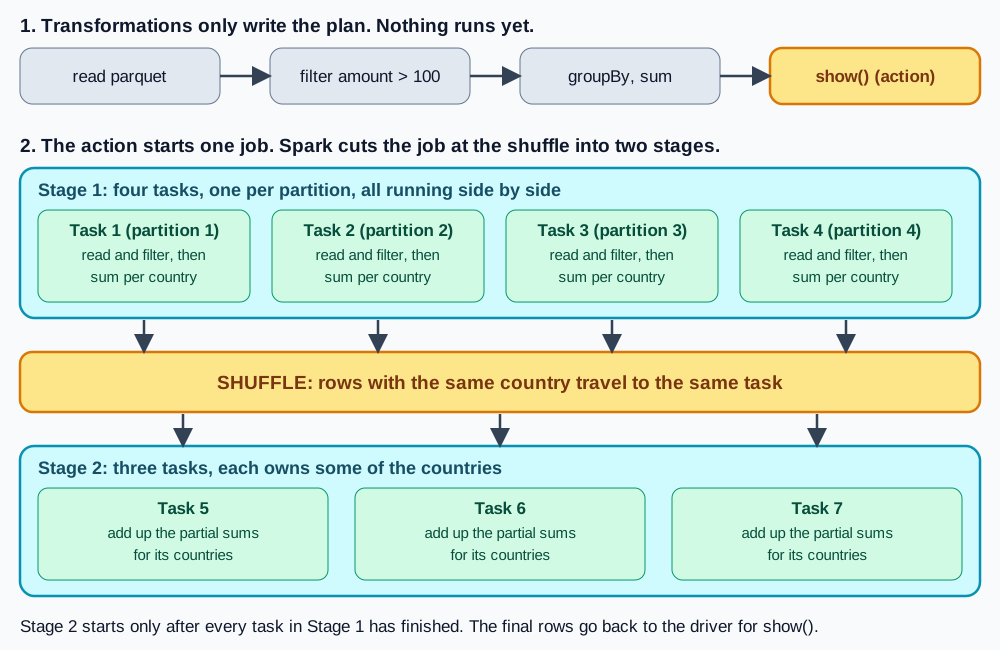
Shuffles are expensive because they send data across the network. They create stage boundaries in the DAG. Understanding where shuffles happen helps you write efficient Spark code.
Why must you keep bulk data off the driver node?
Calling collect() converts every distributed row into Python objects on the driver node.
If the result is larger than the driver's memory, the application can fail with an out-of-memory error.
Use show() for inspection, count() for row counts, and distributed writes for real outputs.
orders = spark.table("orders")

# Safe: only a bounded sample reaches the driver
orders.select("order_id", "order_status").show(20, truncate=False)

# Safe: executors aggregate, driver receives one number
print("rows:", orders.count())

# Dangerous on large data:
# all_orders = orders.collect()  # can crash the driver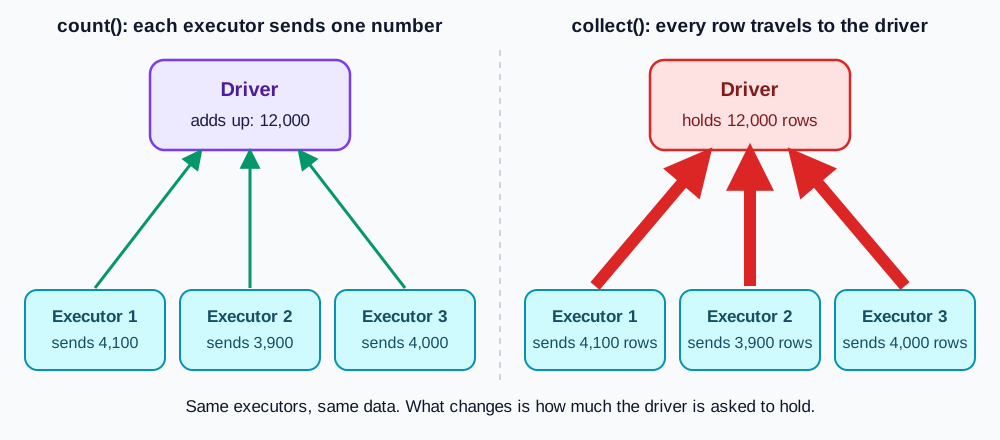
- Use DataFrame expressions over raw Python logic.
- Treat actions as execution (and cost) boundaries.
- Assume the driver is small. Only send bounded results to it.
- Read physical plans to find shuffles and understand cost.
A limit bounds the returned rows, but upstream sorts, aggregations, or selective filters may still process the full dataset. Inspect the plan before assuming a limit makes the query fast.
How do you safely summarize groups without collecting rows?
The exercise below asks you to replace collect() with something safer: groupBy("order_status").agg(F.sum("order_total").alias("total_paid_amount")).
Read it the same way you would read a sentence. groupBy("order_status") gathers rows into buckets, one bucket per distinct status value, such as paid, pending, or cancelled.
- orders Table
- groupBy('order_status')
- agg(F.sum('order_total'))
- 1 Row Per Status Bucket
Then agg(...) computes one summary number per bucket instead of handing back every row.
F.sum("order_total") is the number being computed, the total order value in that bucket. The alias call gives that computed column a readable name instead of a long default.
This matters because the summary has only one small row per group, no matter how many millions of rows went into computing it. agg() itself is a transformation: it describes the summary, and an action such as show() or collect() brings those few rows back.
That is the opposite of collect() on the raw rows, which tries to send back every single row. The summary is safe to collect on large data. The raw rows are not.
Common beginner questions
What architectural questions do beginners ask most often?
Here are three fundamental questions beginner data engineers encounter when learning distributed Spark architecture.
How is Spark different from pandas?
Pandas runs on one machine and holds all data in memory. Spark distributes data across a cluster of machines. Pandas is eager, while Spark builds lazy plans that execute on actions. Use pandas for small data and Spark for large data.
What is a partition?
A partition is a chunk of the dataset that one task processes. A DataFrame might be split into 200 partitions, each handled by a separate task on the cluster. More partitions allow more parallelism, but too many create scheduling overhead.
Why is lazy evaluation useful?
It lets Spark optimize the entire plan before executing. For example, Spark can push a filter close to the data source or skip unused columns before moving bytes across nodes.
Lazy evaluation allows Spark to optimize the full execution plan before touching a single byte on disk.
What comes next
What comes after understanding cluster architecture?
Now that you understand the architecture, you are ready to manipulate DataFrames directly: loading data, inspecting schemas, selecting columns, and filtering rows.
Driver coordinates the application and compiles lazy DAG plans.
- Python Script
- Logical Plan
- DAG Scheduler
Cluster manager allocates executors across worker compute nodes.
- Cluster Manager
- Worker Nodes
- Executors
Narrow operations pipeline; wide operations trigger network shuffles.
- Narrow Pipeline
- Shuffle Barrier
- Stage Boundary
Executors aggregate results, returning bounded data to driver.
- Executor Tasks
- Partial Aggregation
- Safe Preview
In the next lesson, you will master the foundational vocabulary of Spark DataFrames and learn how to construct production data transformations.
- The driver coordinates and schedules; executors process partition tasks in parallel.
- Transformations build lazy plans while actions trigger physical execution.
- DataFrames give the Catalyst optimizer full visibility into schemas and operations.
- Never pull large tables to the driver with collect(); use bounded actions and aggregations.
Practice
Load orders with spark.table('orders'). Filter to paid orders. Instead of collect(), groupBy('order_status') and agg(F.sum('order_total').alias('total_paid_amount')) for a safe 1-row summary, then separately assign a 5-row limit of the filtered DataFrame to result.
The goal is practicing the distinction between a lazy plan (filter, groupBy) and the actions that trigger execution (agg's underlying count, show), while keeping bulk rows off the driver. The summary only runs when an action such as show() or collect() asks for it.
Going further: partitions are the unit of parallel work
The lesson says executors process partitions. A partition is a slice of the data, and Spark runs one task per partition, so the number of partitions decides how much work can happen at once. You can read that number and change it.
This program starts Spark on 2 local cores, creates 1,000 rows and then asks for 8 partitions. Predict the three numbers before you open the output.
from pyspark.sql import SparkSession

spark = SparkSession.builder.master("local[2]").getOrCreate()

df = spark.range(1000)
print("partitions before:", df.rdd.getNumPartitions())
wide = df.repartition(8)
print("partitions after :", wide.rdd.getNumPartitions())
print("rows still :", wide.count())partitions before: 2 partitions after : 8 rows still : 1000
The rows did not change. Only the way they are sliced did. With 2 cores, the first run had 2 slices and 2 tasks. After repartition(8) there are 8 slices, which means 8 tasks queue up for the 2 cores.
The partition count is a dial, not a fixed fact.
| Situation | What happens | Typical fix |
|---|---|---|
| Very few partitions on a big cluster | Most executors sit idle | Increase the partition count |
| Thousands of tiny partitions | Task start-up time dominates the work | Reduce the partition count |
| One huge partition | One task is slow while the rest wait | Repartition on a more even column |
The number on your machine can differ, because the default depends on the cores available. The pattern is the same everywhere: read the count, then decide whether the work is spread evenly.
Try a new scenario
A job runs on 40 cores, but the Spark screen shows that only 4 tasks are running at a time, each taking 10 minutes. What do you check first?
Work it out, then open the answer
Check the number of partitions of the data being processed. With 4 partitions there are only 4 tasks, so 36 cores have nothing to do. Increasing the count, with repartition or by reading the data in more files, lets all 40 cores work at the same time. Do it before the expensive step, not after.
Does repartition cost anything?
Yes. It moves rows between executors across the network, which is a shuffle. It is worth it when it fixes badly uneven or too few partitions, and wasteful when the layout was already fine.
Close the lesson and explain it
Without scrolling up, explain how the number of partitions relates to the number of tasks, and why 4 partitions on 40 cores wastes the cluster.
Practicals · load into the editor
After you read the theory, run these in the pane on the right. They execute in this tab, no cluster.
Finished this lesson?
Mark it as read when you could explain it to someone else.