

Overview
The driver runs your script. Executors process partitions. Jobs are split so many machines can work at once.
On this page7 sections
The picture
The driver sends tasks. Each executor works on partitions. This tab has no real workers.
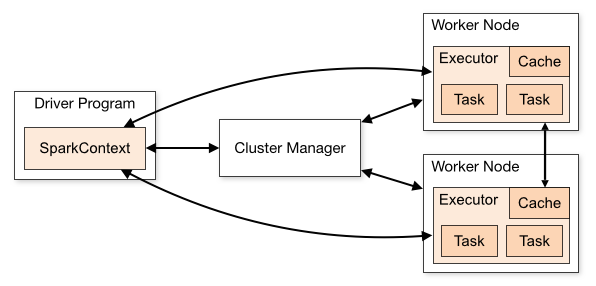
A Spark cluster is a group of machines that share a job. One process, the driver, runs your Python script and holds the plan. Other processes, the executors, sit on worker machines and process chunks of data called partitions. The driver is the coordinator. Executors do the heavy lifting.
A partition is one pile of rows that a single task can process. Spark splits a large table into many partitions so many tasks can run at the same time. If you had only one partition, you would have only one pile, and extra machines would sit idle.
A later lesson (architecture) goes deeper on lazy plans, RDDs, and collect(). This lesson stays beginner: who does the work, why the work is split, and why pulling every row back to the driver is a bad idea.
Why this shape
When a daily paid-orders report is slow, the cause is often not "Python is slow." It is that the driver tried to hold too much, or that all rows sat in one partition, or that a shuffle sent most keys to one executor. You cannot debug that if "cluster" is a cloud buzzword instead of driver plus executors plus partitions.
Even in this tab, you will call count() (an action the driver requests) and limit(5) (a bound so the driver only sees a sample). Those habits match production: ask for summaries and samples, not the whole lake in one list.
Walk the boxes
The driver is a foreman with a clipboard. Executors are crews in other rooms. Partitions are pallets. The foreman never carries every box into the office.
Your script lives on the driver. Transformations (filter, select) update the clipboard. Actions (count, show) radio the crews. Results that must be printed come back to the driver in a small package. collect() asks for every row. That is how driver memory dies on a real cluster.
You will meet lazy evaluation again in the architecture lesson. The split of roles stays the same.
| Name | Role | Beginner takeaway |
|---|---|---|
| Driver | Runs your code, builds the plan, collects small results | Keep it small. Do not collect the lake. |
| Executor | Worker process that runs tasks | This is where partitions are processed. |
| Partition | A chunk of rows for one task | More piles can mean more parallelism. |
| Task | One unit of work, usually one partition | The job is a bunch of tasks, not one Python loop. |
Each box is a partition. Filter can run on each pile without moving rows yet.
A matching example
Run the example below in this tab. Read the input, follow the code, then check the output matches what you expect.
df = spark.table("orders").filter("order_status = 'paid'")
print("paid count", df.count())
result = df.limit(5)
result.show()
filter is planned on the driver and executed on partitions. count() is the whistle: run the plan, return one number. limit(5) keeps the grid small. You will use this pattern in the architecture lesson too, with more theory.
orders = spark.table("orders")
paid = orders.filter("order_status = 'paid'")
print("still a plan until an action")
print("count =", paid.count())
result = paid.limit(5)
result.show()
Assigning paid = orders.filter(...) does not copy all paid rows onto the driver. It names a plan. count() and show() are what demand work.
collect() is not a preview
show() and limit() are for looking. collect() builds a Python list of every row. Skip collect() on large data. Prefer count(), show(), or a write.
If you know Pandas, here is the translation
pandas has no driver or executors. The whole DataFrame is in one process. df[df['order_status']=='paid'] runs immediately. Spark's filter waits for count() or show(). That delay is how Spark can split work across machines.
Copy-paste without reading the output
Run Sample first. If the numbers or row count look wrong, stop and re-read the previous section before changing code.
Common beginner questions
Is this tab a real cluster?
No. There is one process in your browser tab simulating the API. Learn the names here. On a company cluster, the Spark UI shows driver and executor metrics for real.
How many partitions should I have?
Enough that tasks stay busy, not so many that scheduling tiny piles dominates. You will practice repartition later. For now, know that splits exist.
Why does architecture come after this?
This lesson is the cast of characters. Architecture adds laziness, DAGs, and why DataFrames beat old RDD code. Overlap is intentional.
What comes next
Crews need files to work on. The next lesson is reading and writing data: Parquet, CSV, JSON on a cluster, and spark.table in this tab.
Practice
Run Sample to filter paid orders. Then complete Exercise: load spark.table("orders"), filter paid, print the count, and set result to a 5-row limit of that filter.
You are rehearsing driver vs work: filter is the plan, count is the action, limit keeps the sample small.
Practicals · load into the editor
After you read the theory, run these in the pane on the right. They execute in this tab, no cluster.