
Overview
Files are a common input for data jobs. Read CSV, newline-delimited JSON, and text safely, and close the file even when a read fails.
On this page8 sections
What you will do
Most data starts life as a file: a CSV export, a JSON download, a log. Python has to open the file, read what it needs, and let go of it again.
In this lesson you will write a small file, read it back one line at a time, and learn why every file read starts with the words with open.
What does it look like to write a file and read it back?
Two lines of order data go into a file, then a second block reads them back. Predict the three lines it prints.
lines = ["ORD-1,paid,120.50", "ORD-2,cancelled,40.00"]

with open("/tmp/orders.txt", "w") as f:
    for line in lines:
        f.write(line + "\n")

with open("/tmp/orders.txt") as f:
    for line in f:
        print(line.strip())

print("closed:", f.closed)ORD-1,paid,120.50 ORD-2,cancelled,40.00 closed: True
- open(path, "w") opens a file to write. Leave the second word out and Python opens it to read.
- f is a name for the open file. The with block gives you f and takes it away again.
- \n is a new-line mark. Each write needs one, or the lines run together.
- for line in f hands you one line at a time. strip() removes the new-line mark so print does not leave blank lines.
- After the block ends, f.closed is True. Python closed the file for you.
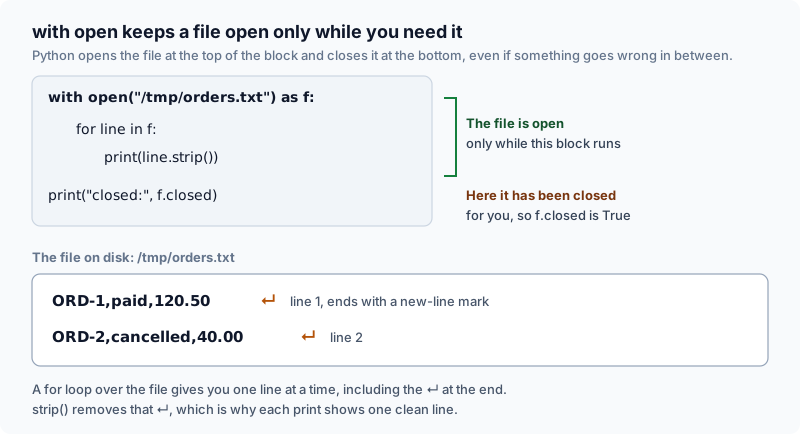
Open a file with with. Python then closes it for you, whatever happens.
The 3 steps of safe file reading
Every file job follows the same three steps: open the file, read the rows, close the file. The with statement does the first and the last for you.
- open the file
- read rows
- close the file
The rest of the lesson uses a sample order file stored at /data/orders.csv.
5 sample orders. Every value in a CSV file arrives as text, even the totals.
| order_id | status | total | country |
|---|---|---|---|
| ORD-1 | paid | 120.50 | IN |
| ORD-2 | cancelled | 40.00 | US |
| ORD-3 | paid | 88.25 | IN |
| ORD-4 | paid | 15.00 | GB |
| ORD-5 | refunded | 210.00 | IN |
with open(...) as f is called a context manager. It asks the operating system for the file, calls it f inside the block, and closes it the moment the block ends.
Matching readers to file formats
Different file types mark where one record ends in different ways. Pick the reader that matches the type, or the data will be read wrongly or not at all.
Each format defines distinct record boundaries. Match the Python parser to the file structure.
A wrong reader either garbles the data without telling you, or crashes.
Select the reader that matches the incoming format. Incompatible parsers fail on record boundaries.
| Format | Parser | Streaming support | Ingestion risk |
|---|---|---|---|
| CSV | csv.DictReader | Yes (row by row) | All columns start as text strings |
| NDJSON | json.loads per line | Yes (line by line) | Accidentally calling json.load on multi-line feeds |
| JSON | json.load | No (reads entire document into RAM) | Memory exhaustion on large multi-megabyte payloads |
| Plain log | for line in f | Yes (line by line) | Requires manual delimiter parsing |
CSV, NDJSON and log files can be read one row at a time. A single JSON document has to be loaded whole, so a very large one can fill your memory.
Words you will see in this lesson
Six words. The rest of the lesson uses only these.
| Word | What it means |
|---|---|
| File | Data saved on disk under a name |
| open | The Python call that gives you access to a file |
| Context manager | The with statement, which closes the file for you |
| CSV | A text file with one row per line and commas between columns |
| Encoding | The way characters are stored in a file, such as UTF-8 |
| Temporary file | A scratch file you write first and rename when it is complete |
Why this skill
A real pipeline opens thousands of files a day. If it forgets to close them, or writes them badly, workers crash and tables fill with half-written data.
Automatic cleanup with context managers
A plain open() call leaves closing to you, and people forget. With with, Python does it. Predict whether f.closed is True or False inside the block, after it, and after an error:
with open("/data/orders.csv", newline="", encoding="utf-8") as f:
    print("inside with:", f.closed)
print("after with:", f.closed)

try:
    with open("/data/orders.csv", newline="", encoding="utf-8") as g:
        raise RuntimeError("read failure")
except RuntimeError:
print("after error:", g.closed)inside with: False after with: True after error: True
The file was closed even when an error interrupted the block. That promise is why with open is the standard way to open files.
Using with open(...) guarantees the file closes the moment the indented block exits, even if an exception occurs mid-read.
Preventing file descriptor leaks
Each open file uses one slot from a limited supply that the operating system gives your program. A job that opens files in a loop and never closes them eventually runs out of slots.
OSError: [Errno 24] Too many open files: '/data/orders.csv'
Depending on host configuration, operating systems cap how many files one process can hold open, often at a few hundred to a few thousand (for example 256 or 1,024 by default). Leaks cause jobs to fail hours after the defect occurred.
Always open files with context managers so file handles close cleanly on every execution path.
Atomic writes with temporary files
If a job crashes halfway through writing daily_orders.csv, the next job reads half a file. The safe way is to write to a temporary file first and rename it to the real name only when it is complete.
import os

final = "/tmp/daily_orders.csv"
tmp = final + ".tmp"

with open(tmp, "w", newline="", encoding="utf-8") as f:
    f.write("order_id,total\nORD-1,120.50\n")

os.replace(tmp, final)
print(os.path.exists(tmp), os.path.exists(final))False True
os.replace swaps the finished temporary file in as the real file in one step, when both are on the same disk. A reader sees either the old complete file or the new complete file, never a half-written one.
Memory efficiency of streaming readers
A CSV reader yields 1 row at a time. Wrapping the reader in list() forces every row into memory simultaneously.
import csv

with open("/data/orders.csv", newline="", encoding="utf-8") as f:
    reader = csv.DictReader(f)
    print(next(reader)["order_id"])
    print(len(list(reader)))
    print(len(list(reader)))
Predict what the second and third print statements output:
ORD-1
4
0
The initial call to next() extracted 1 record. The first list() consumed the remaining 4 records. The second list() returned an empty list because readers are single-pass iterators.
Iterate over file readers directly rather than loading entire datasets into memory with list().
How the code works
Python built-in modules provide dedicated classes for delimited tables, JSON objects, and operating system paths.
Parsing CSV rows with DictReader
The csv.DictReader class reads the header line as column names and turns every subsequent row into a dictionary.
import csv

with open("/data/orders.csv", newline="", encoding="utf-8") as f:
    rows = list(csv.DictReader(f))

print("Total rows:", len(rows))
print("First row:", rows[0])
print("Column names:", list(rows[0].keys()))
print("Paid orders:", sum(1 for row in rows if row["status"] == "paid"))
Predict the total row count and number of paid orders:
Total rows: 5
First row: {'order_id': 'ORD-1', 'status': 'paid', 'total': '120.50', 'country': 'IN'}
Column names: ['order_id', 'status', 'total', 'country']
Paid orders: 3
Each dictionary maps header strings to row values. However, notice that the total column contains a string '120.50' rather than a floating-point number.
Numeric casting on CSV strings
All values returned by csv.DictReader are strings. Mathematical operators perform text concatenation unless you cast numeric fields explicitly.
import csv

with open("/data/orders.csv", newline="", encoding="utf-8") as f:
    first = next(csv.DictReader(f))

print(first["total"] * 2)
print(float(first["total"]) * 2)
Predict what prints for text multiplication versus numeric multiplication:
120.50120.50
241.0
Multiplying a string duplicates text characters. Multiplying after float() computes the correct monetary sum. Cast incoming columns as soon as you read them.
DictReader yields string values for all columns, including numeric totals. Always convert values with float() or int() before performing calculations.
Handling missing and required columns
Accessing an unknown key with brackets raises KeyError, whereas the .get() method returns a fallback value.
import csv

with open("/data/orders.csv", newline="", encoding="utf-8") as f:
    first = next(csv.DictReader(f))

print(first.get("discount"))
try:
    print(first["discount"])
except KeyError as exc:
print(f"KeyError: {exc}")None KeyError: 'discount'
Use square brackets for mandatory columns so corrupted schemas halt execution early. Use .get() only for optional attributes with safe defaults.
Quoted delimiters and CSV parsers
Splitting raw lines with str.split(',') fails when fields contain embedded commas inside quotes.
import csv
import io

line = 'ORD-9,"123 Main St, Suite 4",paid'
print(line.split(","))
print(next(csv.reader(io.StringIO(line))))['ORD-9', '"123 Main St', ' Suite 4"', 'paid'] ['ORD-9', '123 Main St, Suite 4', 'paid']
Naive splitting fragmented the street address across two indices, shifting all downstream columns out of alignment. The csv module handles quoted delimiters correctly.
Parsing newline-delimited JSON streams
Event pipelines frequently stream records as NDJSON, where each line represents an independent JSON document.
import json

with open("/data/events.ndjson", encoding="utf-8") as f:
    events = [json.loads(line) for line in f if line.strip()]

print("Event count:", len(events))
print(events[0])
print([e["type"] for e in events])Event count: 4
{'event_id': 'e1', 'user': 'U001', 'type': 'purchase', 'amount': 120.5}
['purchase', 'page_view', 'purchase', 'add_to_cart']
Each line forms a self-contained JSON document. Parsing line-by-line enables streaming arbitrarily large event datasets without loading the entire file into memory.
Single documents versus multi-line records
Calling json.load() on an NDJSON stream attempts to parse the entire file as a single document and crashes immediately.
import json

try:
    with open("/data/events.ndjson", encoding="utf-8") as f:
        json.load(f)
except json.JSONDecodeError as exc:
print(f"JSONDecodeError: {exc}")JSONDecodeError: Extra data: line 2 column 1 (char 65)
The parser read the first line object and then encountered extra text on line two. Remember that json.load expects one document, whereas json.loads parses one string.
Use json.load on a file handle for single documents, and json.loads on each line for NDJSON streams.
Reading log files line by line
Plain text log files have no standard parser. Iterate over the file handle directly to read lines lazily.
with open("/data/access.log", encoding="utf-8") as f:
    for number, line in enumerate(f, start=1):
        if number > 2:
            break
print(number, line.rstrip())1 2026-08-01T08:01:00Z GET /orders 200 line=1 2 2026-08-01T08:02:00Z GET /orders 200 line=2
Each raw line preserves its trailing newline character. Strip the trailing newline with rstrip() before logging, parsing, or matching regex patterns.
Line endings and UTF-8 encoding
Pass newline='' when you open a file for the csv module, and pass encoding='utf-8' for text files, so the same code behaves the same on every machine.
Include newline and encoding parameters explicitly on every text file open statement.
| Argument | Purpose | Default omission risk |
|---|---|---|
| newline="" | Delegates line termination parsing to csv module | Extra blank lines on Windows or truncated multi-line cells |
| encoding="utf-8" | Specifies standard character byte encoding | Platform-dependent encoding defaults that corrupt text |
Naming the encoding means the job does not depend on each machine's default, so it reads the same text on a laptop, in a container, and on a cloud worker.
Writing structured records with DictWriter
The csv.DictWriter class formats Python dictionaries into CSV lines. The fieldnames argument fixes the column sequence.
import csv

rows = [
    {"order_id": "ORD-1", "amount": 120.50},
    {"order_id": "ORD-3", "amount": 88.25},
]

with open("/tmp/paid_orders.csv", "w", newline="", encoding="utf-8") as f:
    writer = csv.DictWriter(f, fieldnames=["order_id", "amount"])
    writer.writeheader()
    writer.writerows(rows)

with open("/tmp/paid_orders.csv", newline="", encoding="utf-8") as f:
print(f.read())order_id,amount ORD-1,120.5 ORD-3,88.25
The writeheader() method emits the column labels, and writerows() outputs each record in uniform order.
Write mode truncation versus appending
Opening a file with mode 'w' truncates existing content immediately upon opening. Mode 'a' appends new content to the end.
path = "/tmp/note.txt"
with open(path, "w", encoding="utf-8") as f:
    f.write("first\n")
with open(path, "a", encoding="utf-8") as f:
    f.write("second\n")
with open(path, encoding="utf-8") as f:
    print(f.read().split())

with open(path, "w", encoding="utf-8") as f:
    pass
with open(path, encoding="utf-8") as f:
print(repr(f.read()))['first', 'second'] ''
Even an empty with block opened with mode 'w' wipes the existing file. The truncation happens during open, not during write.
Inspecting file paths with pathlib
The pathlib module provides an object-oriented interface for inspecting filenames, parents, and extensions without string slicing.
from pathlib import Path

landing = Path("/data/orders.csv")
print(landing.name, landing.stem, landing.suffix)
print(landing.parent)
print(landing.exists())orders.csv orders .csv /data True
Path objects encapsulate platform-specific separator rules and provide clean attributes for file manipulation.
Path attributes replace brittle string splitting operations on file paths.
| Attribute | Description | Value for /data/orders.csv |
|---|---|---|
| .name | Complete filename with extension | 'orders.csv' |
| .stem | Base filename without extension | 'orders' |
| .suffix | File extension including the period | '.csv' |
| .parent | Directory holding the file | Path('/data') |
Worked examples
Combine file parsing techniques into an end-to-end ingestion workflow.
Calculating paid revenue from disk
Stream records from /data/orders.csv, filter for paid orders, sum the converted totals, and count event logs.
import csv
import json

with open("/data/orders.csv", newline="", encoding="utf-8") as f:
    paid_totals = [
        float(row["total"])
        for row in csv.DictReader(f)
        if row["status"] == "paid"
    ]

with open("/data/events.ndjson", encoding="utf-8") as f:
    events = [json.loads(line) for line in f if line.strip()]

print("Paid total:", sum(paid_totals))
print("Event count:", len(events))
Predict the total revenue and event count:
Paid total: 223.75
Event count: 4
The 2 files are ingested independently. Summing 120.50, 88.25, and 15.00 produces total paid revenue of 223.75.
Batch processing with bounded memory
Large production files cannot fit entirely into RAM. Process incoming rows in fixed-size batches to maintain a constant memory footprint.
import csv

batch = []
with open("/data/orders.csv", newline="", encoding="utf-8") as f:
    for row in csv.DictReader(f):
        batch.append(row["order_id"])
        if len(batch) == 2:
            print("Processed batch:", batch)
            batch.clear()
    if batch:
        print("Processed batch:", batch)
batch.clear()Processed batch: ['ORD-1', 'ORD-2'] Processed batch: ['ORD-3', 'ORD-4'] Processed batch: ['ORD-5']
Processing records in bounded batches keeps memory usage flat regardless of whether the source file holds 5 rows or 50 million rows.
Pipeline replay on raw orders
with open requests a file handle for orders.csv and guarantees closure.
- open orders.csv
DictReader maps column headers to dictionary keys for each row.
- open orders.csv
- stream rows
The pipeline filters for paid status and casts text amounts to float.
- stream rows
- filter paid
- cast float
DictWriter exports the aggregated records with uniform headers.
- filter paid
- write output
The context manager closes the file handle when the block finishes.
- write output
- closed
Five operational rules for file handling in data pipelines:
- Always open files with context managers so descriptors close cleanly on all code paths.
- Match the parser to the data format: DictReader for CSV, json.loads per line for NDJSON.
- Cast CSV values with float() or int() before performing numerical calculations.
- Stream records line-by-line rather than loading whole files into memory with list().
- Write data to temporary files before renaming so readers never encounter partial writes.
Common beginner questions
Why is newline='' required when reading CSV files?
The csv module handles line ending translations internally. Passing newline='' prevents the Python runtime from adding extra carriage returns on Windows, which would create blank rows or corrupt multi-line fields.
Why must I specify encoding='utf-8' explicitly?
Operating systems default to different text encodings such as Windows-1252 or ASCII. Setting encoding='utf-8' guarantees that your script interprets character bytes consistently across all operating systems and cloud environments.
What is the difference between json.load and json.loads?
json.load takes an open file object and parses a single JSON document. json.loads takes a string. Because NDJSON files contain one JSON document per line, you must call json.loads on each individual line.
What happens if an input file does not exist?
Calling open() on a nonexistent path raises FileNotFoundError. In production pipelines, failing fast on missing files is preferred because missing source data indicates that an upstream ingestion dependency failed to deliver.
What comes next
You now know how to read and stream files from disk. In the next lesson, we focus on JSON structures: navigating nested dictionaries and handling missing keys.
Practice
Run Sample to inspect CSV rows and event streams. In the Exercise, read /data/orders.csv using csv.DictReader, count the number of rows with status 'paid', assign that count (3) to result, and print it.
Going further: writing a CSV the right way
The lesson reads files. Pipelines also write them, and the first instinct is to join values with commas by hand. That works until a value itself contains a comma, which an address often does.
The program below writes the same two rows twice: once by joining with commas, once with the csv module. It writes to an in-memory buffer so that nothing touches your disk. Predict how many columns each version has for the second row.
import csv
import io

rows = [
    {"order_id": "ORD-1", "address": "12 MG Road", "status": "paid"},
    {"order_id": "ORD-2", "address": "4 Park St, Kolkata", "status": "paid"},
]

by_hand = [",".join(r.values()) for r in rows]
print(by_hand)

buffer = io.StringIO()
writer = csv.DictWriter(buffer, fieldnames=["order_id", "address", "status"])
writer.writeheader()
writer.writerows(rows)
print(buffer.getvalue().splitlines())

print(len(by_hand[1].split(",")), "columns by hand")
print(len(next(csv.reader(io.StringIO(buffer.getvalue().splitlines()[2])))), "columns from the csv module")['ORD-1,12 MG Road,paid', 'ORD-2,4 Park St, Kolkata,paid'] ['order_id,address,status', 'ORD-1,12 MG Road,paid', 'ORD-2,"4 Park St, Kolkata",paid'] 4 columns by hand 3 columns from the csv module
The csv module put quotation marks around the address that contains a comma, so a reader sees it as one value. The hand-made line has 4 columns on a 3-column file, and every later column moves one place to the right.
Reading and writing have matching tools.
| Task | Use | Because |
|---|---|---|
| Read a CSV | csv.DictReader | It handles quotes and gives columns by name |
| Write a CSV | csv.DictWriter | It adds quotes when a value contains a comma |
| Open the file | newline="" and encoding="utf-8" | Stops blank lines on Windows and garbled names |
Try a new scenario
You export 50,000 customer rows with a notes column that sometimes contains line breaks. The finance team says some rows look split in two. Which part of your writing code do you check first?
Work it out, then open the answer
Check whether the file is written with the csv module and opened with newline="". A note with a line break must be wrapped in quotes so a reader treats the break as part of the value. Hand-joined lines cannot do that, and opening without newline="" can add extra breaks on some systems.
Why write to a buffer in the example instead of a real file?
A buffer behaves like a file but lives in memory, so the example has no side effects and runs anywhere. The csv module works the same on a real file object. Swap io.StringIO() for open(path, "w", newline="", encoding="utf-8") when you write a real file.
Close the lesson and explain it
Without scrolling up, explain what goes wrong with a hand-joined CSV row when one value contains a comma, and name the module that prevents it.
Practicals · load into the editor
After you read the theory, run these in the pane on the right. They execute in this tab, no cluster.
Finished this lesson?
Mark it as read when you could explain it to someone else.