
Overview
APIs and event files often arrive as JSON. Parse the text into dictionaries and lists, then pull nested fields while handling missing keys.
On this page8 sections
What you will do
A checkout service sends each order as one line of JSON text. The text holds the order id, the total, the customer's city and a list of items. A dashboard needs just the city and the total.
In this lesson you will turn that text into a Python dictionary, reach the values you need, and see what goes wrong when a field is missing.
What does JSON look like, and how do you read it in Python?
JSON is plain text that labels every value. Curly braces hold named values, square brackets hold a list, and names are in double quotes. The json module turns the text into a dictionary. Predict the five lines.
import json

raw = '{"id": "ORD-1", "total": 49.99, "customer": {"city": "Austin"}, "items": ["pen", "book"]}'
order = json.loads(raw)

print(order["id"])
print(order["total"])
print(order["customer"]["city"])
print(order["items"][0])
print(len(order["items"]))ORD-1 49.99 Austin pen 2
- json.loads reads the text and builds a dictionary. The s stands for string.
- order["id"] looks up the value stored under the key id.
- order["customer"]["city"] goes two levels in: first the customer, then the city inside it.
- order["items"][0] takes the first thing in the list. Lists count from 0.
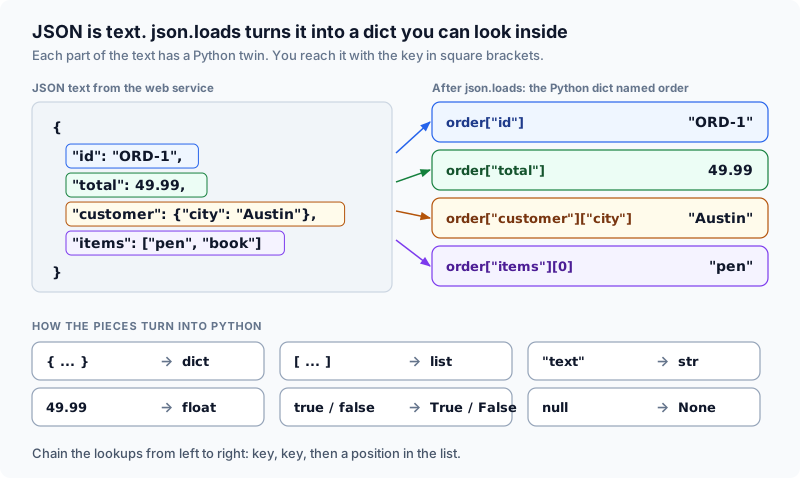
JSON is only text until json.loads turns it into a dictionary. After that it is ordinary Python.
From text to a live dictionary
The path has four stops: the JSON text, json.loads, the Python dict, and then a key lookup. json.dumps walks the same path backwards, from a dict to text.
loads parses strings into dictionaries. Key lookups extract fields. dumps serializes data back to text.
Selecting the right JSON function
The json module has four functions. Two work on text held in a variable, and two work on a file on disk.
The letter s in loads and dumps stands for string. Functions without an s operate on file handles.
| Function | Input argument | Output result | Primary use case |
|---|---|---|---|
| json.loads | String of JSON text | Python dict or list | Parsing API responses and NDJSON records |
| json.dumps | Python dict or list | Serialized string | Formatting payloads for API requests |
| json.load | Open file stream | Python dict or list | Reading complete JSON documents from disk |
| json.dump | Python dict plus file | Writes to file | Saving structured data directly to storage |
Remember it this way: loads and dumps end in s for string. load and dump, with no s, work on an open file.
Words you will see in this lesson
Six words. The rest of the lesson uses only these.
| Word | What it means |
|---|---|
| JSON | A text format that labels each value, like amount: 450 |
| Parse | Read text and turn it into Python objects |
| Serialize | Turn Python objects into text |
| Dictionary | Python's way to store key and value pairs |
| Nested | A value that holds other values inside it |
| null | JSON's word for no value. Python calls it None |
Why this skill
Almost every web service and cloud tool sends data as JSON. If you read it carelessly, you drop fields or turn numbers into text, and the totals on a dashboard quietly go wrong.
JSON as a text interchange format
JSON starts as text, like a sentence. Python cannot look up a key or add a number inside it until json.loads has parsed it, which means read it and build objects from it.
import json

raw = '{"id": "ORD-1", "total": 49.99, "status": "paid"}'
order = json.loads(raw)

print(type(raw).__name__, type(order).__name__)
print(order["id"], order["total"], type(order["total"]).__name__)
Predict the data types of raw and order before and after parsing:
str dict
ORD-1 49.99 float
Before parsing, raw was a single str. After parsing, order is a dict and total is a float ready for aggregation.
Type mapping between JSON and Python
JSON has six kinds of value, and each one has a matching Python type. The code below parses one of each and prints what Python made.
import json

data = json.loads('{"s": "hi", "n": 3, "f": 1.5, "ok": true, "none": null, "list": [1, 2], "obj": {"k": 1}}')
for key, value in data.items():
print(key, repr(value), type(value).__name__)s 'hi' str
n 3 int
f 1.5 float
ok True bool
none None NoneType
list [1, 2] list
obj {'k': 1} dict
JSON uses lowercase true, false, and null. Python translates these to True, False, and None. Dates have no dedicated JSON type and travel as formatted strings.
Numeric fidelity and quoted numbers
In JSON syntax, 49.99 represents a number, while '49.99' represents text characters. Predict the resulting types after parsing:
import json

row = json.loads('{"a": 49.99, "b": "49.99"}')
print(type(row["a"]).__name__, type(row["b"]).__name__)
print(float(row["b"]) + row["a"])float str 99.98
The json.loads function preserves source types faithfully. When external vendors wrap numbers in quotation marks, cast them with float() before computing metrics.
If an API returns '"total": "49.99"' with quotation marks, json.loads keeps it as a Python str. Always convert with float() when a field represents numeric money.
Business meaning of missing attributes
Sometimes a field is simply not there. Decide for each field whether a missing value has an obvious meaning, in which case a default is fine, or whether the record is unusable and should be set aside.
Apply defaults only when the omission has an unambiguous real-world meaning.
| Missing field | Business context | Correct pipeline action |
|---|---|---|
| tip | Customer left no gratuity | Default safely to 0.0 |
| total | Transaction amount missing | Quarantine record for inspection |
| status | Order lifecycle state unknown | Quarantine record for inspection |
Defaulting a missing total to 0.0 quietly corrupts sales metrics. Reject incomplete records to a quarantine dataset so downstream reports remain accurate.
A default is an explicit claim about business reality. Apply defaults only when the business meaning is certain.
Serializing complex types like datetime
JSON has no date type, so json.dumps cannot write a Python datetime and stops with a TypeError. Dates travel as text instead.
import json
from datetime import datetime

record = {"id": "ORD-1", "created": datetime(2026, 8, 1, 8, 0, 0)}

try:
    json.dumps(record)
except TypeError as exc:
    print(f"TypeError: {exc}")

print(json.dumps(record, default=str))
print(json.dumps({**record, "created": record["created"].isoformat()}))TypeError: Object of type datetime is not JSON serializable
{"id": "ORD-1", "created": "2026-08-01 08:00:00"}
{"id": "ORD-1", "created": "2026-08-01T08:00:00"}
Passing default=str provides a quick serialization fallback. For production pipelines, format dates explicitly with isoformat() to adhere to ISO-8601 contracts.
How the code works
The json module ships with Python. The next sections show how to dig into nested data, cope with missing keys and write JSON back out.
Navigating nested arrays and objects
To reach a value deep inside, chain the lookups from left to right: a key, then a position, then another key.
import json

payload = {"orders": [{"id": "ORD-1", "total": 49.99}, {"id": "ORD-2", "total": 18.75}]}

print(payload["orders"][0]["total"])
print(json.dumps(payload))49.99
{"orders": [{"id": "ORD-1", "total": 49.99}, {"id": "ORD-2", "total": 18.75}]}
Chaining payload['orders'][0]['total'] walks through the dictionary key, accesses the first list element, and extracts the total field.
Defensive attribute access with get
Square brackets raise a KeyError when the key is missing. The .get() method returns a fallback you choose instead, so one missing field does not stop the job.
import json

raw = """
{"orders": [
  {"id": "ORD-1", "total": 49.99, "tip": 3.50, "customer": {"city": "Austin"}},
  {"id": "ORD-2", "total": 18.75, "customer": {"city": "Denver"}}
]}
"""
payload = json.loads(raw)

for order in payload["orders"]:
    tip = order.get("tip", 0.0)
    city = order.get("customer", {}).get("city", "unknown")
    print(f"{order['id']} in {city}: total {order['total']}, tip {tip}")

try:
    print(payload["orders"][1]["tip"])
except KeyError as exc:
print(f"KeyError: {exc}")ORD-1 in Austin: total 49.99, tip 3.5 ORD-2 in Denver: total 18.75, tip 0.0 KeyError: 'tip'
Directly accessing order['tip'] on ORD-2 halts the pipeline. Using order.get('tip', 0.0) provides a safe numerical default.
Filtering valid records and quarantining anomalies
A real batch has a few bad records. Keep the good ones and set the incomplete ones aside so you can look at them later.
orders = [
    {"id": "ORD-1", "total": 49.99},
    {"id": "ORD-2", "total": 18.75},
    {"id": "ORD-5"},
]

good = [o for o in orders if "total" in o]
skipped = [o["id"] for o in orders if "total" not in o]

print(round(sum(o["total"] for o in good), 2))
print("quarantined:", skipped)68.74 quarantined: ['ORD-5']
Separating verified records from incomplete entries preserves data integrity without crashing the broader ingestion job.
Formatting and deterministic serialization
json.dumps can also tidy the text. indent=2 spreads it over lines for people to read, and sort_keys=True puts the keys in the same order every time.
import json

order = {"status": "paid", "id": "ORD-1", "total": 49.99}
print(json.dumps(order, sort_keys=True))
print(json.dumps(order, indent=2, sort_keys=True)){"id": "ORD-1", "status": "paid", "total": 49.99}
{
"id": "ORD-1",
"status": "paid",
"total": 49.99
}
Setting sort_keys=True ensures consistent key order across runs. Omit indentation in high-volume pipelines to minimize payload size over network connections.
Safe dictionary chaining across optional levels
Chaining .get('customer', {}) returns an empty dictionary if customer is missing, allowing subsequent lookups without exceptions.
order = {"id": "ORD-3", "total": 5.0}

print(order.get("customer", {}).get("city", "unknown"))

try:
    print(order["customer"]["city"])
except KeyError as exc:
print(f"KeyError: {exc}")unknown KeyError: 'customer'
If customer is missing, the fallback dictionary prevents an AttributeError or KeyError on downstream access.
Chain .get() with an empty dictionary default to navigate nested payloads defensively.
Null values versus absent keys
When an API marks an optional address as null, order.get('customer', {}) returns None rather than a dictionary.
import json

order = json.loads('{"id": "ORD-4", "customer": {"address": null}}')

try:
    print(order["customer"]["address"]["city"])
except TypeError as exc:
    print(f"TypeError: {exc}")

address = order.get("customer", {}).get("address") or {}
print(address.get("city", "unknown"))TypeError: 'NoneType' object is not subscriptable unknown
The or {} pattern catches both missing keys and keys holding null values, ensuring the subsequent .get call succeeds.
Null detection versus key membership
A key holding null indicates an explicit empty value, whereas an absent key indicates the attribute was never recorded.
import json

a = json.loads('{"id": "ORD-1", "discount": null}')
b = json.loads('{"id": "ORD-1"}')

print(a.get("discount"), b.get("discount"))
print("discount" in a, "discount" in b)None None True False
Using the in operator reveals whether a key exists, even if its value is None.
Handling schema drift and type changes
When an upstream service restructures a field from a flat string to a nested dictionary, naive code fails with AttributeError.
old = {"address": "123 Market St"}
new = {"address": {"street": "123 Market St", "suite": "4B"}}

print(old["address"].upper())
try:
    print(new["address"].upper())
except AttributeError as exc:
print(f"AttributeError: {exc}")123 MARKET ST AttributeError: 'dict' object has no attribute 'upper'
Validate payload structures at the ingestion boundary before running transformation logic on incoming records.
String inputs versus file streams
Passing a string to json.load instead of json.loads raises AttributeError because strings do not implement a .read() method.
import json

raw = '{"id": "ORD-1", "total": 49.99}'

try:
    json.load(raw)
except AttributeError as exc:
    print(f"AttributeError: {exc}")

print(json.loads(raw)["total"])AttributeError: 'str' object has no attribute 'read' 49.99
Remember that json.loads parses in-memory strings, while json.load reads from file streams.
json.loads with an 's' parses a text string in memory. json.load without an 's' expects an open file object. Mixing them produces an AttributeError or TypeError.
Valid JSON syntax versus Python dictionaries
Python dictionary representations use single quotes, whereas JSON standards mandate double quotes.
import json

printed = "{'id': 'ORD-1', 'total': 49.99}"

try:
    json.loads(printed)
except json.JSONDecodeError as exc:
    print(f"JSONDecodeError: {exc}")

print(json.loads(json.dumps({"id": "ORD-1", "total": 49.99})))JSONDecodeError: Expecting property name enclosed in double quotes: line 1 column 2 (char 1)
{'id': 'ORD-1', 'total': 49.99}
Always serialize Python objects using json.dumps rather than printing dictionary representations directly.
Key normalization and string conversion
JSON object keys must always be strings. Non-string keys are converted to strings during serialization.
import json

print(json.loads(json.dumps({1: "a"})))
print(json.dumps({"city": "Zürich"}))
print(json.dumps({"city": "Zürich"}, ensure_ascii=False)){'1': 'a'}
{"city": "Z\u00fcrich"}
{"city": "Zürich"}
Because integer keys become string keys in JSON, lookups must use string keys after deserialization.
Round-trip file serialization
The json.dump and json.load functions serialize and deserialize data directly to and from file handles on disk.
import json

order = {"id": "ORD-1", "total": 49.99, "status": "paid"}

with open("/tmp/order.json", "w", encoding="utf-8") as f:
    json.dump(order, f, indent=2)

with open("/tmp/order.json", encoding="utf-8") as f:
    print(f.read())

with open("/tmp/order.json", encoding="utf-8") as f:
print(json.load(f) == order){
"id": "ORD-1",
"total": 49.99,
"status": "paid"
}
True
Writing with json.dump and reading with json.load preserves dictionary structure across file persistence.
Fault isolation in multi-line event feeds
In NDJSON files, each line is an independent JSON document, isolating syntax errors to specific records.
import json

lines = [
    '{"event_id": "e1", "type": "purchase"}',
    '{"event_id": "e2", "type": ',
    '{"event_id": "e3", "type": "page_view"}',
]

good, quarantine = [], []
for number, line in enumerate(lines, start=1):
    try:
        good.append(json.loads(line))
    except json.JSONDecodeError:
        quarantine.append(number)

print(len(good), "good, bad lines:", quarantine)2 good, bad lines: [2]
Quarantining corrupted lines allows the ingestion pipeline to process valid records uninterrupted.
Worked examples
Evaluate high-volume ingestion architecture and practical processing constraints.
NDJSON architecture for high-volume pipelines
Modern data platforms prefer NDJSON over giant monolithic JSON arrays for high-throughput event processing.
NDJSON provides fault isolation and streaming scalability for event systems.
| Dimension | NDJSON (line-by-line) | Monolithic JSON array |
|---|---|---|
| Memory footprint | Constant O(1) bounded buffer per line | Full payload loaded into memory at once |
| Fault isolation | Corrupted line 4 does not block line 5 | Single syntax error halts entire ingestion |
| Streaming ingestion | Append lines continuously to log files | Cannot append without rewriting ending bracket |
Monolithic JSON arrays require parsing the entire file before any record can be processed.
Memory overhead of parsed objects
Parsed Python objects consume significantly more memory than raw serialized text.
import json
import sys

raw = '{"id": "ORD-1", "total": 49.99, "status": "paid"}'
order = json.loads(raw)
print("text bytes:", len(raw))
print("dict alone:", sys.getsizeof(order))text bytes: 49 dict alone: 184
A 1 GB text file can take several times that much RAM once it is parsed into Python dictionaries and lists.
For most pipelines the standard json module is enough. Faster third-party parsers exist if profiling shows that parsing is the bottleneck.
Pipeline replay on a raw order
A checkout service emits ORD-1 as a serialized JSON string.
- raw text
json.loads parses the string into a live Python dictionary.
- raw text
- parsed dict
Chained key lookups and .get() retrieve nested customer and total fields.
- parsed dict
- fields
Incomplete records without totals are diverted to quarantine.
- fields
- valid records
- quarantine
json.dumps serializes transformed records back to deterministic JSON.
- valid records
- json text
Five operational rules for JSON handling in data pipelines:
- Parse text at the boundary with json.loads before processing records.
- Use loads and dumps for strings, and load and dump for file streams.
- Use .get() with defaults only when the absence of a field has a clear business meaning.
- Defend against null values with the
or {}pattern when traversing nested objects. - Prefer NDJSON for high-volume event streams to achieve fault isolation and bounded memory usage.
Common beginner questions
Why did my number stay a string after parsing?
Because the incoming JSON wrapped the number in quotation marks like '"total": "49.99"'. The json.loads parser respects the original types. Cast values with float() or int() when you know an attribute represents a numeric metric.
What is NDJSON and why is it used?
Newline-delimited JSON formats data with one complete JSON object per line. It enables ingestion workers to stream records line-by-line with constant memory usage and isolate syntax errors to individual rows without dropping the entire dataset.
Can JSON represent dates and timestamps?
No. JSON has only six data types: string, number, boolean, null, array, and object. Timestamps travel as strings, typically in ISO-8601 format like '2026-08-01T08:00:00Z'. Ingestion workers must parse these strings into datetime objects explicitly.
How is a JSON string different from a Python dictionary?
A JSON string is raw text used to transmit data across networks or files. A Python dictionary is an active data structure stored in memory. The json.loads and json.dumps functions bridge the two formats.
What comes next
You now know how to parse, navigate, and serialize JSON data safely. In the next lesson, we connect to HTTP APIs to fetch live JSON datasets over the network.
Practice
Run Sample to parse one order. Then complete Exercise: parse the raw order string with json.loads, assign the numeric total (49.99) to result, and print it.
Going further: what changes on the way through JSON
json.dumps followed by json.loads should give you the same data back. For most records it does. For a few Python types it quietly changes them, and the surprise shows up later in a join or a lookup.
This record holds a tuple, an integer key and a set-like list. Predict which parts come back different after the round trip.
import json

record = {
    "id": "ORD-1",
    "coords": (12.97, 77.59),
    "stock": {101: "tea", 102: "samosa"},
}

back = json.loads(json.dumps(record))

print(back["coords"], type(back["coords"]).__name__)
print(list(back["stock"].keys()))
print(back == record)[12.97, 77.59] list ['101', '102'] False
JSON has only lists, not tuples, so the tuple came back as a list. JSON object keys are always text, so the key 101 came back as "101". The two records are no longer equal, which is why a lookup with stock[101] now fails.
What survives and what does not.
| Python value | After dumps then loads | Fix |
|---|---|---|
| Tuple (1, 2) | List [1, 2] | Convert back with tuple(...) if you need one |
| Integer key 101 | Text key "101" | Use text keys on purpose, or int(key) after loading |
| datetime | Not allowed | Write an ISO text value and parse it back |
| Plain numbers, text, True, None | Unchanged | Nothing to do |
Try a new scenario
A cache stores {42: "gold"} as JSON and a later job loads it and runs cache[42]. The job fails with a KeyError. What happened, and what are two ways to fix it?
Work it out, then open the answer
The key was saved as the text "42", so cache[42] looks for an integer key that no longer exists. Fix it by looking up cache[str(42)], or by converting the keys back after loading with {int(k): v for k, v in cache.items()}. Better still, decide on text keys when you design the format.
Is this a bug in the json module?
No. JSON is a text format with a fixed set of types, and object keys must be text in the standard. The module follows the standard. The lesson is that saving and loading can change types, so check a round trip on a sample record whenever a format boundary is involved.
Close the lesson and explain it
Without scrolling up, name two Python values that come back changed after json.dumps and json.loads, and say what they become.
Practicals · load into the editor
After you read the theory, run these in the pane on the right. They execute in this tab, no cluster.
Finished this lesson?
Mark it as read when you could explain it to someone else.
Practice this idea
Each page shows the idea moving, then lists problems from easiest. Open one now, or come back when you finish the lesson.
Practice this
Same ideas as interview drills. These challenges open in the studio with a dataset and tests already set up.
- Count events per minuteInterview-style drill: Group stream events into one-minute buckets and count how many fall in each bucket.Studiobeginnerpython10 min
- Counter for warehouse zone visitsInterview-style drill: Given a sequence of warehouse zone visits, return each zone's visit count sorted by frequency.Studiobeginnerpython10 min
- First Occurrence MapInterview-style drill: Map each distinct character to the index of its first occurrence.Studiobeginnerpython10 min