
Overview
Run a short program, store a value under a name, and read your first error message without worry.
On this page8 sections
What you will do
A program is a list of instructions that the computer follows one line at a time, from the top. In this lesson you will run a short program, change it, and then break it on purpose so that the first error message you meet is one you were expecting.
What is the smallest Python program?
One line is enough. The word print asks Python to show something on the screen, and the quotes mark the text to show. Predict what appears before you run it.
print("Hello, Priya")Hello, Priya
The quotes are not part of the message. They tell Python that Hello, Priya is text and not an instruction. Change the name and run it again: the output changes because you changed the program, and that is the whole loop of programming.
To try it yourself, press Run in the editor beside this page. The first run can take a few seconds while Python starts in your browser tab. After that, each run is quick. Python also cares about spelling and capital letters, so Print and print are not the same word.
Why this skill
Every later lesson in this track is a longer version of what you do here: give Python some values, ask it to work something out, and read what comes back. Learning to read the output and the error, calmly, is most of the skill.
Does Python treat text and numbers differently?
Yes, and the quotes decide which one you have. Predict the three outputs below. Two of them look alike.
print("Hello, Priya")
print(2 + 3)
print("2 + 3")Hello, Priya 5 2 + 3
Without quotes, 2 + 3 is arithmetic, so Python works it out and prints 5. With quotes it is just text, so Python prints it exactly as written.
Quotes mean text. No quotes means Python will try to work it out.
How the code works
A program becomes useful when it remembers values. You give a value a name with an equals sign, and you can use the name on any later line.
How does a program remember a value?
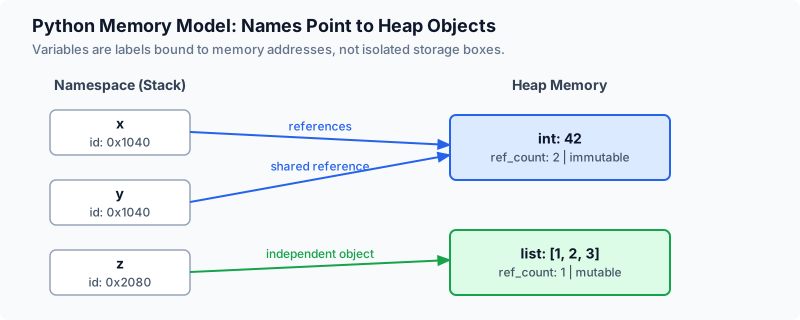
Here is a small bill for one customer. The first two lines store a name and an amount in rupees. The later lines use them. Work out by hand what the last line prints, then run it.
customer = "Priya"
amount = 450
print(customer, amount)

gst = amount * 5 / 100
print(gst)

total = amount + gst
print(f"{customer} owes {total}")Priya 450 22.5 Priya owes 472.5
- customer = "Priya" stores the text under the name customer. Python prints nothing for this line, because it only stores.
- amount * 5 / 100 is 5 percent of 450. The star means multiply and the slash means divide.
- f"{customer} owes {total}" is text with a letter f in front. Anything inside curly braces is replaced by its value.
Reading a program is the same as running it in your head: take one line at a time, note what each name now holds, and move down.
What order does Python run the lines in?
Top to bottom, always. A name has to be stored before a line below it can use it. This program asks for total one line too early. Predict whether it prints a number or fails.
print(total)
total = 450 + 22.5Traceback (most recent call last):
File "bill.py", line 1, in <module>
print(total)
^^^^^
NameError: name 'total' is not definedPython stopped at line 1. It never looked at line 2, so as far as it knew, total did not exist yet. The fix is to swap the two lines.
The last line names the problem (NameError: name 'total' is not defined). The line above it points at the code that caused it. Start there, not at the top.
What happens when a name is stored twice?
The second value replaces the first. The earlier value is gone, and every line after it sees the new one.
amount = 450
amount = 500
print(amount)
print(amount * 2)500 1000
Changing a stored value and running again is the quickest way to learn what a line does.
Worked examples
How do you leave a note for yourself in the code?
A line that starts with # is a comment. Python skips it completely, so you can use comments to say why a line is there.
# 5% GST on food bills
gst_rate = 5
amount = 450
print(amount * gst_rate / 100) # prints the tax only22.5
Notice that only 22.5 appears. Both comments are for the reader, not for Python.
How do you print several things on one line?
Put them inside one print, separated by commas. Python puts a single space between the pieces and starts a new line only when the print ends. Predict the two lines.
item = "tea"
price = 15
print(item, price)
print(item, "costs", price, "rupees")tea 15 tea costs 15 rupees
Text and numbers mix freely when they are separated by commas. You do not need to convert anything, which makes this the easiest way to look at a value while you are still working out what a program does.
When you are unsure what a name holds at some line, add a print of it just above and run again. Experienced programmers do this every day.
What does a missing quote look like?
Forgetting the closing quote is the most common first mistake. Python reports it before running anything, because it cannot make sense of the line.
print("Hello, Priya) File "hello.py", line 1
print("Hello, Priya)
^
SyntaxError: unterminated string literal (detected at line 1)The caret points at where the text starts, and the message says what is wrong: a string, which is Python's word for text, was never closed. Add the quote and run again.
Common beginner questions
Do I need to remember all these words?
No. You will type print and the equals sign hundreds of times in the next few lessons, and they stick without effort. Spend your effort on predicting what a line will do before you run it.
I got an error message. Did I break something?
No. An error is Python telling you which line it could not follow and why. Nothing is damaged, and you can fix the line and run again. Reading the last line of the error first answers most cases.
What comes next
You have now run a program, stored values under names and read two kinds of error. The next lesson, What is data engineering?, explains where programs like this are used. After that, Variables and types looks closely at the kinds of value you stored here: text, whole numbers and decimals.
Practice
Open the editor on the right. Store a customer name and an amount, work out 5% GST, and print one sentence with the total.
Going further: how do you find the broken line?
Your first programs fail on one line. Real programs have dozens, and the error message is the map. The same four clues appear every time, so learning to read them now pays off in every lesson after this.
This bill adds three items, but one name was never stored. Read the error and find the four clues before you open the table.
tea = 15
samosa = 20
total = tea + samosa + vada
print("Total:", total)Traceback (most recent call last):
File "bill.py", line 3, in <module>
total = tea + samosa + vada
^^^^
NameError: name 'vada' is not definedFour clues in one error message.
| Clue | Where it is | What it told you here |
|---|---|---|
| The kind of error | Start of the last line | NameError: a name was used that Python does not know |
| The name involved | End of the last line | vada was never stored |
| The line number | The File line above the code | Line 3, so lines 1 and 2 ran fine |
| The exact spot | The carets under the code | The ^^^^ sit under vada, not under tea or samosa |
Two fixes are possible: store vada on a new line above line 3, or remove it from the sum. Which one is right depends on what the bill should contain, and Python cannot decide that for you.
Try a new scenario
A learner writes tea = 15 on line 1 and prints Tea on line 2. The error says NameError: name 'Tea' is not defined. Why does Python say that, and what is the fix?
Work it out, then open the answer
Python treats upper and lower case letters as different. The program stored tea, in lower case, and then asked for Tea, which was never stored. The fix is to use the same spelling in both places. Whenever a NameError names something you are sure you stored, compare the spelling letter by letter.
Why does Python stop at the first error instead of running the rest?
Later lines often depend on the earlier ones. If line 3 could not produce total, then line 4 would be printing something that does not exist. Stopping at the first problem keeps the message short and pointed at the real cause.
Close the lesson and explain it
Without scrolling up, explain in your own words which line of an error message you read first, and what the line number tells you about the lines above it.
Practicals · load into the editor
After you read the theory, run these in the pane on the right. They execute in this tab, no cluster.
Finished this lesson?
Mark it as read when you could explain it to someone else.