
Overview
Most pipeline data arrives as text before it becomes numbers or dates. Learn how to split, strip, replace, and format strings without changing the wrong characters.
On this page8 sections
What you will do
A file arrives as plain text: ORD-1, laptop, 999.99. Python sees one long piece of text, not an id, a product and a price. You cannot add up prices while they are still text.
In this lesson you will cut a line into pieces, clean each piece, and turn the price into a real number.
What is a string, and how do you pick it apart?
A string is text inside quotes. Python numbers its characters from 0, so you can ask for any character by its position. Predict the seven lines before you open the output.
order_id = "ORD-1"
print(order_id)
print(len(order_id))
print(order_id[0])
print(order_id[-1])
print(order_id[0:3])
print(order_id.lower())
print(order_id)ORD-1 5 O 1 ORD ord-1 ORD-1
- len counts the characters, so it gives 5.
- [0] is the first character. [-1] counts from the right, so it is the last.
- [0:3] is a slice. It starts at 0 and stops before 3, so it keeps O, R and D.
- .lower() gives a lower-case copy. The last print shows that order_id itself did not change.
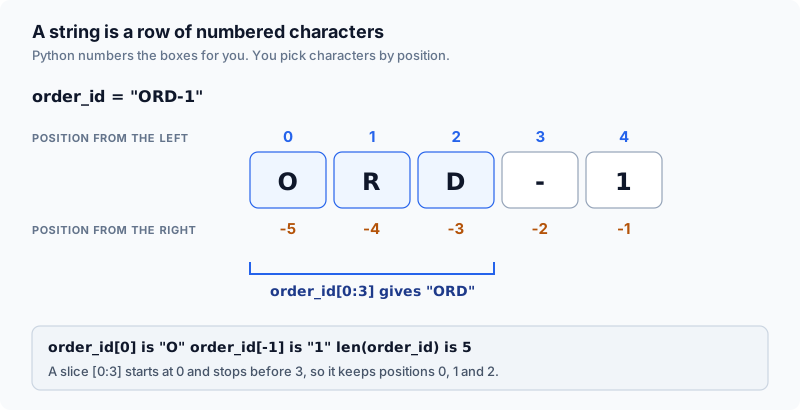
Text methods never change the original. They hand back a new string, so you must store the result if you want to keep it.
From raw text to structured fields
Files and web services send everything as text, even numbers. A price arrives as the characters 9, 9, 9, a dot, 9, 9, so Python cannot add it until you convert it.
The usual cleaning has three moves: split the line at the commas, strip the stray spaces off each piece, then convert the price with float. The picture shows the path.
split separates columns, strip clears padding, and float converts currency.
We trace one sample order across this lesson: ORD-1, laptop, 999.99.
Core string manipulation methods
Seven operations handle most text cleaning. A method is a function that belongs to a value, so you write it after the value with a dot.
Chain strip after split so padded CSV fields compare accurately.
| Operation | What it does | Pipeline example |
|---|---|---|
| split(',') | Divides a string into a list by delimiter | 'a, b'.split(',') -> ['a', ' b'] |
| strip() | Removes leading and trailing whitespace | ' paid '.strip() -> 'paid' |
| lower() / upper() | Normalizes character casing | 'PAID'.lower() -> 'paid' |
| replace(old, new) | Swaps matching substrings | 'ORD_1'.replace('_', '-') -> 'ORD-1' |
| parts[0] / parts[-1] | Accesses first or last field by index | parts[0] extracts order_id |
| startswith / endswith | Tests prefix or suffix existence | filename.endswith('.csv') |
| f"{value}" | Interpolates variables into structured text | f'id={order_id}' |
Words you will see in this lesson
Six words. The rest of the lesson uses only these.
| Word | What it means |
|---|---|
| String | Text in Python |
| Method | A function that belongs to a value, like text.strip() |
| strip | Remove spaces from both ends |
| split | Cut text into pieces at a separator |
| Whitespace | Spaces, tabs and new lines |
| f-string | Text with an f in front that fills in values inside braces |
Why this skill
Data pipelines ingest text generated by diverse external services where whitespace padding and case mismatches cause silent record loss.
The cost of stray whitespace in comparisons
An order export arrives formatted as ORD-1, laptop, 999.99. Splitting on comma without stripping preserves leading spaces on subsequent fields.
line = "ORD-1, laptop, 999.99"
parts = line.split(",")
print(parts)
print(parts[1] == "laptop")
Predict whether the equality check evaluates to True or False:
['ORD-1', ' laptop', ' 999.99']
False
A downstream filter checking product == 'laptop' misses this record completely. The file contents were present, but unstripped whitespace corrupted the aggregation.
Unstripped strings like ' paid ' and 'paid' are not equal in Python. Always strip whitespace before performing equality checks on incoming text.
Presentation changes versus structural changes
Some methods only tidy how the text looks, some change what it says, and one changes its shape. Knowing which is which tells you which method to reach for.
Pick the method that matches the job, so you do not change more than you meant to.
| Method | What it changes | Kind of change |
|---|---|---|
| strip() | Removes spaces at the start and end | Looks only |
| lower() | Makes every letter lower case | Looks only |
| replace(a, b) | Swaps one piece of text for another | Content |
| split(',') | Cuts the text into a list of pieces | Shape |
Real files are untidy. Bank exports pad numbers with spaces, delivery logs mix upper and lower case, and ids arrive buried inside longer text.
Defensive cleaning of whitespace
Old forms and spreadsheet exports leave double spaces, line breaks and tabs inside the text. strip only trims the two ends, so the middle needs a different tool.
name = "New  York"
print(repr(name.strip()))
print(repr(" ".join(name.split())))'New York' 'New York'
strip removed the outer spaces but left the double space inside. split() with nothing in the brackets cuts at any run of spaces, and join puts the pieces back with one space between them.
Clean the text as soon as it arrives, before it reaches a table.
How the code works
Python gives every string built-in methods for cutting, checking and formatting it.
Splitting lines and stripping fields
The line below cuts the text at each comma and strips every piece. The square-bracket loop in the middle is called a list comprehension. It is a short way to write a for loop that builds a list.
line = "ORD-1, laptop, 999.99"
parts = [p.strip() for p in line.split(",")]
print(parts)
print("first field:", parts[0])
print("last field:", parts[-1])
Predict what prints for the first and last extracted fields:
['ORD-1', 'laptop', '999.99']
first field: ORD-1
last field: 999.99
Position 0 is the order id and position -1 is the price. The price is still text, so you must call float() before doing any arithmetic with it.
Unpacking fields and formatting f-strings
You can pour a list straight into named variables, one name per item. An f-string then builds a readable sentence by filling each name into a pair of braces.
parts = ["ORD-1", "laptop", "999.99"]
order_id, product, price_text = parts
print(f"{order_id} sold {product} for {float(price_text)}")
print(order_id.startswith("ORD-"))
print(order_id[:3])ORD-1 sold laptop for 999.99 True ORD
startswith asks whether the text begins with a given start, and answers True or False. [:3] is a slice with no start, so it begins at 0 and keeps the first three characters.
Formatting specifiers for numbers and identifiers
You can add a colon and a short code inside the braces to control how a number looks. .2f means two decimal places, and 06d means a whole number padded with zeros to six digits.
amount = 999.9
batch_id = 42
print(f"{amount:.2f}")
print(f"{batch_id:06d}")999.90 000042
Use .2f for money and 06d for fixed-width ids. Python does the padding, so you do not write a loop for it.
String immutability and memory assignment
Python strings cannot be changed in place. A method never edits the original. It builds and returns a new string, which is why the earlier lower() left order_id alone.
s = "ORD-1"
try:
    s[0] = "X"
except TypeError as exc:
print(f"TypeError: {exc}")TypeError: 'str' object does not support item assignment
To change text, make a new string with a method such as replace and store it. The old variable keeps its value unless you assign the new one to it.
Because a string never changes after it is made, it is safe to use one as a dictionary key.
Case normalization across data sources
Three different systems write the same status in three different ways: with spaces, in capitals, and in a mixed case.
Three paid orders formatted inconsistently across rows.
| order_id | Raw status in file |
|---|---|
| ORD-1 | " PAID " |
| ORD-2 | "paid" |
| ORD-3 | "Cancelled" |
| ORD-4 | "PAID" |
rows = [
    {"order_id": "ORD-1", "status": " PAID "},
    {"order_id": "ORD-2", "status": "paid"},
    {"order_id": "ORD-3", "status": "Cancelled"},
    {"order_id": "ORD-4", "status": "PAID"},
]

def normalize(text: str) -> str:
    return text.strip().lower()

naive_paid = sum(1 for r in rows if r["status"] == "paid")
clean_paid = sum(1 for r in rows if normalize(r["status"]) == "paid")

print("Without normalizing:", naive_paid)
print("After strip + lower:", clean_paid)
Predict how many paid orders are detected before and after text normalization:
Without normalizing: 1
After strip + lower: 3
Without cleaning, two paid orders were missed. Nothing crashed, yet the report was wrong. This is the kind of mistake that is hardest to notice.
String concatenation versus numerical addition
The plus sign joins two strings end to end. It does not add them as numbers.
print("3" + "4")
print(int("3") + int("4"))
Predict what prints for text concatenation versus integer addition:
34
7
Python keeps text and numbers apart. Convert text with int() or float() before doing any maths.
Safe slicing versus strict indexing
A slice that runs past the end of a string is forgiving. Asking for one character that does not exist is not.
text = ""
print(repr(text[:4]))
try:
    print(text[0])
except IndexError as exc:
print(f"IndexError: {exc}")'' IndexError: string index out of range
The slice returned an empty string and carried on. Asking for text[0] on empty text raised an IndexError.
Slicing also supports an optional step argument text[start:end:step]. For instance, text[::-1] reverses a string.
A step of 2 takes every second character. A step of -1 walks backward, which is how text[::-1] reverses a string.
Delimiter collisions in raw text splits
Splitting at commas works on tidy lines. It breaks when a comma also appears inside a value, such as an address.
line = 'ORD-9,"123 Main St, Suite 4",paid'
print(line.split(","))['ORD-9', '"123 Main St', ' Suite 4"', 'paid']
One address became two pieces, so every field after it moved one place to the right. Check that len(parts) matches the number of columns you expect.
Without that check, the second half of the address would be treated as the status.
A comma inside quotes like '123 Main St, Suite 4' splits into multiple columns with split(','). Use Python csv module for files containing quoted fields.
Worked examples
Now use the same tools on layouts you will meet in real files.
Fixed-width record extraction
Legacy banking systems and insurance feeds export fixed-column layouts without delimiters. Slice fields by character offsets.
line = "ORD-1     laptop    000000099999"

if len(line) != 32:
    raise ValueError("record has the wrong length")

order_id = line[0:10].strip()
product = line[10:20].strip()
cents = int(line[20:32])

print(order_id, product, cents / 100)ORD-1 laptop 999.99
Validating record length ensures truncated records are caught before corrupted columns load into analytical tables.
Collecting in lists and joining once
Strings are immutable, so repeated concatenation with += inside a loop can copy the growing string again and again. CPython sometimes optimizes this, but you cannot rely on it.
rows = ["ORD-1", "ORD-2", "ORD-3"]
chunks = []
for r in rows:
    chunks.append(f"order={r}")

payload = "\n".join(chunks)
print(payload)order=ORD-1 order=ORD-2 order=ORD-3
Collecting rows in a list and calling join builds the result once, which stays fast as the data grows.
Replay on one raw line
The raw line ORD-1, laptop, 999.99 arrives as a single text string.
- raw text
split(',') partitions the line into 3 fields, leaving leading spaces.
- raw text
- 3 items
strip() cleans each field into ORD-1, laptop, and 999.99.
- 3 items
- clean fields
parts[0] provides order_id and float(parts[2]) converts numeric price.
- fields
- id, product, 999.99
An f-string formats clean output lines, and normalize() harmonizes status codes.
- fields
- f-string
- analytics
Four operational rules for string handling in pipelines:
- Always strip whitespace and normalize case before performing equality comparisons.
- Zero-based indexing starts at 0, while negative index -1 references the last element.
- split works for simple delimiters; verify field counts or use csv when fields contain quotes.
- Collect text chunks into a list and call join once rather than concatenating with += in a loop.
Common beginner questions
Why is '3' + '4' equal to '34' instead of 7?
The plus operator performs concatenation when applied to strings. Python follows strict data typing and will not convert text to numbers automatically. Cast strings with int() or float() before mathematical operations.
Does strip() remove spaces in the middle of words?
No. strip() only removes characters from the leading and trailing ends of a string. To collapse internal whitespace runs, use ' '.join(text.split()).
Why does indexing start at 0 instead of 1?
Python follows zero-based indexing common in systems programming. In a 3-item list, valid indices are 0, 1, and 2. Index 3 raises an IndexError because that slot does not exist.
When should I use regular expressions instead of split?
Use split() for simple, uniform delimiters like commas or pipes. Use regex when extracting fields from complex patterns like server log lines containing timestamps, HTTP verbs, and status codes.
What comes next
The next lesson reads files from disk. Each line you read is a string. You will split and strip those lines the same way you did here.
Practice
In the exercise, split the string 'ORD-1, laptop, 999.99' on commas, strip whitespace from each field, assign the product name (second field) to result, and print it.
Going further: cleaning an amount that arrives as text
Money in exported files rarely arrives as a plain number. An Indian price can come with a rupee sign, thousands separators and stray spaces, and float() refuses all of them. The cleaning is string work, so it belongs in this lesson.
Predict what float() does with the first value, and then what it gives after the text is cleaned.
raw = " ₹1,299.50 "

try:
    print(float(raw))
except ValueError as exc:
    print("ValueError:", exc)

cleaned = raw.strip().replace("₹", "").replace(",", "")
print(repr(cleaned))
print(float(cleaned) + 100)ValueError: could not convert string to float: ' ₹1,299.50 ' '1299.50' 1399.5
Each step has a job. strip removes the outer spaces, the first replace removes the rupee sign, and the second replace removes the commas. After that the text is only digits and a decimal point, so float() accepts it.
The last row shows what cleaning cannot fix.
| Raw text | After cleaning | float() gives |
|---|---|---|
| " ₹1,299.50 " | "1299.50" | 1299.5 |
| "₹ 80" | " 80" | 80.0, float() ignores the space |
| "1,00,000" | "100000" | 100000.0 |
| "N/A" | "N/A" | ValueError, still text |
Try a new scenario
A column holds 12 amounts such as 450, 1,299 and N/A. You write one line that removes commas and calls float() on every value. What happens at the N/A row, and what should the pipeline do about it?
Work it out, then open the answer
float("N/A") raises a ValueError and stops the whole run on that row. Cleaning commas does not turn missing data into a number. Decide what N/A means for the business, then either skip the row, store None, or send the row to a rejects file with a note about why, and keep going.
Why not remove every character that is not a digit?
Because that also removes the decimal point and any minus sign, so 1,299.50 would become 129950 and a refund of -450 would become 450. Strip only the characters you know are noise, and let anything unexpected fail loudly so you notice it.
Close the lesson and explain it
Without scrolling up, list the three cleaning steps that turn " ₹1,299.50 " into a number, and say what each step removes.
Practicals · load into the editor
After you read the theory, run these in the pane on the right. They execute in this tab, no cluster.
Finished this lesson?
Mark it as read when you could explain it to someone else.
Practice this idea
Each page shows the idea moving, then lists problems from easiest. Open one now, or come back when you finish the lesson.
Practice this
Same ideas as interview drills. These challenges open in the studio with a dataset and tests already set up.
- Bigrams from a sentenceInterview-style drill: Build pairs of consecutive words after lowercasing and removing punctuation.Studiobeginnerpython8 min
- Compact a run-length encoded event logInterview-style drill: Compress a sequence of repeated status codes into a run-length encoded form.Studiobeginnerpython10 min
- Expand a run-length encoded shift logInterview-style drill: Expand a run-length encoded string back into its original repeated sequence.Studiobeginnerpython10 min